Utilities
The Utilities screen offers additional features and functionality in the gateway including Logging,
Security, Update Firmware Capability, and Restart Options.
Here you can also:
• Configure logging settings for diagnostic purposes.
• Configure security settings.
• Download firmware right from the webpage.
• Various options to reset the gateway.
Logging
Most users will not need to do anything with this feature. If there are problems with the 490NBX, a RTA
Technical Support Specialist will direct you in how to use this feature.
Security Configuration
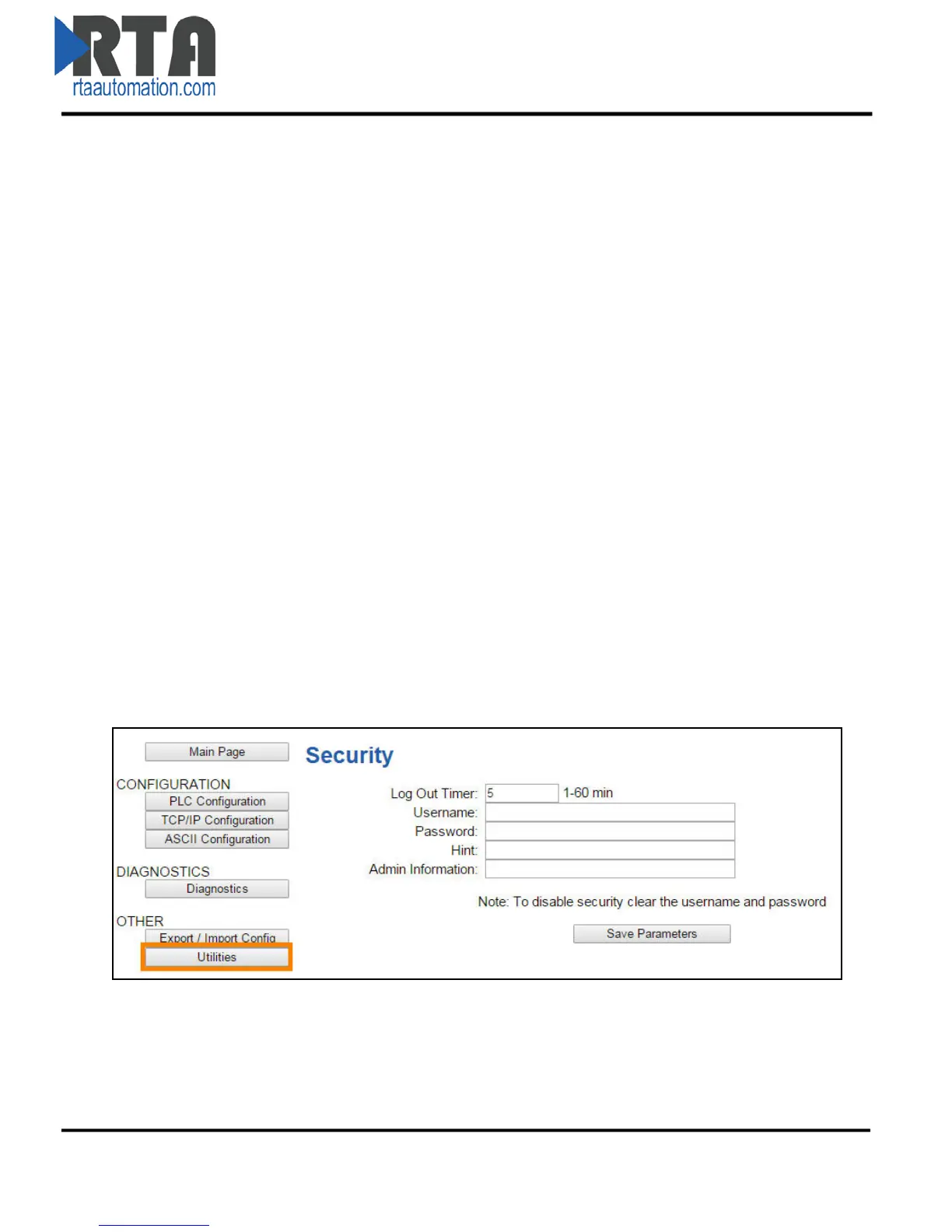
To configure security for a single username and password, click the Utilities button under the OTHER
navigation pane and then click the Security button.
1) Log Out Timer: The system will automatically log inactive users off after this period of time.
2) Username: Enter a username, max of 30 characters, case sensitive.
3) Password: Enter a password for the username, max of 30 characters, case sensitive.
4) Hint: A helpful reminder of what the password is.
5) Admin Information: Enter contact information in case username/password is forgotten.
6) Click the Save Parameters button to save.
Real Time Automation, Inc. 26 1-800-249-1612



 To Next Page