RDC6445G/S Control System manual
SHENZHEN RUIDA TECHNOLOGY
The operation and settings of the factory parameters are the same as the user parameters.
8.5.3 Origin Setting
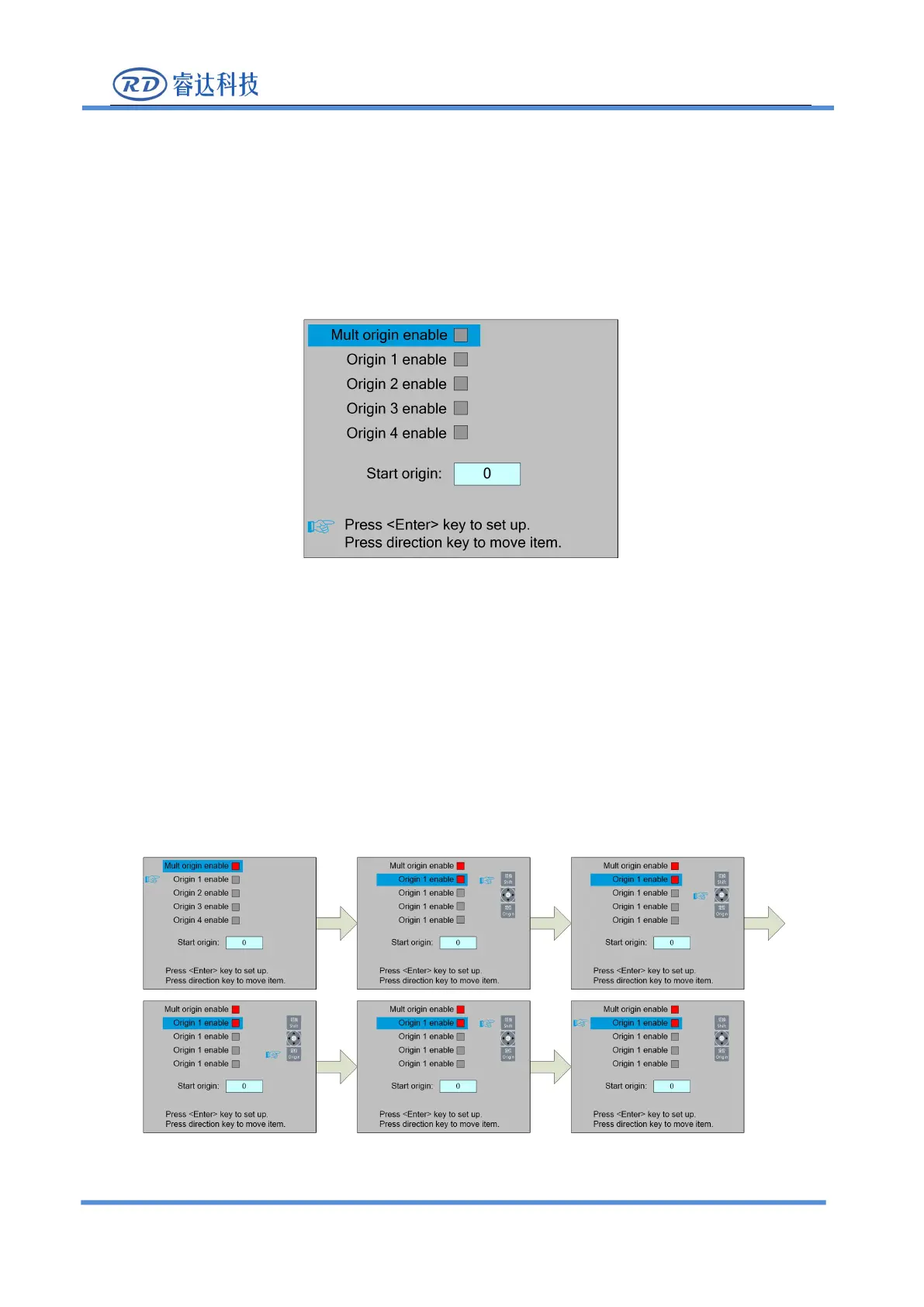
In the menu interface, select "Origin setting" entry and press the <Enter> key ,it will show as
At this point, the "blue selection block" defaults to select the "Mult origin enable" entry, press
the <Enter> key to enable or disable(the right small square shows red when enabled), when enabled,
the little finger to "Origin 1 enable" entry means to start setting the origin point 1, first move the
"blue selection block" to this entry and press the <Enter> key to enable the location point 1 entry,
then press <Shift> key, then press the direction key to change the X/Y axis coordinate value, then
press <Origin> key to set the current coordinate value to the location point 1, and finally press
<Shift> key to return to the current interface operation. The operation process interface is as follows:
Other origins are set in the same way.



 To Next Page