Plate Mounting
and
Removing,
and
Diagonal Image Adjustment Process
Error messages when mounting and removing a plate, and doing the diagonal image adjustment
..
Maintenance Edition
-45
Paper master mounting and removing process without clamping the tail edge
..
Operation Edition -
65
and 66
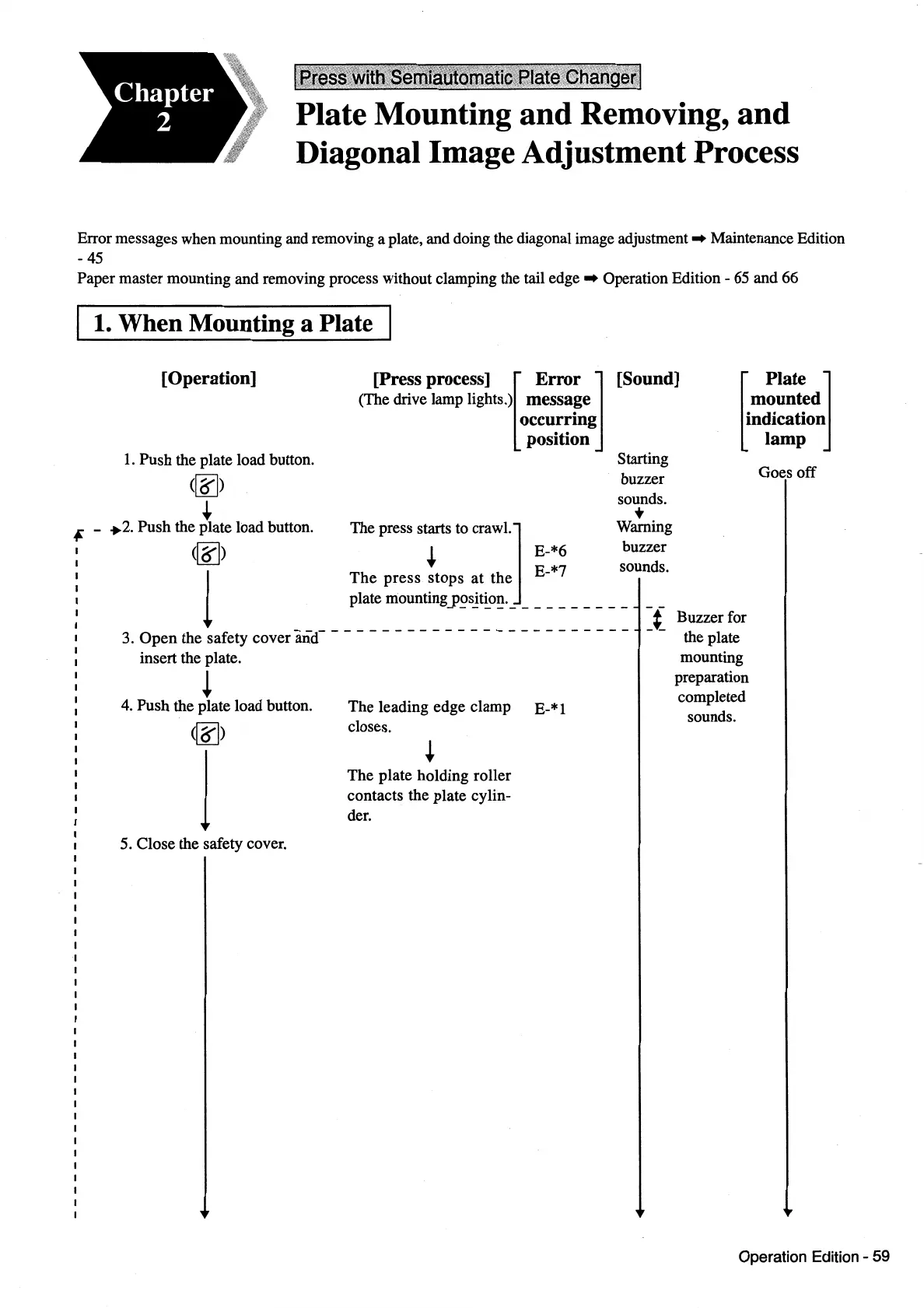
1.
When
Mounting a Plate I
[Operation]
[Press process] [
Error
]
(The drive lamp lights.)
messa~e
[Sound]
[
Plate
J
1.
Push the plate load button.
(~)
+
occurrmg
position
(~)
+ E-*6
Starting
buzzer
sounds.
•
Warning
buzzer
sounds.
i - ,.2. Push the plate load button. The press starts
to
crawl.]
1
The
press stops
at
the E-*7
plate
mounting_p~s_!t~o~.
_________
_
--
=t
3. Open the safety cover
and----------------------
-
insert the plate.
!
4.
Push the plate load button.
(~)
1
5.
Close the safety cover.
The leading edge clamp
closes.
The plate holding roller
contacts the plate cylin-
der.
E-*1
mounted
indication
lamp
Buzzer for
the plate
mounting
preparation
completed
sounds.
Goes off
Operation Edition - 59



 To Next Page