Chapter 2 Periodic Inspection
<Adjustment procedures>
Maintenance Edition - 12
Push
the
water
and
ink
form roller
ON
button
to
contact
the
ink
form rollers with the plate surface.
(Note)
If
the water sensor does
not
detect the
dampening
solution
in the water fountain, the water and ink form roller
ON
button
cannot
be
turned ON.
After running the press
for
a few minutes, stop the press.
After
a
few seconds,
push
the crawl
button
and
check
the
nip
width
that
appears
on
the
ink
oscillating roller.
(Reference) The nip width should
be
checked
after
removing
the
distributor rollers
shown
by
the
diagonal
lines
in
the
illustration on the left.
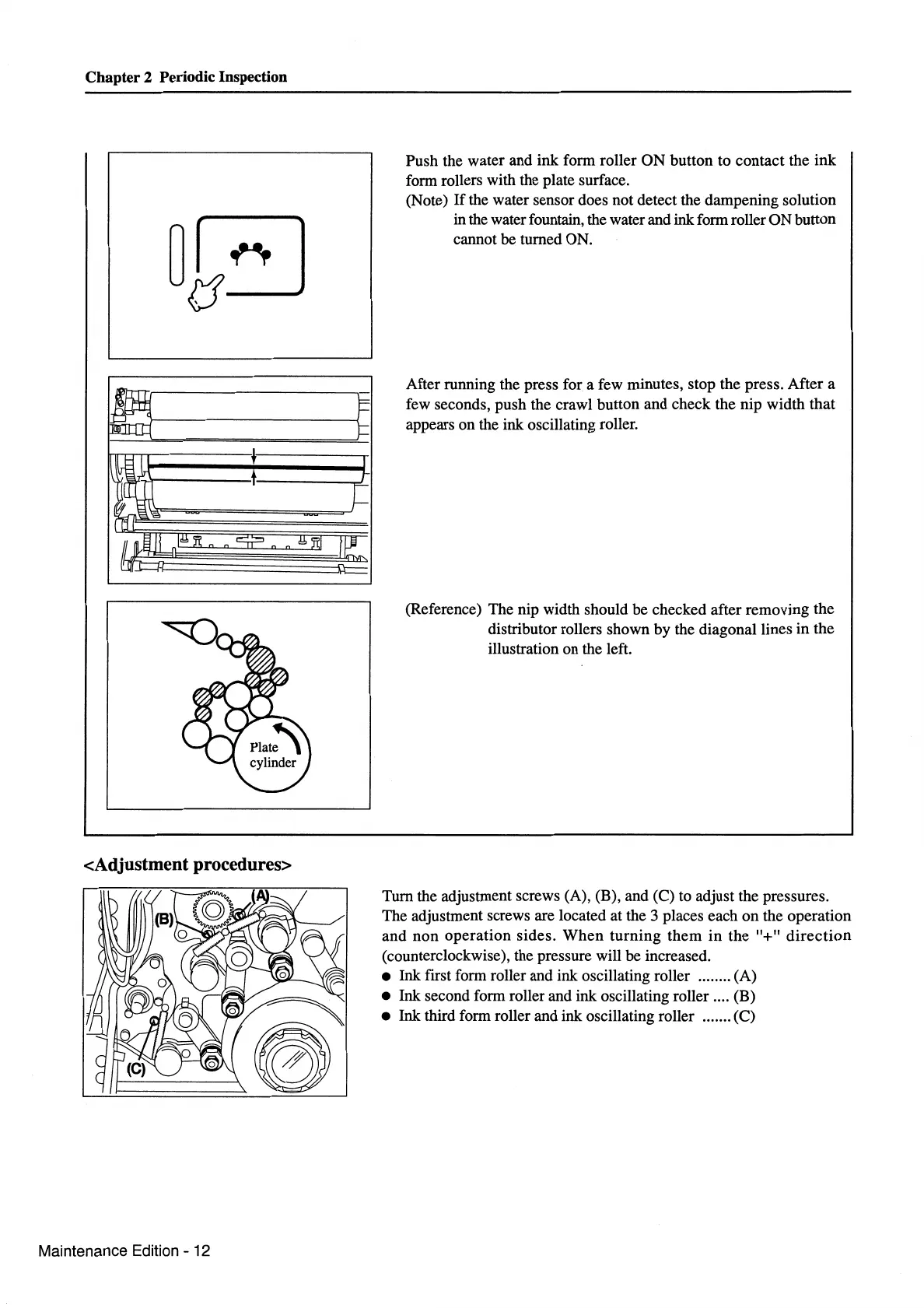
Tum
the adjustment screws (A), (B),
and
(C) to adjust the pressures.
The adjustment screws are located at the 3 places
each
on
the
operation
and
non
operation
sides.
When
turning
them
in
the
"+"
direction
(counterclockwise), the pressure will
be
increased.
• Ink first form roller
and
ink oscillating roller ........ (A)
• Ink second form roller and ink oscillating roller .... (B)
• Ink third form roller and ink oscillating roller ....... (C)



 To Next Page