• Configuring Battery Boosters
Required if a Battery Booster is replaced
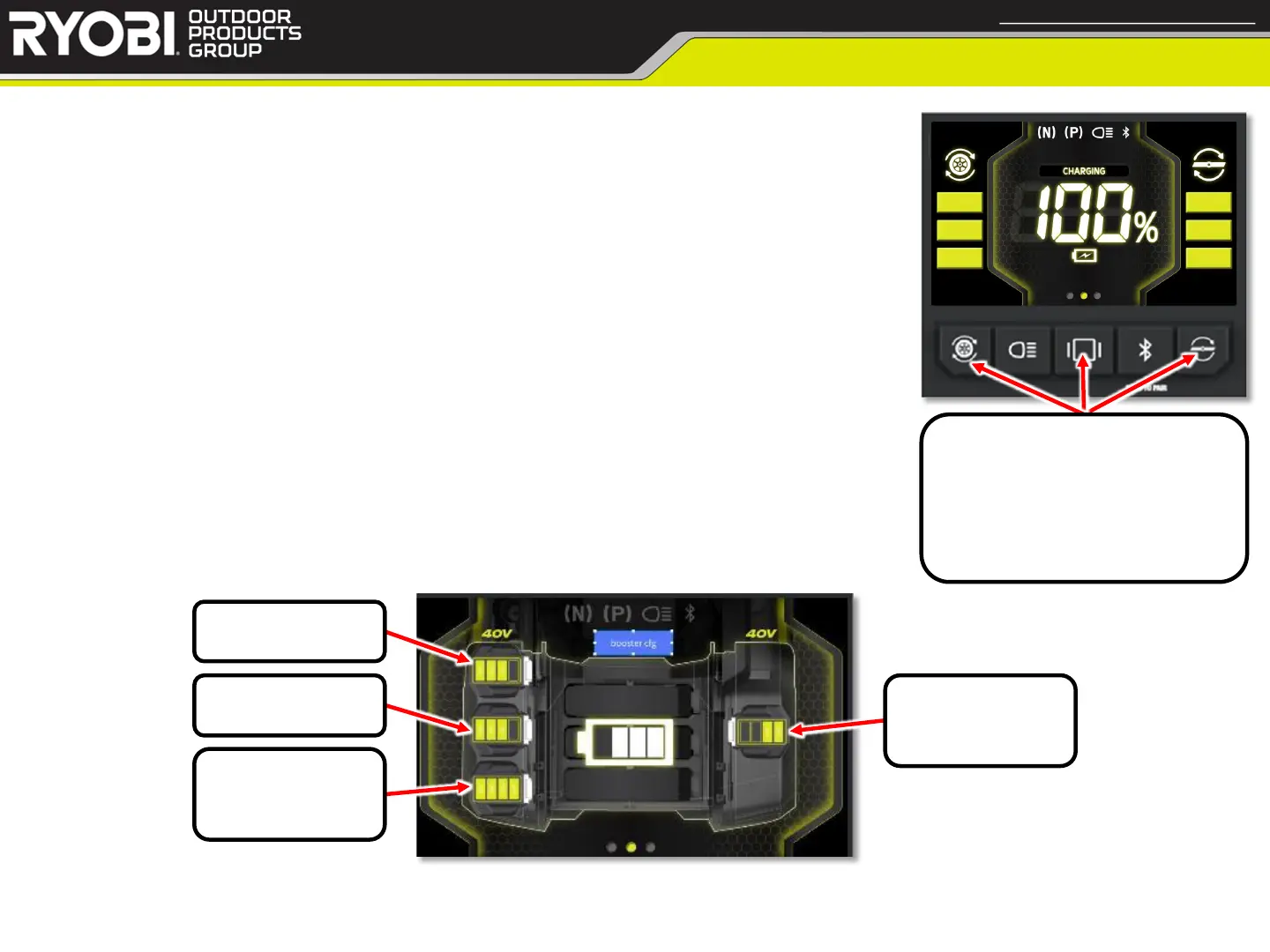
• Configuring Steps:
1. Remove all 40v Batteries
2. Enter Booster Configuration Mode (see picture to the right)
3. Insert 40v Battery into top left location (marked 1 on position
on below picture) and wait for battery SOC data to appear for
slot
4. Repeat for remaining 40v Batteries in order indicated below
a. Mower may power down. This is normal. Turn key off, then on again.
Mower will return to Booster Configuration Mode.
5. Exit Booster Configuration Mode (see picture to the right)
36
< Return to Table of Contents
Configuring Battery Boosters
Confidential and Proprietary - Property of Techtronic Power Equipment - DO NOT COPY or DISCLOSE
Hold Drive Speed, Mode,
and Blade Speed buttons
for 10 seconds to enter or
exit Booster Configuration
Mode
40v Slot 1
40v Slot 2
40v Slot 3
42” & 54” only!
40v Slot 4
42” & 54” only!


 To Next Page