INTEGRA-X User Manual WEB GUI
SAF Tehnika JSC 47
Modify mode
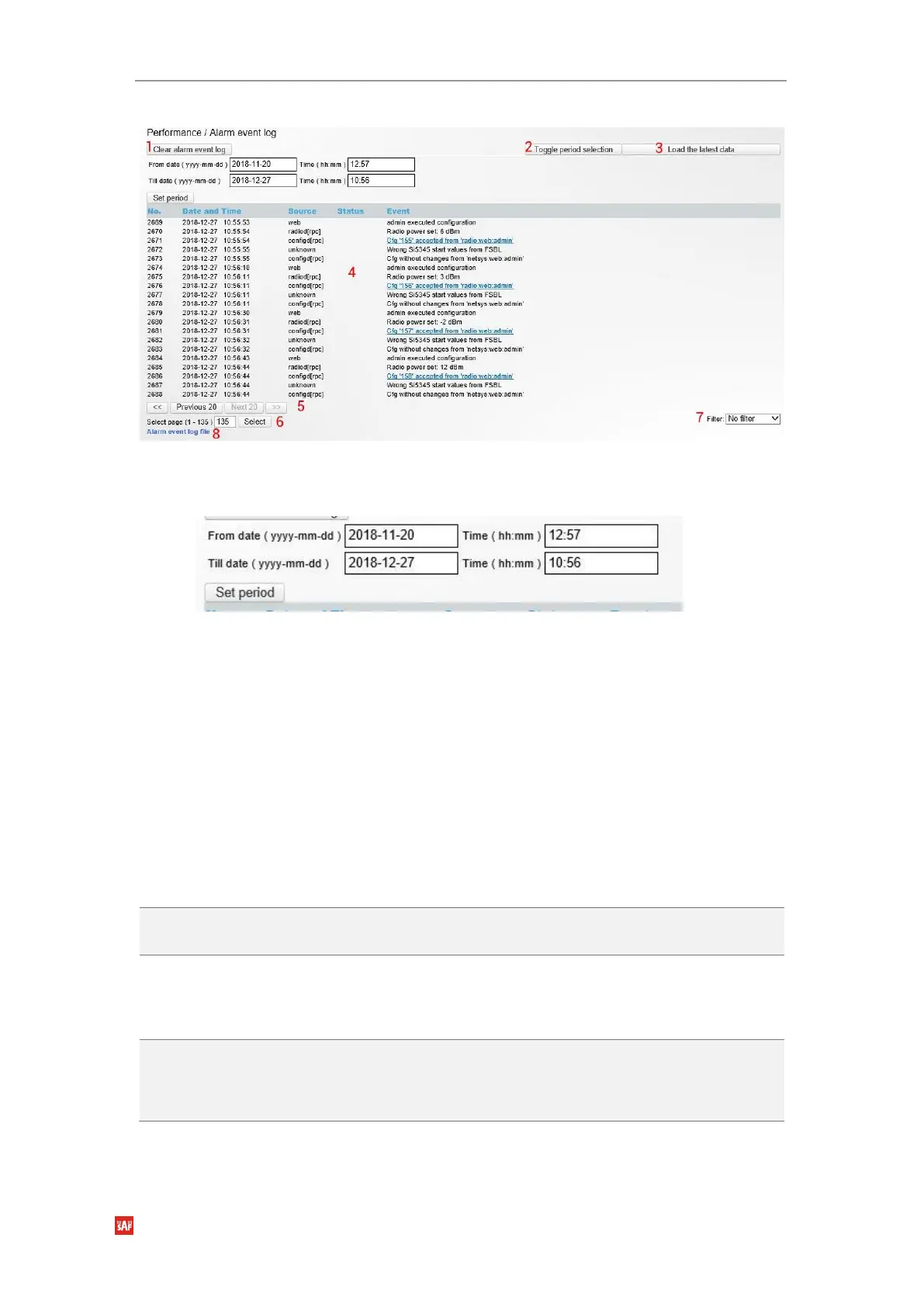
Figure 3-36 Modify Alarm log
1)
Clear alarm log
– deletes all alarm log entries;
2)
Toggle period selection
– opens/closes period selection controls, see
Figure 3-37
;
Figure 3-37 Period selection.
3)
Load the latest data
– refreshes alarm log and shows last 20 log entries;
4)
List of alarm log entries
– entry number, date and time, source, status and event name;
5)
Navigation controls
. “<<” navigates to start of alarm log, while “>>” – to the end; “Previous
20” navigates to previous alarm log page showing 20 previous alarm log entries (if
available), while “Next 20” – to next alarm log page showing 20 next alarm log entries (if
available).
6)
Shows the number of the currently viewed alarm log page. You can enter the specific page
number to navigate to the required page;
7)
Filter
– press to filter alarms from a certain source node (e.g. Radio);
8)
Alarm event log file
– press the link to download full alarm log text file.
CLI commands
See Chapter 4: COMMAND LINE INTERFACE
log event show last <#_of_entries>
Use to show a certain number of last alarm log
entries.
log event show time <starttime>
[<endtime>]
Use to show entries from a certain time point.
Following formats are supported:
YYYY-MM-DD/hh:mm:ss; MM-DD/hh:mm:ss;
MM-DD/hh:mm; hh:mm:ss; hh:mm
log event show sensor <sensor>
[last <#_of_entries>] [time
<starttime> [<endtime>]]
Use to show entries for a specific sensor. Regarding
subcommands “last” and “time” refer to commands
above.



 To Next Page