Chapter 4: Operation
Firmware – S2011 and S3012
Revision: 1 (9/98) 28 © Saftronics, Inc.
4.4.2 Operation Check Points
Check the following items during operation.
o Motor rotates smoothly.
o Motor rotates in the correct direction.
o Motor does not have abnormal vibration or noise.
o Acceleration and deceleration are smooth.
o Current matches the load flow.
o Status indicator LED’s and Digital Operator display are correct.
4.4.3 Example of Basic Operation.
§ Operation by Digital Operator
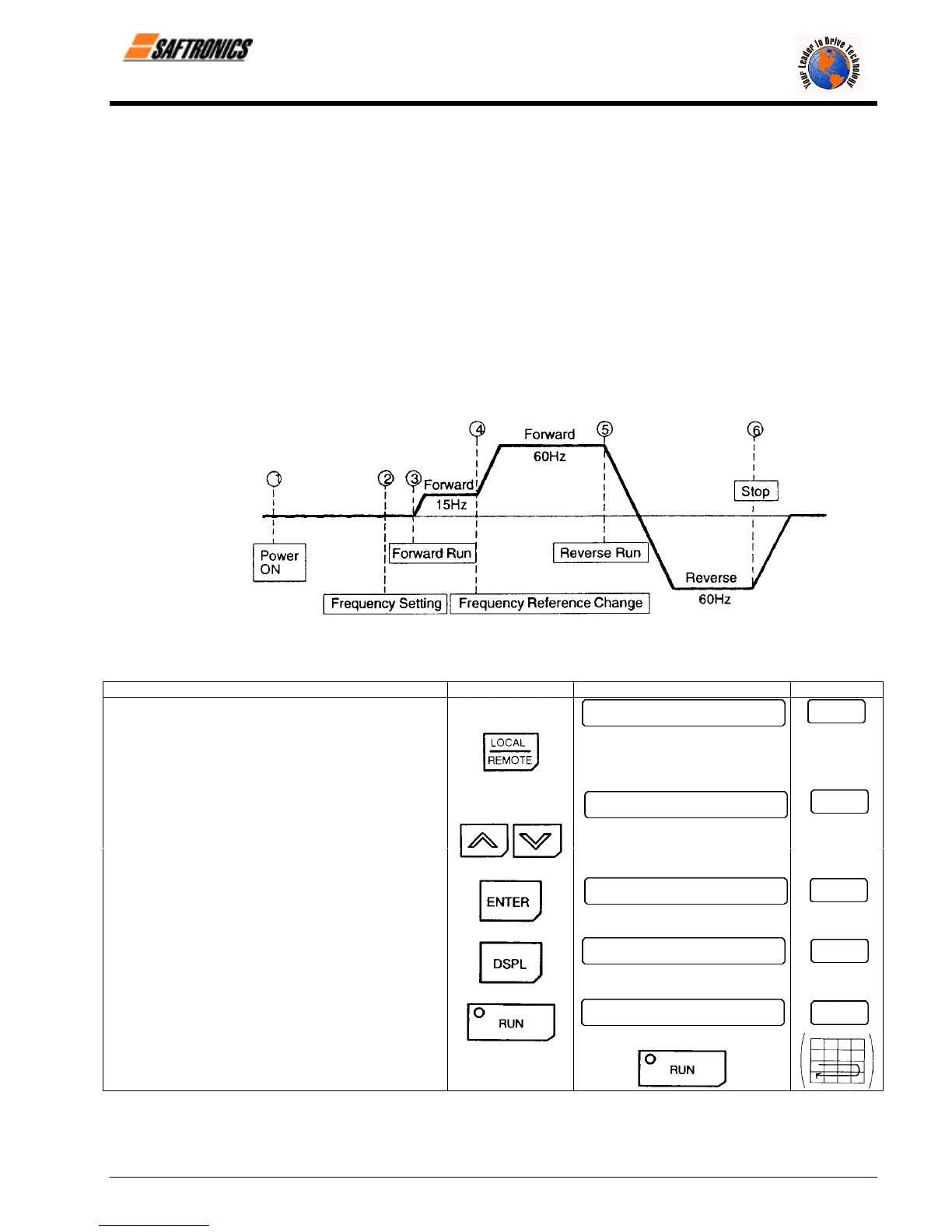
The diagram below shows a typical operation pattern using the Digital Operator.
Figure 15 Operation Sequence by Digital Operator
Table 10 Typical Operation by Digital Operator
Description Key Sequence Digital Operator Display LED Display
¬ Power ON
• Display frequency reference value. 0.0
Fref
Operation Condition Setting REMOTE LED (SEQ. REF) OFF
• Select LOCAL mode.
\ /
-
Frequency Setting Change the value
• Change reference value.
by pressing
15.0
Fref
/ \
• Write-in set value.
15.0
Fref
• Select output frequency monitor display.
0.0
Fout
® Forward Run
• Forward run (15 Hz) 15.0
Fout
RUN LED ON
efesotomasyon.com - Control Techniques,emerson,saftronics -ac drive-servo motor


 To Next Page