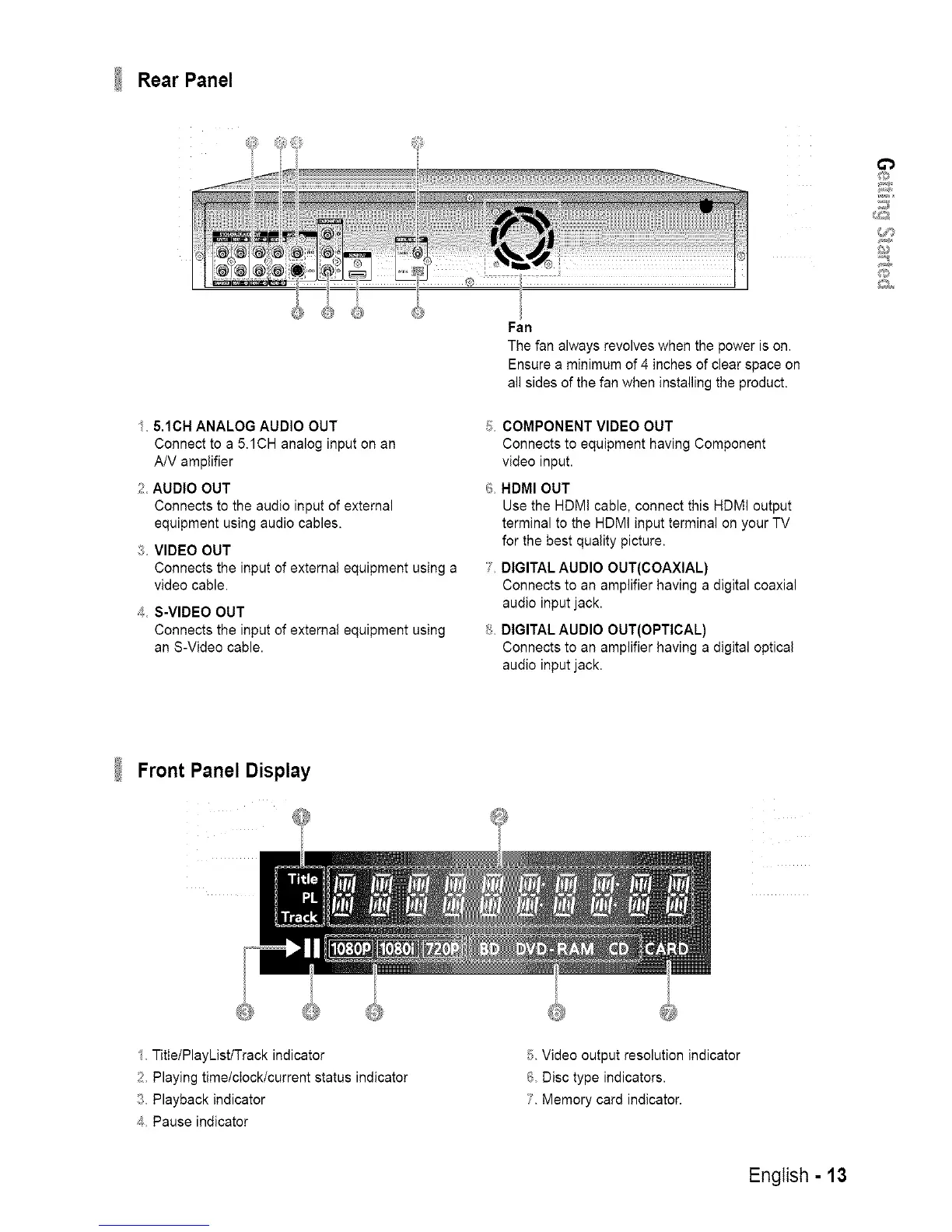
Rear Panel
/ 5.1CH ANALOG AUDIO OUT
Connect to a 5.1CH analog input on an
A!V amplifier
AUDIO OUT
Connects to the audio input of external
equipment using audio cables•
_ VIDEO OUT
Connects the input of external equipment using a
video cable.
_ S-VIDEO OUT
Connects the input of external equipment using
an S-Video cable.
Fall
The fan always revolves when the power is on.
Ensure a minimum of 4 inches of clear space on
all sides of the fan when installing the product.
_; COMPONENT VIDEO OUT
Connects to equipment having Component
video input.
6 HDMI OUT
Use the HDM! cable, connect this HDMI output
terminal to the HDMI input terminal on your TV
for the best quality picture.
7 DIGITAL AUDIO OUT(COAXIAL)
Connects to an amplifier having a digital coaxial
audio input jack.
_ DIGITAL AUDIO OUT(OPTICAL)
Connects to an amplifier having a digital optical
audio input jack.
o
#//?
/
Front Panel Display
I Title/PlayList/Track indicator
2, Playing time/clock/current status indicator
3 Playback indicator
4 Pause indicator
Video output resolution indicator
_; Disc type indicators.
Memory card indicator.
English - 13














 To Next Page