tW-'7
E
7;5
Disc Type
Characteri
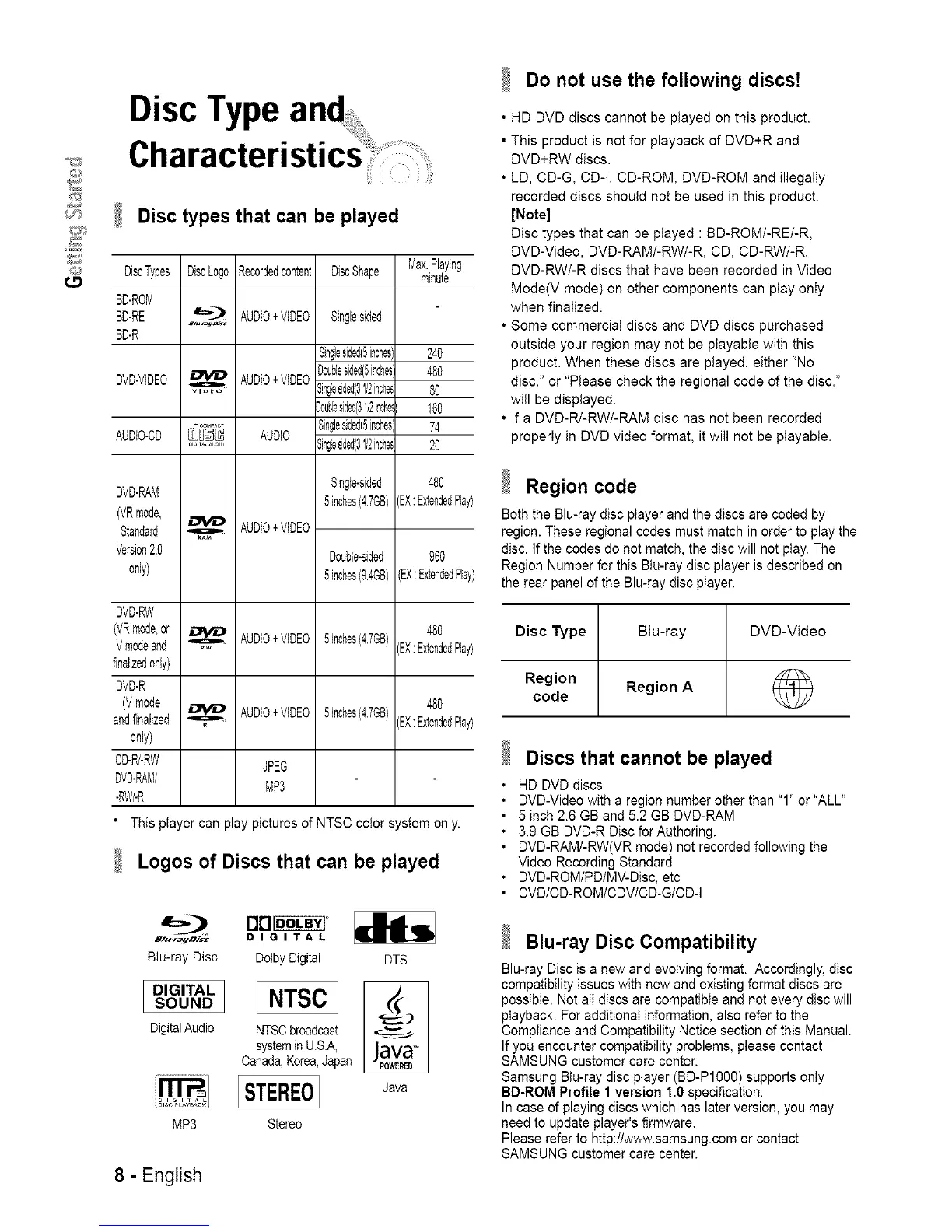
Disc types that can be played
DiscTypes DiscLogo Recordedcontent
BD-ROM
BD-RE 4r=,;_ AUDIO+VIDEO
BD-R
DVD-VIDEO _ AUDIO+VIDEO
,gl=lI_,
AuDio-cD_ AUDIO
DVD-RAM
(VRmode,
Standard
Vereion2.0
only)
AUDIO+VIDEO
DVD-RW
VRmode,or
Vmodeand _ AUDIO+VIDEO
finalizedonly)
DVD-R
(Vmode _ AUDIO+VIDEO
andfinalized
0nly)
CD-R/-RW JPEG
DVD-RAMi
MP3
-RWi-R
DiscShape
Singlesided
Singlesided(5inches)
Doublesided(5inches
Singlesided(31/2inches
3oubfesided{3I/2inche_
Singlesded(5inches:
Bingesided(31/2inches
Single-sided
5inches(4.7GB)
Double-sided
5inches(9.4GB)
5inches(4.7GB)
5inches(4.7GB)
Max.Playing
minute
240
480
80
160
74
20
480
"X:ExtendedPlay:
960
EX:ExtendedPla
480
-'X:ExtendedPlay:
480
X: ExtendedPlay:
This ptayer can play pictures of NTSC color system only.
Logos of Discs that can be played
i:l#.,tayDist D I G I T A L
Blu-ray Disc Dotby Digital DTS
DIGITAL
SOU.D NTSC
DigitalAudio NTSCbroadcast
systemin USA,
Canada,Korea,Japan
STEREO Java
MP3 Stereo
8 - English
Do not use the following discs!
• HD DVD discs cannot be played on this product.
• This product is not for playback of DVD+R and
DVD+RW discs.
• LD, CD-G, CD-I, CD-ROM, DVD-ROM and illegally
recorded discs should not be used in this product.
[Note]
Disc types that can be played : BD-ROM/-RE/-R,
DVD-Video, DVD-RAM/-RW/-R, CD, CD-RW/-R.
DVD-RW/-R discs that have been recorded in Video
Mode(V mode) on other components can play only
when finalized.
• Some commercial discs and DVD discs purchased
outside your region may not be playable with this
product. When these discs are played, either "No
disc." or "Please check the regional code of the disc."
will be displayed.
• If a DVD-R/-RW/-RAM disc has not been recorded
properIy in DVD video format, it will not be pIayabte.
Region code
Both the Blu-ray disc pIayer and the discs are coded by
region. These regional codes must match in order to play the
disc. If the codes do not match, the disc will not play. The
Region Number for this BIu-ray disc player is described on
the rear panel of the Blu-ray disc player.
Disc Type Blu-ray DVD-Video
Region Region A
code
Discs that cannot be played
• HD DVDdiscs
• DVD-Video with a region number other than "1" or "ALL"
• 5 inch 2.6 GB and 5.2 GB DVD-RAM
• 3.9 GB DVD-R Disc for Authoring.
• DVD-RAM/-RW(VR mode) not recorded following the
Video Recording Standard
• DVD-ROM/PD/MV-Disc, etc
• CVD/CD-ROM/CDV/CD-G/CD-I
Blu-ray Disc Compatibility
Blu-ray Disc is a new and evoIving format. Accordingly, disc
compatibility issues with new and existing format discs are
possible. Not atI discs are compatibIe and not every disc will
playback. For additional information, also refer to the
CompIiance and Compatibility Notice section of this Manual.
If you encounter compatibility problems, please contact
SAMSUNG customer care center.
Samsung Btu-ray disc player (BD-PIO00) supports only
BD-ROM Profile 1 version 1.0 specification.
In case of playing discs which has later version, you may
need to update player's firmware.
Please refer to http:t/w_#_v.samsung.com or contact
SAMSUNG customer care center.














 To Next Page