t;£7
E
Tour of the Remote Control
..... 17
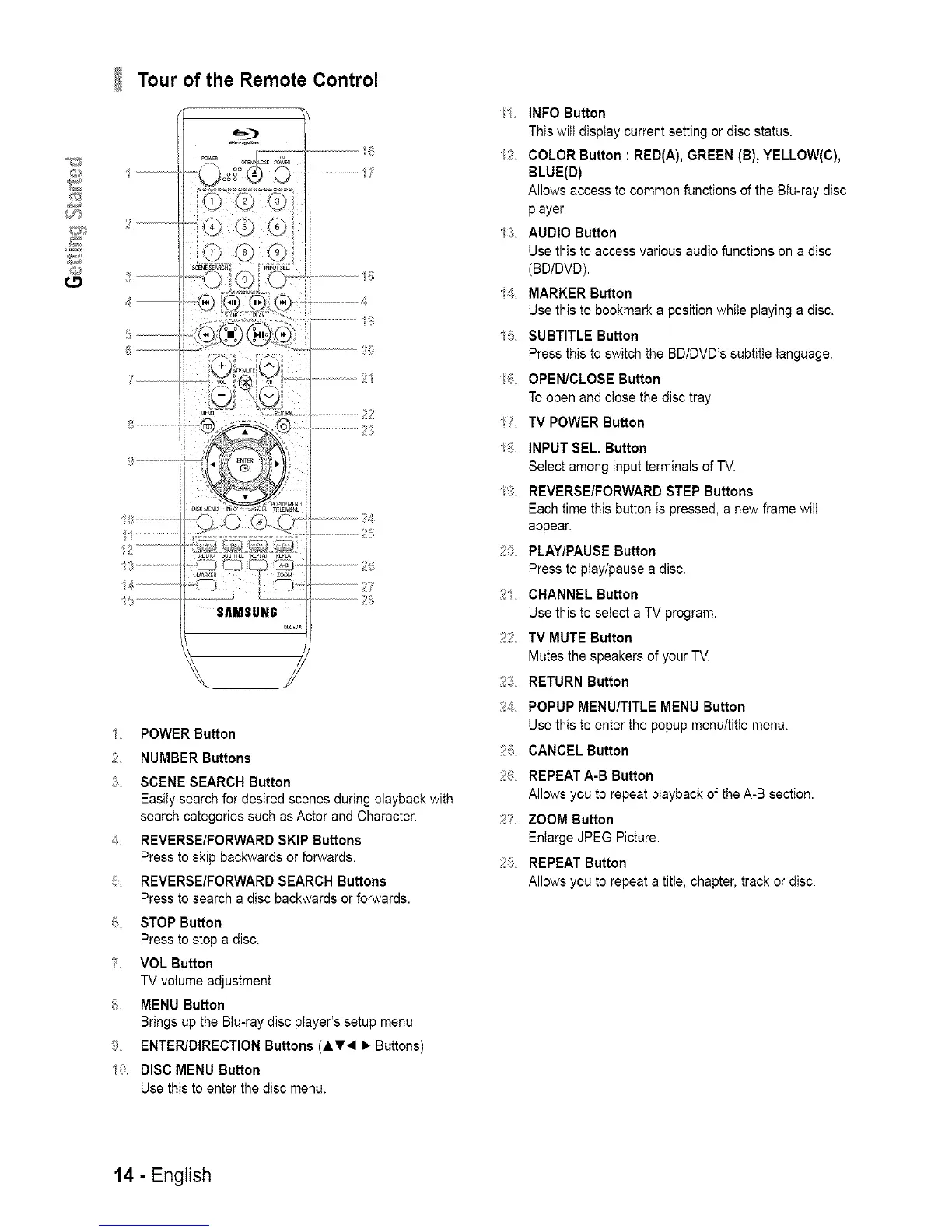
1 POWER Button
2 NUMBER Buttons
3 SCENE SEARCH Button
Easily search for desired scenes during playback with
search categories such as Actor and Character.
+_ REVERSE/FORWARD SKIP Buttons
Press to skip backwards or forwards.
5 REVERSE/FORWARD SEARCH Buttons
Press to search a disc backwards or forwards.
f_ STOP Button
Press to stop a disc.
7 VOL Button
TV volume adjustment
8 MENU Button
Brings up the BIu-ray disc player's setup menu.
9 ENTER/DIRECTION Buttons (iV< • Buttons)
10 DISC MENU Button
Use this to enter the disc menu.
/1 INFO Button
This will display current setting or disc status.
s2 COLOR Button : RED(A), GREEN (B), YELLOW(C),
BLUE(D)
Allows access to common functions of the Btu-ray disc
player.
13 AUDIO Button
Use this to access various audio functions on a disc
(BDIDVD).
s4 MARKER Button
Use this to bookmark a position while playing a disc.
/5 SUBTITLE Button
Press this to switch the BD/DVD's subtitle language.
% OPEN/CLOSE Button
To open and close the disc tray.
/7 TV POWER Button
/8 INPUT SEL. Button
Select among input terminals of TV.
/9 REVERSE/FORWARD STEP Buttons
Each time this button is pressed, a new frame will
appear.
20 PLAY/PAUSE Button
Press to play/pause a disc.
2 CHANNEL Button
Use this to select a TV program.
22 TV MUTE Button
Mutes the speakers of your TV.
23 RETURN Button
24 POPUP MENU/TITLE MENU Button
Use this to enter the popup menu/titie menu.
25 CANCEL Button
2_5 REPEATA-B Button
Allows you to repeat playback of the A-B section.
27 ZOOM Button
Enlarge JPEG Picture.
2;_ REPEAT Button
Allows you to repeat a titie, chapter, track or disc.
14 - English














 To Next Page