NOTE
may cause damage to the speakers and
your ears.
• Please set the audio in the menu screen
according to the Amplifier.
(See pages 40 to 41)
• The position of terminals may vary
depending on the Amplifier.
Please refer to the user's manual of your
Amplifier.
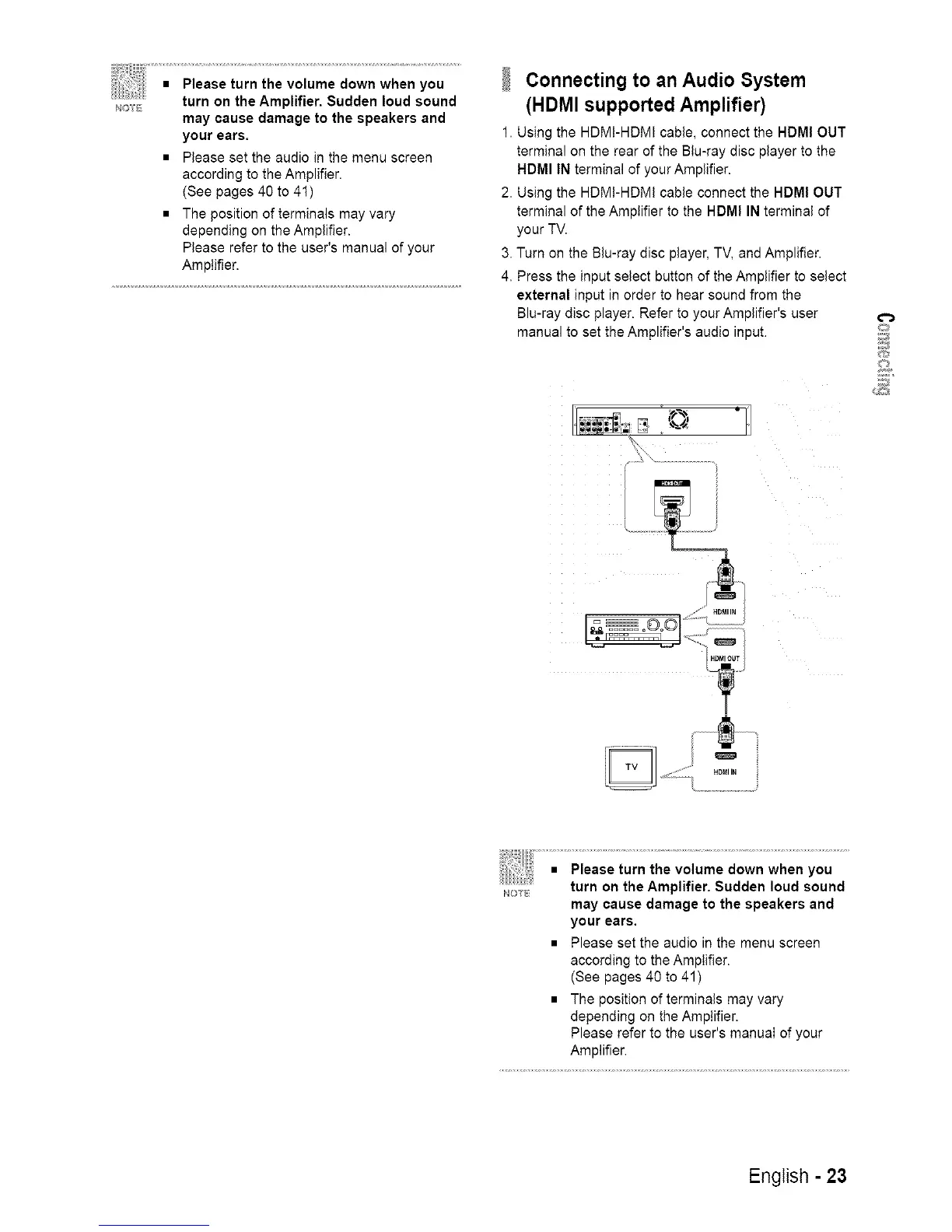
Connecting to an Audio System
(HDMI supportedAmplifier)
1. Using the HDM!-HDM! cable, connect the HDMI OUT
terminal on the rear of the Btu-ray disc player to the
HDMI IN terminal of your Amplifier.
2. Using the HDM!-HDMI cable connect the HDMI OUT
terminal of the Amplifier to the HDMI IN terminal of
your TV.
3. Turn on the Blu-ray disc player, TV, and Amplifier.
4. Press the input select button of the Amplifier to select
external input in order to hear sound from the
Blu-ray disc player. Refer to your Amplifier's user
manual to set the Amplifier's audio input.
O
NOTE
may cause damage to the speakers and
your ears.
• Please set the audio in the menu screen
according to the Amplifier.
(See pages 40 to 41)
• The position of terminals may vary
depending on the Amplifier.
Please refer to the user's manuaI of your
Amplifier.
English - 23














 To Next Page