03233A(E)-CHAPTER 1 10/30/03 3:58 PH Page 5
YOUR NEW 3WAY COMBINATION UNIT
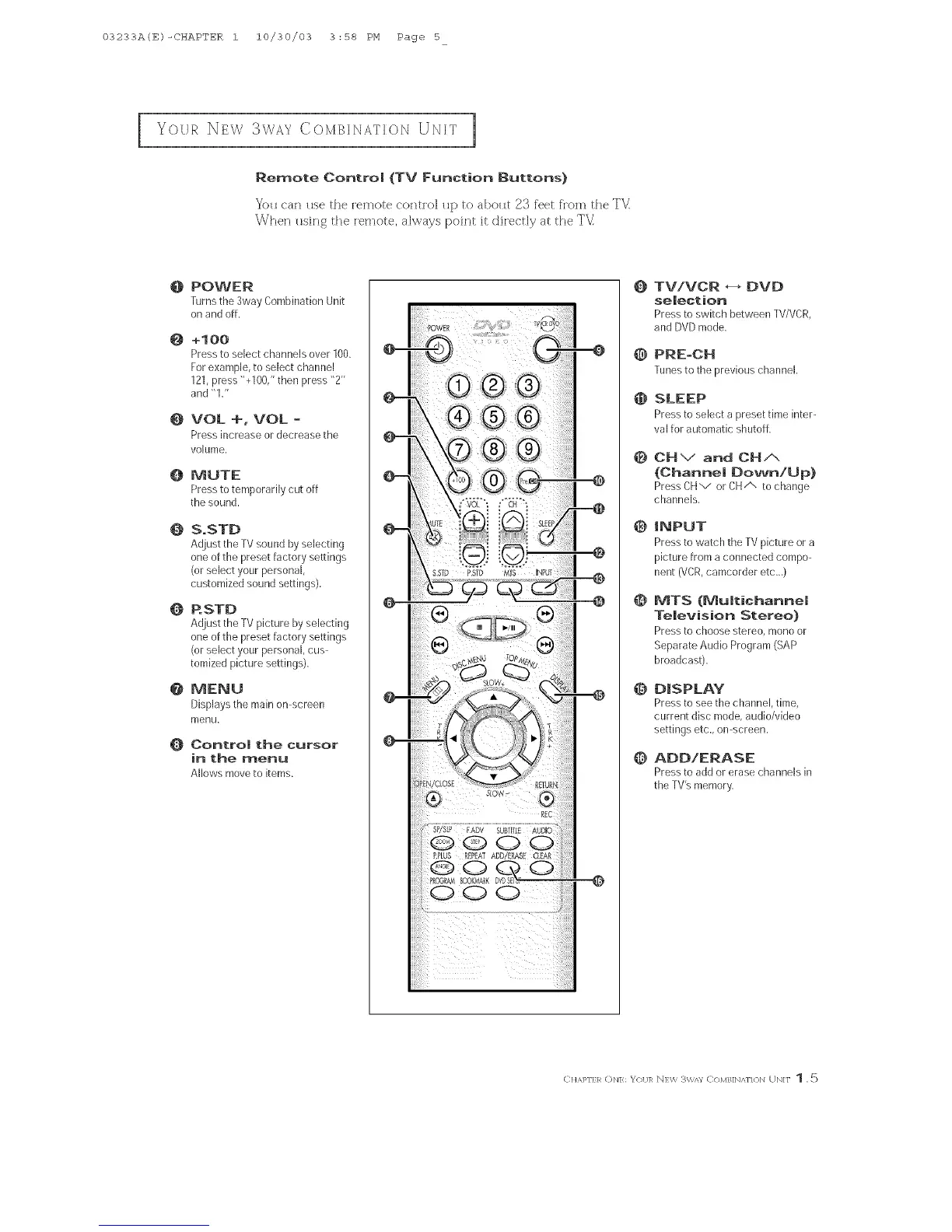
Remote Contro| (TV Function Buttons)
YoH can Hse the remote contK)] Hp to aboHt 23 f'eet from the TVI
When Hsing the [emote, always point it diiectly at the TV
@
@
@
@
@
@
@
@
POWER
]-urnsthe 3wayCombinationUnit
onandoff.
+too
Pressto selectchannelsover100.
Forexample,to selectchannel
121,press"+100,"thenpress"2"
and"1/'
VOL +, VOL -
Press increase or decrease the
volume,
MUTE
Press to temporarily cut off
the sound,
S.STD
Adjust the TV sound by selecting
one of the preset factory settings
(or select your personal,
customized sound settings),
RSTD
Adjust the TV picture by selecting
one of the preset factory settings
(or select your personal, cus-
tomized picture settings),
MENU
Displays the main on-screen
meKIu,
Oontto! the cursor
in the menu
Allows move to items.
@
@
@
@
@
@
@
@
TViVCR _ DVD
seJection
Pressto switchbetweenTV/VCR,
andDVDmode,
PRE-CH
Tunesto the previous channel.
SLEEP
Press to select a preset time inter-
val for automatic shutoff,
CHV and CHA
(ChanneJ Down!Up)
PressCHv orCHA to change
channels,
|NPUT
Press to watch the TV picture or a
picture from aconnected compo-
nent (VCR,camcorder etc._)
t%4TS (Multichanne!
Television Stereo)
Press to choose stereo, mono or
Separate Audio Program (SAP
broadcast),
DISPLAY
Press to see the channel, time,
current disc mode, audio/video
settings etc., on-screen.
ADD!ERASE
Pressto addor erasechannelsin
theTV%memory,
CHAPFER (_N]: _'<)I/]R N]W 3W/n C<)MB]N/_N{ Hq UN]F 1 ,5



 To Next Page