03233AIE)-CHAPTER 1 10/30/03 3:58 PH Page 6
YOUR NEW 3WAY COk,,:iBINAT]ON UN]T 1
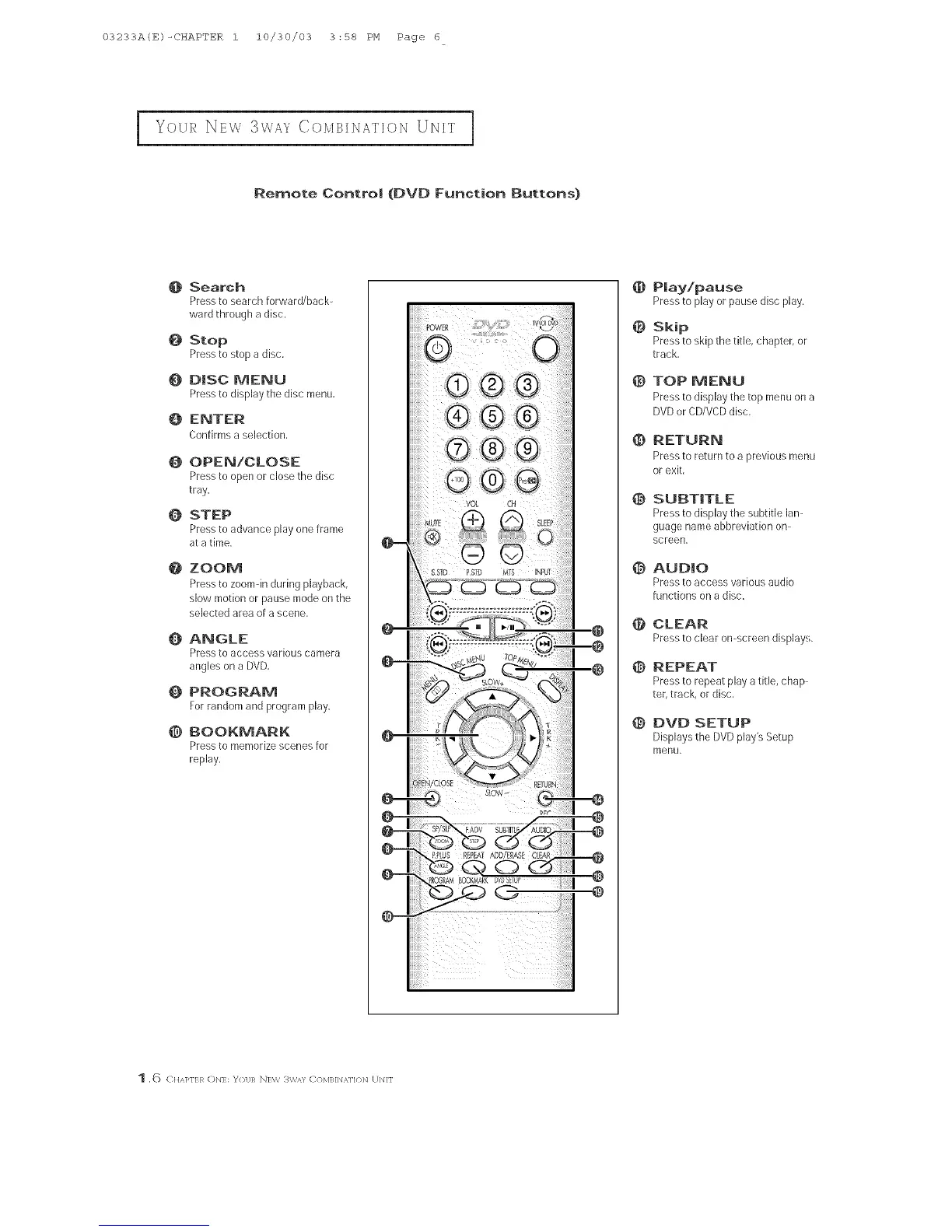
Remote Contro| (DVD Function Buttons}
@ Search
Press to search forward/back-
ward through a disc.
O Stop
Pressto stop a disc,
O DISC MENU
Pressto display the disc menu.
O ENTER
Confirms a selection,
0 OPEN/CLOSE
Pressto open or close the disc
tray.
O STEP
Pressto advance play one frame
at a time,
@
@
ZOOM
Pre% to zoomdn during playback,
slow motion or pause mode onthe
selected area of a scene,
ANGLE
PFeSS to access various camera
angles on a DVD.
_} PROGRAM
Forrandom and program play.
@ BOOKMARK
Pressto memorize scenes for
replay.
CH
0
@
@
@
@
@
@
@
@
@
Ray!pause
Pressto playorpausediscplay.
Skip
Press to skip the title, chapter, or
track,
TOP MENU
Press to display the top menu on a
DVD or CD/VCDdisc,
RETURN
Press to return to a previous menu
or exit,
SUBTITLE
Press to display the subtitle lan-
guage name abbreviation on-
screen,
AUDIO
Press to access various audio
functions on a disc,
CLEAR
Pressto clearomscreendisplays.
REPEAT
Press to repeat play a title, chap-
ter,track, or disc,
DVD SETUP
Displays the DVD play's Setup
menu,
1 ,6 C]]AKIR ON]: %31;R N]W 3W/_/ COM]_]N _,]lON UNIT



 To Next Page