03233AIE)-CHAPTER1 10/30/03 3:58PH Page7
YOUR NEW 3WAY COMBINAT]ON UNIT
Remote Contro| (VCR Function Buttons}
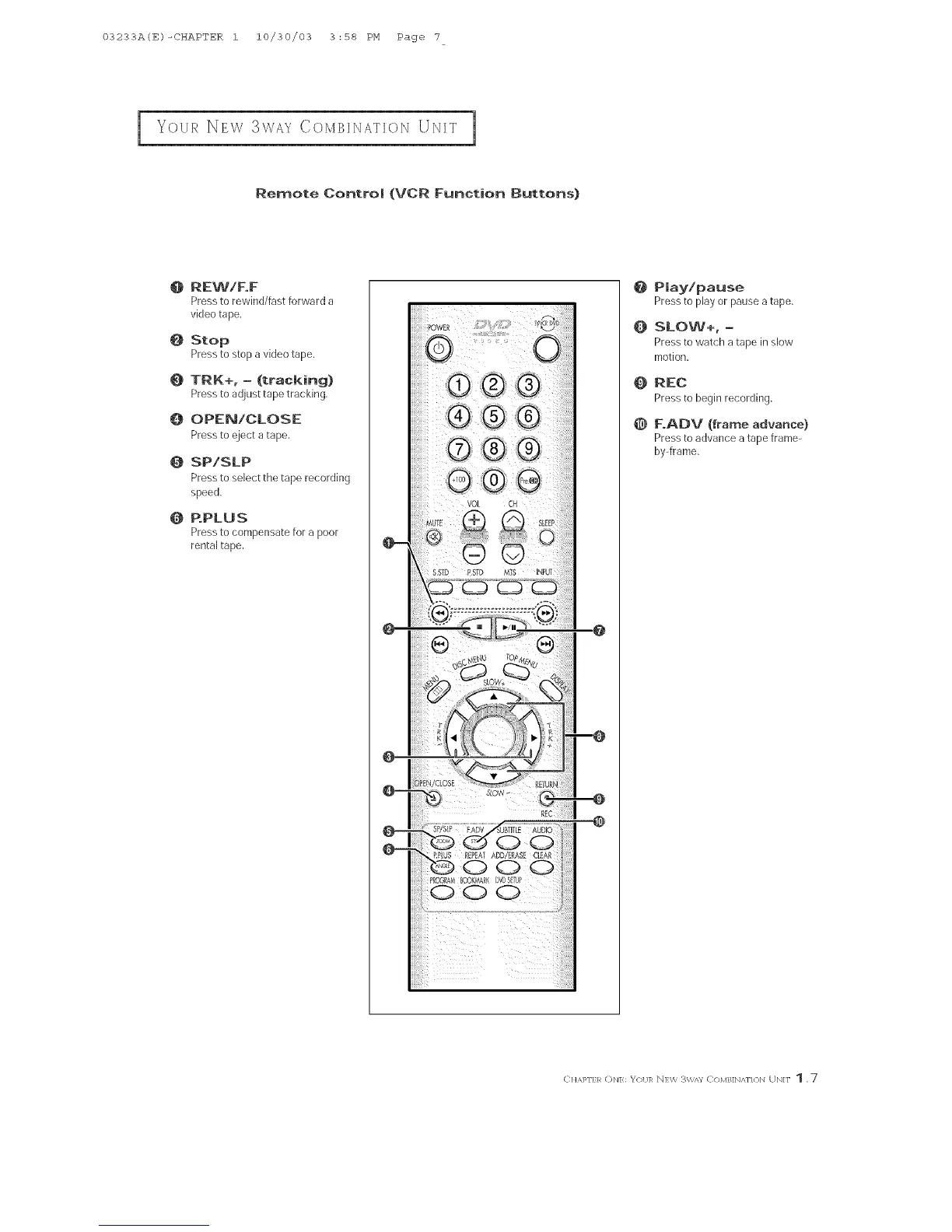
O REWIF.F
Press to rewind/fast forward a
video tape,
O Stop
Press to stop avideo tape.
0 TRK+, - (tracking}
Press to adjust tape tracking.
O OPEN!CLOSE
Press to eject a tape.
0 SP/SLP
Press to select the tape recording
speed.
0 P.PLU S
Press to compensate for a poor
rental tape.
@ Play!pause
Pressto playorpauseatape.
O SLOW+,-
Pressto watcha tape inslow
motion.
Q REC
Press to begin recording.
F.ADV (frame advance}
Press to advance atape frame-
bpframe.
C]{APFER (DN]: _R)II]R N]W 3W,'n C/)MB]N,,_N/}N UN]F 1 ,7



 To Next Page