03233A(E)-CHAPTER 2 10/30/03 4:00 PH Page 3
Connecting to a Cab|e Box that Descramb|es Some Channe|s
If yot cable box desct'ambies only some channels (stlch as plemitlm chmlne]s), follow the
instIHctions below. You will need a two-way splitter, an RF (AJB) switch, and fbtl_ lengths o["
coaxial cable. (These items ale available at most electionics stoies.)
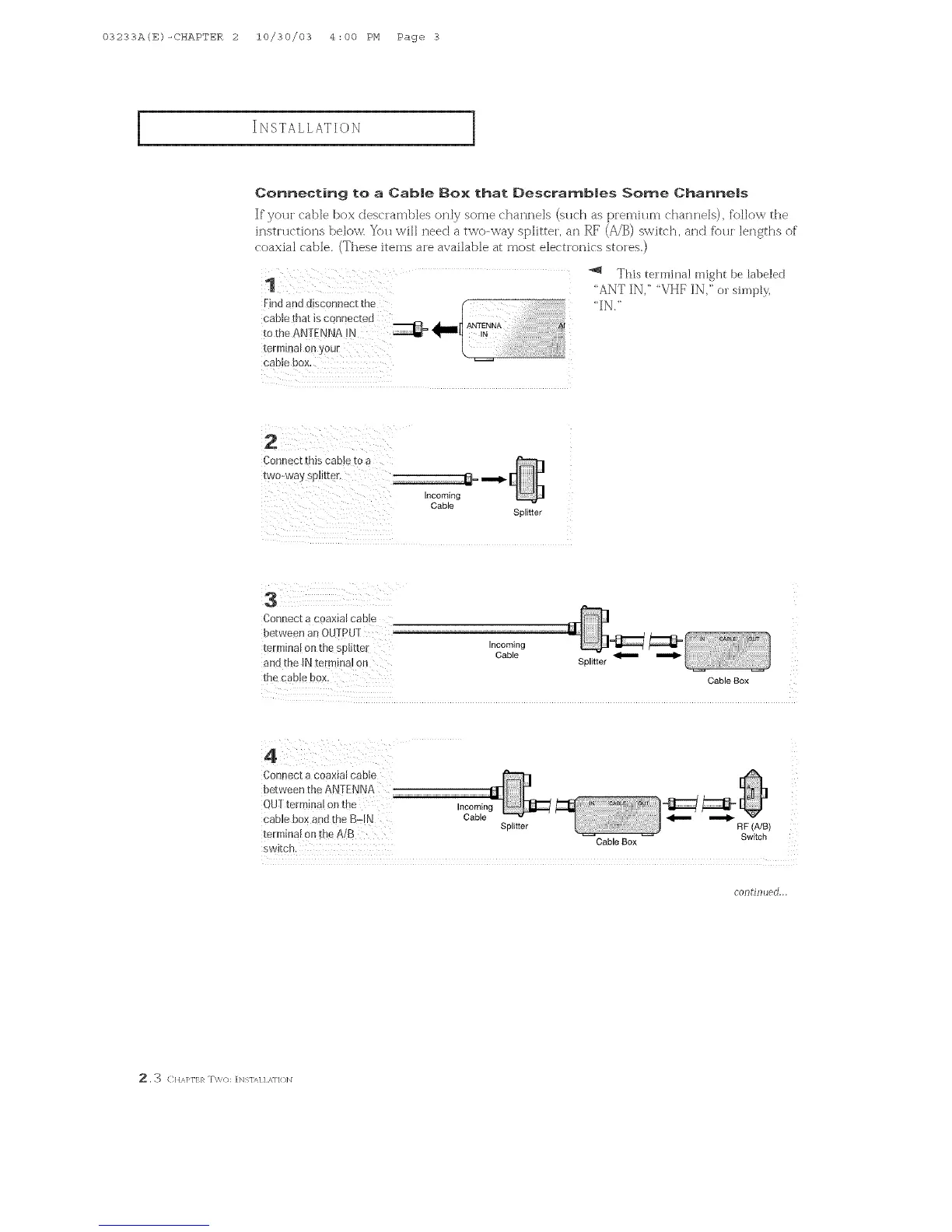
Findand disconnect the <
cable that is connected
ANTENNA
totheterminalAN ENN on 0u !N 4"
cable box.
_'_ This tm'mina! might be labeled
'ANT IN,' "VHF IN," c, sh_)pb',
"IN."
Connect this cabJe to a
Incoming
Cable
Splitter
Connect a coaxial cable
between an OUTPUT '
terminal on the splitter Incoming
Cable _
and the INterminal on Splitter
the cable box. CableBox
4
Connect a coaxial cable
between the ANTENNA
OUT term[na{ onthe Incoming
cable box and the B-IN Cable Splitter _ _ RF (A/B)
terminal on the A/B Switch
switch. CableBox
COlltf11[_ed...
,3 CHAPI']:R T\%():[Ngl/q I ,s,1]()]N



 To Next Page