03233A(E)-CHAPTER 3 10/30/03 4:04 PM Page 3
TV OPERATION
Memorizing the Channels
Y<)_lr TV can memorize and store all of the available channels for both "off-air" (antenna)
and cable channels. Aher the available channels a!÷ memoiized, use the CH A and
C Jd V b_lttons to scan thro_lgh the channels. This eliminates the need to change chan-
tlels by entering the channel digits. There are three steps ff)/memorizin 8 channels:
selecting a broadcast soH/ce, memoiizing the channels (aHtomatic) anct actEting and debt
ing channels (marulal).
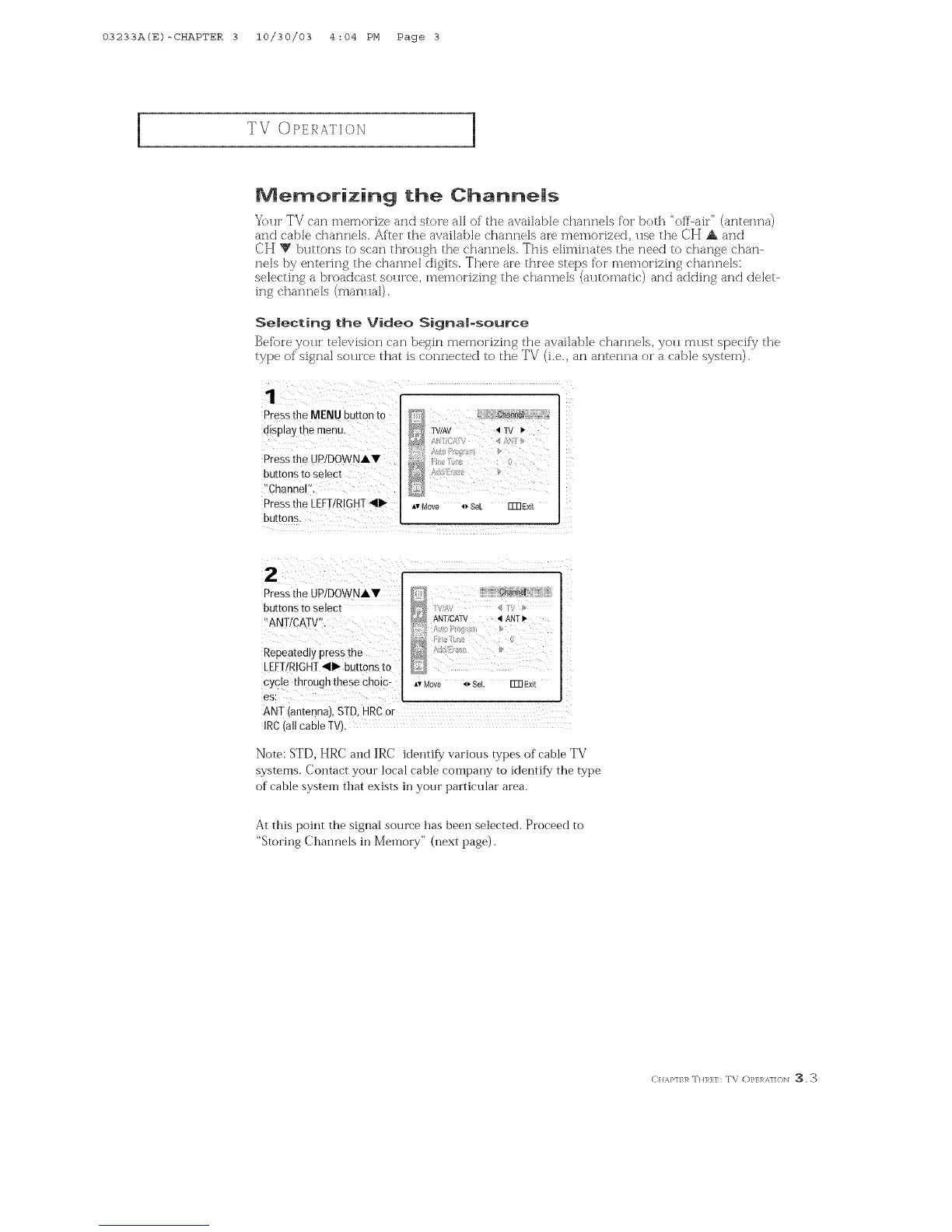
Selecting the Video Signam-source
Befb)re yoH["television can begin memorizing the available channels, yoH must specif,/the
type of signal source that is connected to the TV (i.e., an antenna or a cable system).
Pressthe MENU button to
alsolay the menu.
Pressthe JP/DOWNAV
buttons to select
Channel ,
Pressthe LEFTIRIGHT_II1_
buttons.
IV/A\ _1TV •
_,vMove 4_SeL Fm E×it
Press the UP!DOWNAV
buttons to select
?ANT!CATV".
Repeatedly press the
LEFT/RIGHT_II1_buttons to
cycle through these choic:
es:
D }}}}_ :.j[
ANT/CATV _1ANTI_
Ao
g ! : 0
A,rMove _ Sel. _ Exit
ANT (antenna), S!D, HRCor
IRC(all cable TV).
Note: ST[), HRC and IRC identify various types of cable TV
systems. Contact your local cable company to identify the type
of cable system that exists in your particular area.
At this point the signal source has been selected. Proceed to
"Storing Chaimels in _J[emory" (next page).
E)}/,_,}qf 1,_mHl_l,:lh TV O}'EI _,l/(/b] _, 3



 To Next Page