03233A(E)-CHAPTER 3 10/30/03 4:04 PM Page 4
TV OPERATION
Storing Channels in Memory (Automatic Method)
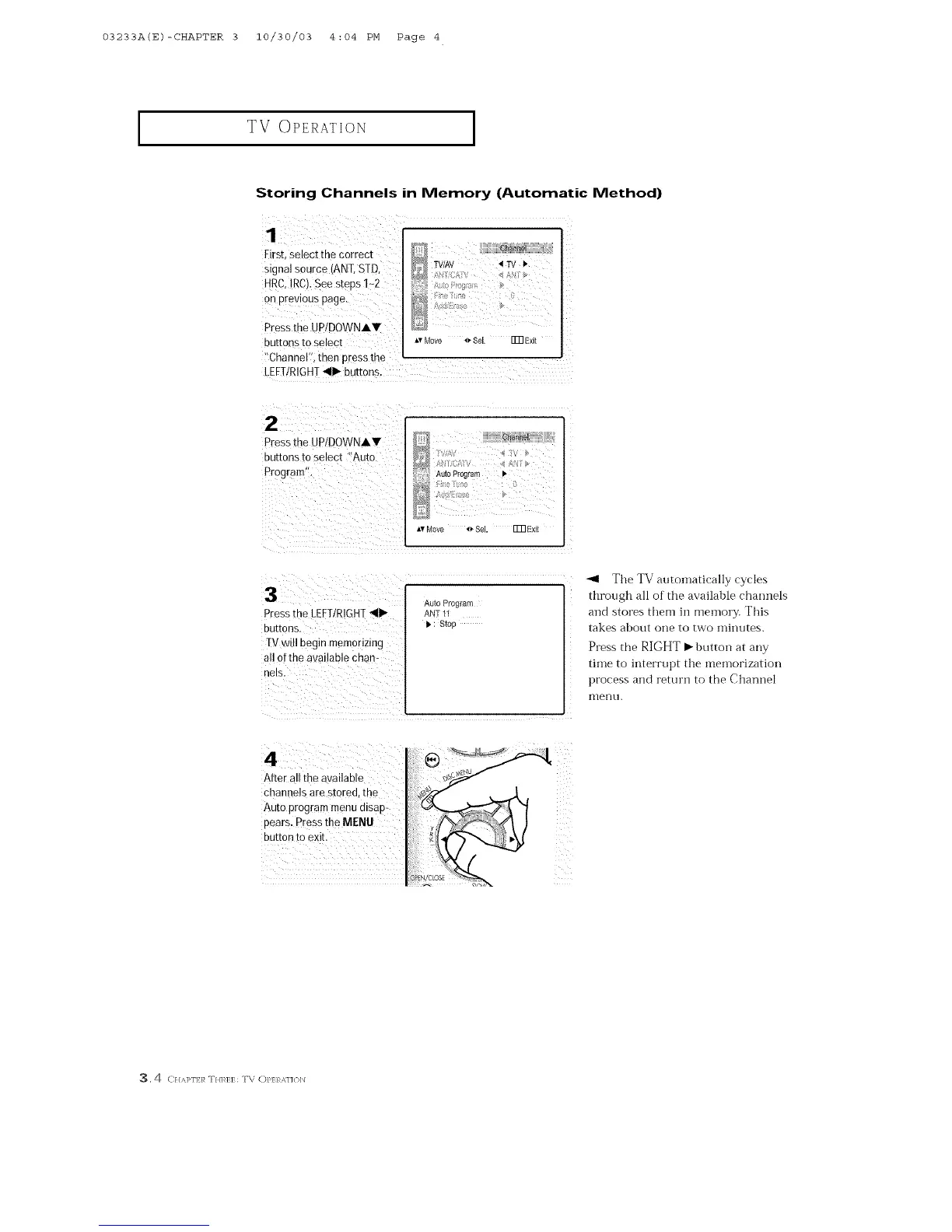
First.select me correct
stgnal source/ANT. STD
HRC.IRCt.See steps 1-2
on prevtous page.
Pressthe UPtDOWNAV
3UEORS to select
"Channel" men press tns
LEFT/RIGHT_11_buttons.
8ha_mN
TV/AV _ IV _"
,v Move _ Sel Fm Exit
2
Pressthe UPtDOWNAV
3uttonsto select "Auto
Prograrr
Auto Program
Av Move *_ Sel. Fm Ex_l
i
Pressihe LEFT/RIGHT_llb
buttons.
IV will begin memorizing
all ofthe available Chan-
nels.
Auto Program
ANT 11
i, : Stop
After all the available
channels are stored, the
Auto program menu disap-
pears. Pressthe MENU
button to exit.
_l The TV autoinatically cycles
through all of the available channels
and stores them iI1 rl]elllOi_. This
takes about one to two minutes.
Press the RIGHT m button at any
time to interrupt the memorization
process and return to the Channel
Illerlu.
3.4 C///q>F]7:/_ T//]'_]7:]7:: T\ C)/>17:RM]{)lN



 To Next Page