03233A(E)-CHAPTER 3 10/30/03 4:04 PM Page 8
TV OPERATION
Customizing the Picture
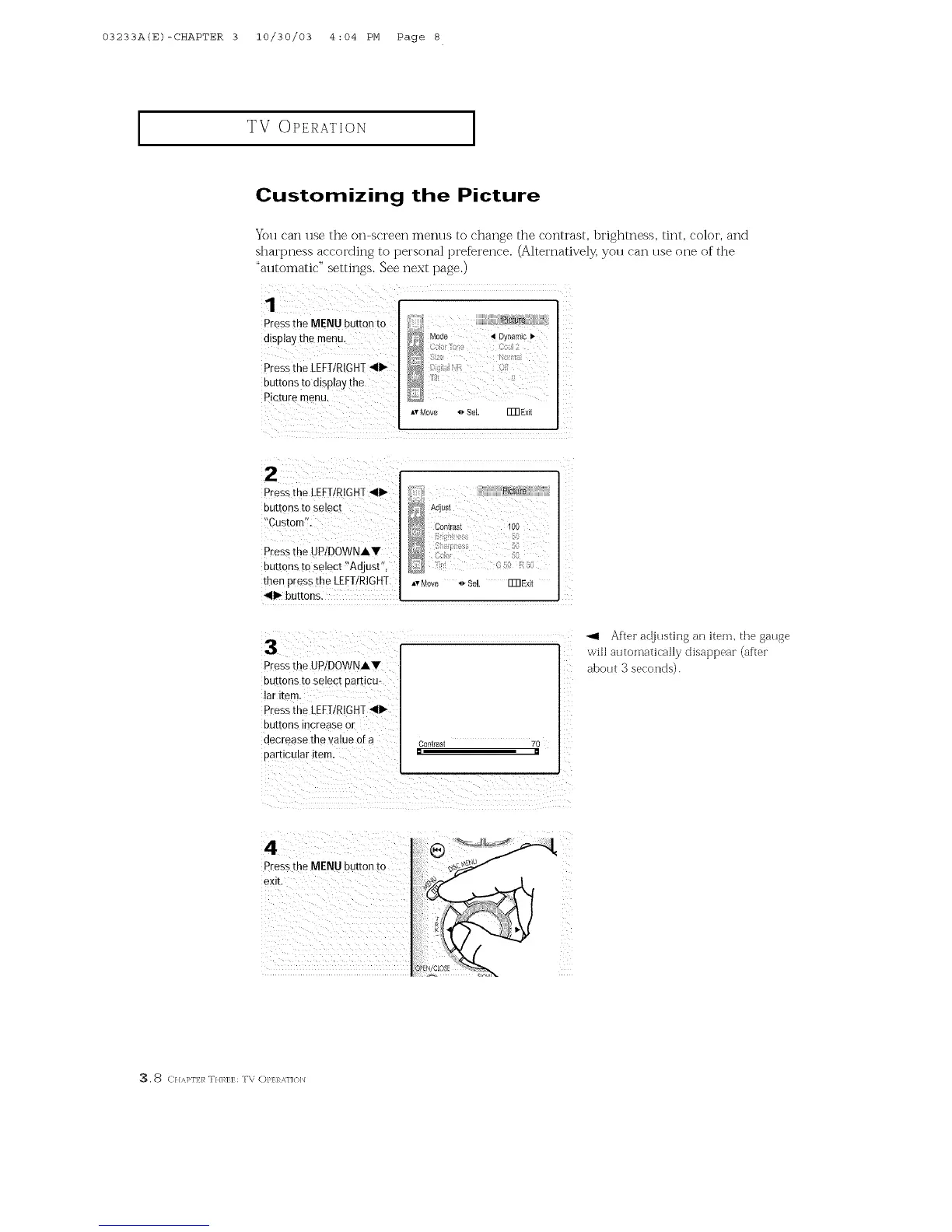
Press the MENU button to
display the menu.
Press':heLEFI/RIGHI 411_
buttons to display the
Picture menu.
You can use the on-screen menus to change the contrast, brighmess, tint, color, and
sharpness according to personal preference. (Alternatively, yott can ttse one of the
"automatic" settings. See next page.)
_s Mode _ Dy_amc I_
1 oMove oSel. FmExit
Pressthe LEFT/RIGHT_II1_
buttons to Select
!'Custom'!:
Pressthe UP/DOWNi,.V
buttons to select _Adjust'_,
then press the LEFT/RIGHT
_II1_buttons.
...._ Contrast 100
Av Move 4_SeL Fm Exit
Pressthe UP/DOWNIV
buttons to select particu-
lar item.
press the LEFI!R!GHT_11_
buttons increase or
decrease the 'valueof a
Contrast 70
After adjusting an item, the gauge
will automatically disappear (after
about 3 seconds).
Press the MENU button to
, 8 C//,M>I'E/_ T//]'_EE: T\ C)P/7:RA,]]{)b]



 To Next Page