03233A(E)-CHAPTER 3 10/30/03 4:04 PM Page 23
TV OPERATION
Setting the On/Off Timer
I
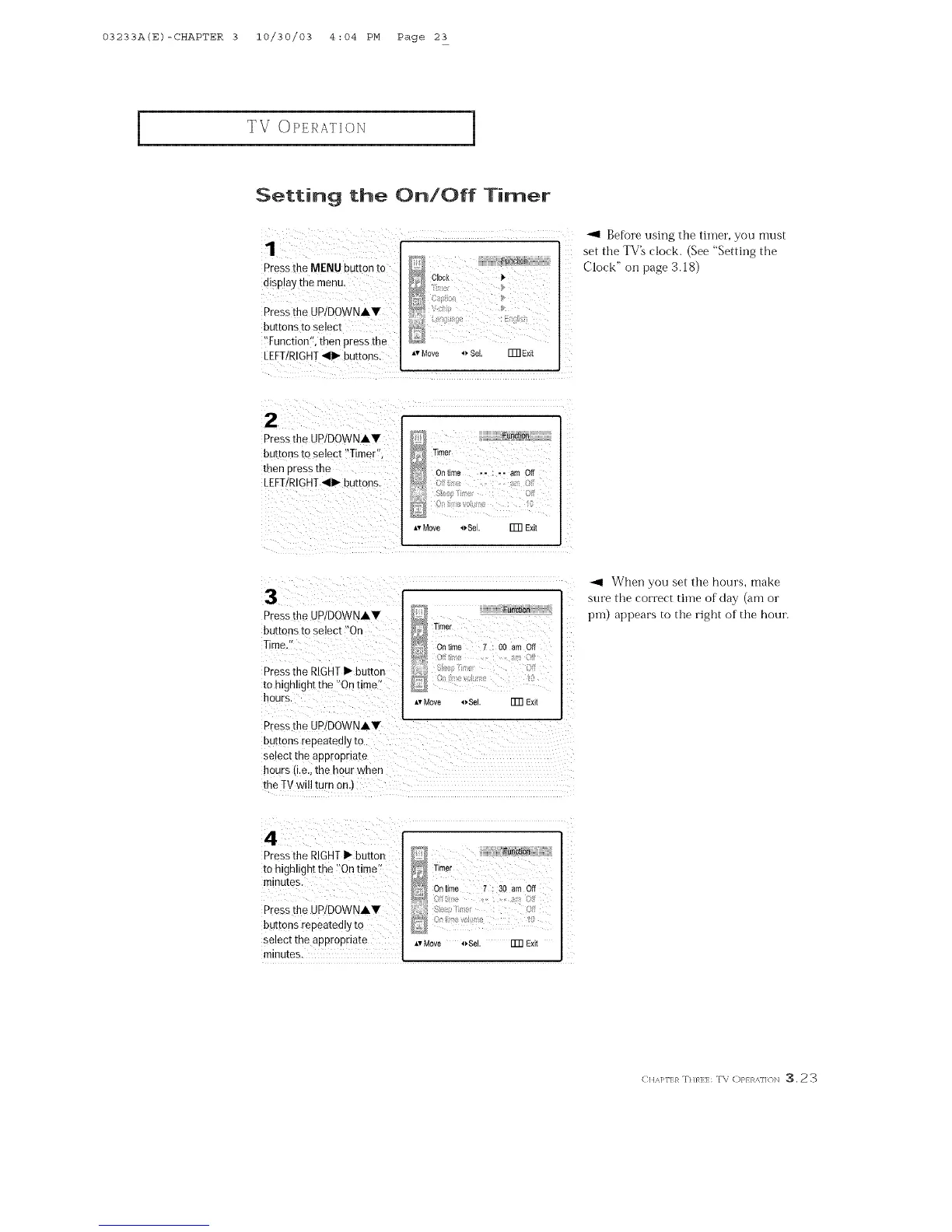
Pressthe MENU button to
di#p!ay the menu,
Press the UP/DOWNAY
buttons to select
Before using the timer, you must
set the TV_ clock. (See "Setting the
D
,oci Clock"o. page3.18)
N
i'Function i_,then press the
LEFT/RIGHT<11_buttons. ,,Move _,SeL ITNE×it
!2 ¸ : < i
Pressthe Up/DowNAv D
buttons to select !'Timert'; _ _mer
then press the _ Oi time 2: : ,i amoff
LEFT/RIGHT<1_ buttons. ....: -
,,, ,, :
_,vMove 4_,Sel. FFR Exit
Pressthe UP/DOWNAV
buttons to select "On
Press the RIGHTI_ button
to highlight the '_Ontimell
Timer
_/_ On time 7 : O0 am Off
AvMove _Sel. FFR Exit
<
/i
/
Z
Z_
Pressthe UP/DOWNAV
buttons repeatedly to
Select the appropriate
hours (i.e.,the hour when
the TV will turn on.)
When you set the hours, make
sure the correct time of clay (am or
i)11-1)appears to the right of the hour.
Press the RIGHTI_ button
to highlight the _!Ontime';
minutes.
Press the UPiDOWNAY
butDns repeatedly tO
select the appropriate
_ Timer
On time 7 : 30 am Off
_vMove 4_Sel. FFR Exit
minutes.
EuA]<:}_:n.,q:.:TV oP}>,,]>N 3.23



 To Next Page