03233A(E)-CHAPTER 3 10/30/03 4:04 PM Page 28
TV OPERATION
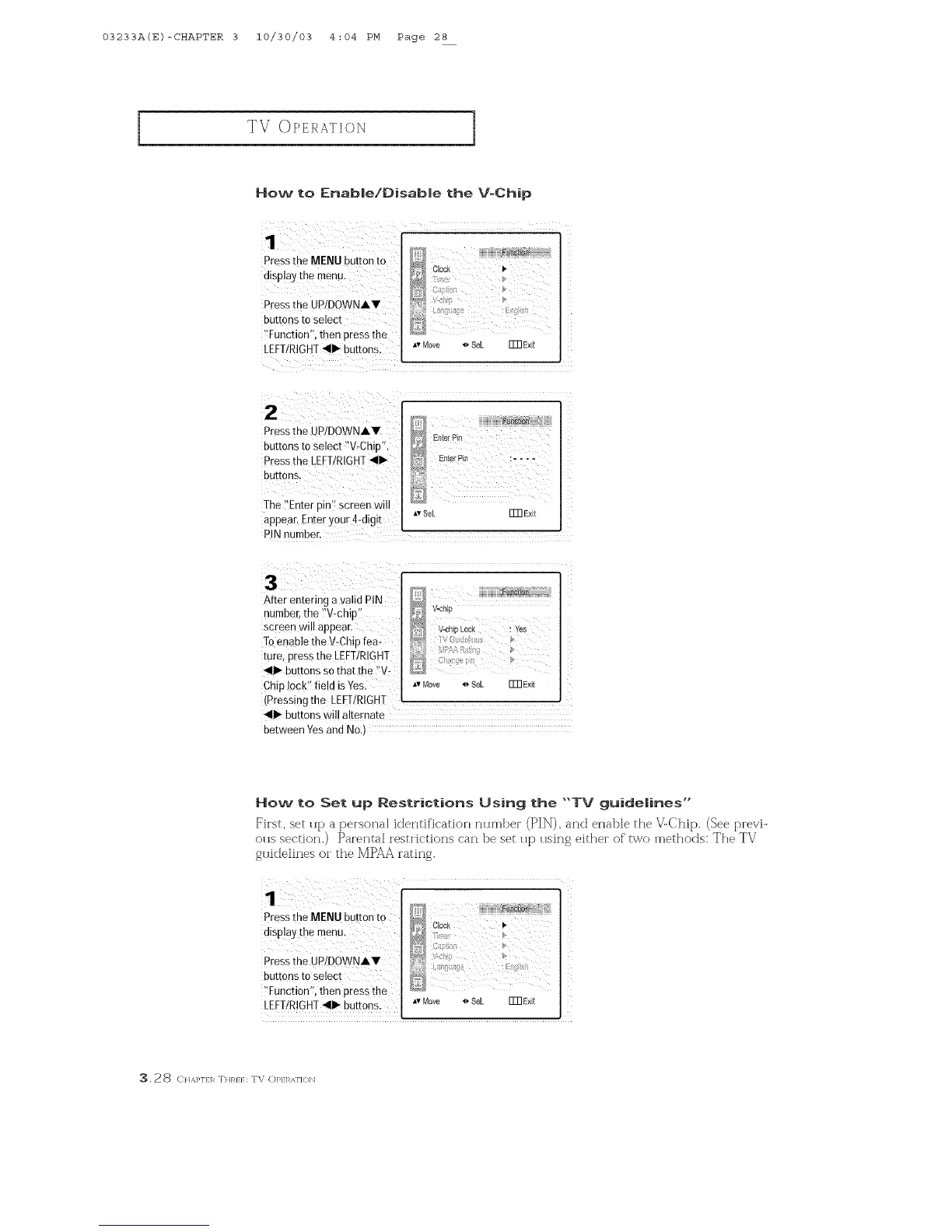
How to Enable!Disable the V=Chip
Press the MENU button to
dtsDlay the menu.
Pressthe UP/DOWNAV
DUE[ORS to select
"Function' tnen Dressthe
LEFT/RIGHT_11_buttons.
ATMOVe _* Se[
ITR Exit
2
Pressthe UP/DOWNAV
buttons to select "V-Chip"
Pressthe LEFTIRIGHT,111_
BUT[ORS,
The Enter [)in" screen will
appear. Enter your 4-d gl!
PIN number.
h,vSel. ITR Exit
After entering a valid PIN
number,the ?V-chip:'
screen wi!l appear.
Toenable the V:Chip fea
ture, press the [EFTIRIGHT
411_buttons so that the "V:
Chip !0ck:' field isYes. *,Move 4, Sel. ITnE×it
(Pressing the LEFT/RIGHT
41_ buttons will alternate
between Yesand No.)
How to Set up Restrictions Using the "'TV guidelines'"
_'h'st, set tip a pe_sona] identification ntlrnbe_ (]PI]X_),and enable the V-Chip. (See p[evi-
otis section.) Parental z'est[k'tions can be set tip using either of" two methods: The TV
gt lidelines or the IV[PAA rating.
Press the MENU button to
display the menu.
Pressthe UPIDOWNAV
buttons to select
!'Function'!, then press the
LEFT/RIGHT_II1_buttons.
_, 28 C}1,_,}'1}1_ THR}} : TV OP}l_,_ki'](}b]



 To Next Page