03233A(E)-CHAPTER 3 10/30/03 4:04 PM Page 27
TV OPERATION
Using the V°Chip
The VtChip f_atlne alltomatk ally locks o_lt plogramming that is deemed inappropriate fbi
childrerl. The user must first enter a PIN (persorlal ID mlmbeJ bef'ore any of" the V-Chip
restiictions can be set np Ol changed.
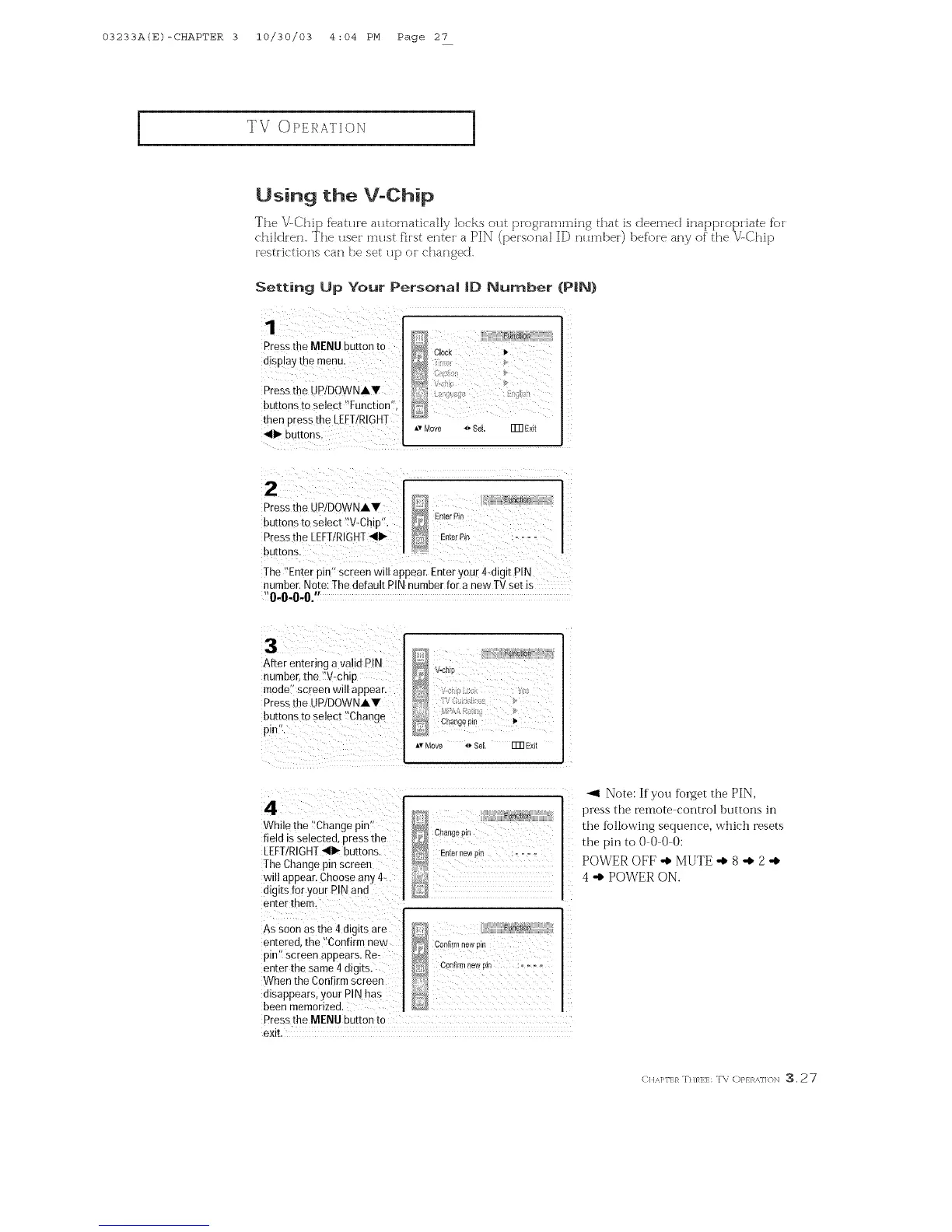
1
Pressthe MENU button to
disp!ay the menu•
Press the UP/DOWNAV
buttons to select _[ut]etion';
then press the LEE!/RIGHT
Setting Up Your Persona| |O Number (PIN)
;!i[ >
D
Av Move o SeL ITR E×it
Ihe '_Et]terpin'_screen will appear. Enter your 4digit PIN
t]umber` Note: The default PIN number for a new IV set is
"0000"
After entering a valid PIN
number, the "V-chip
moae' screen will appear.
Pressthe UPIDOWNAV
buttons m select "Change
pmn.
ITR Exit
4
While the "Change pm
field is selected oressthe
LEFTIRIGHT_111_buttons.
The Change pmnscreet]
will appear. Choose any 4-
digits for your PIN and
et]rer them.
Cha£geD_r
Enter/_ewi_i
As soon as the 4 digits are
et][ered, the "Confirm new
pit] screen at]Dears. Re-
enter the same4digits.
When the Conf rm screen
msappears, your PIN has
been memorized.
Pressthe MENU button tc
exit
Func{r_
Cof@Tn new [_lr_
Con_rm new r},,.....
_1 Note: If you ffmget the PIN,
press the remote control 1)uttons in
the following sequence, w'hich resets
the pin toO000:
POWER OFF "_ MUTE "_ 8 "_ 2 "_
4 "_ POWER ON.
<uA_<:}_T.},_H:::r\; <:>}>,,..N :3.27



 To Next Page