03233A(E)-CHAPTER 3 10/30/03 4:04 PM Page 26
TV OPERATION
Viewing C|osed Captions
Your TV decodes and displays the dosed captions that are b_'oadca_,t with certain TV shows.
These captions are usHallj subtitles [bE the headn S impai_'ed or fbreigndanguage hans-
]ations. All VCRs record the closed caption signal flora television progiams, so home-recorded
video tapes also p_ovide closed captions. Most DVDs and [)re-recoided commeicial video tapes
p_ovide closed captions as well. Check fbr the closed capt{on symbol in yoHr television sched-
ule and on the tape_ packaging: @.
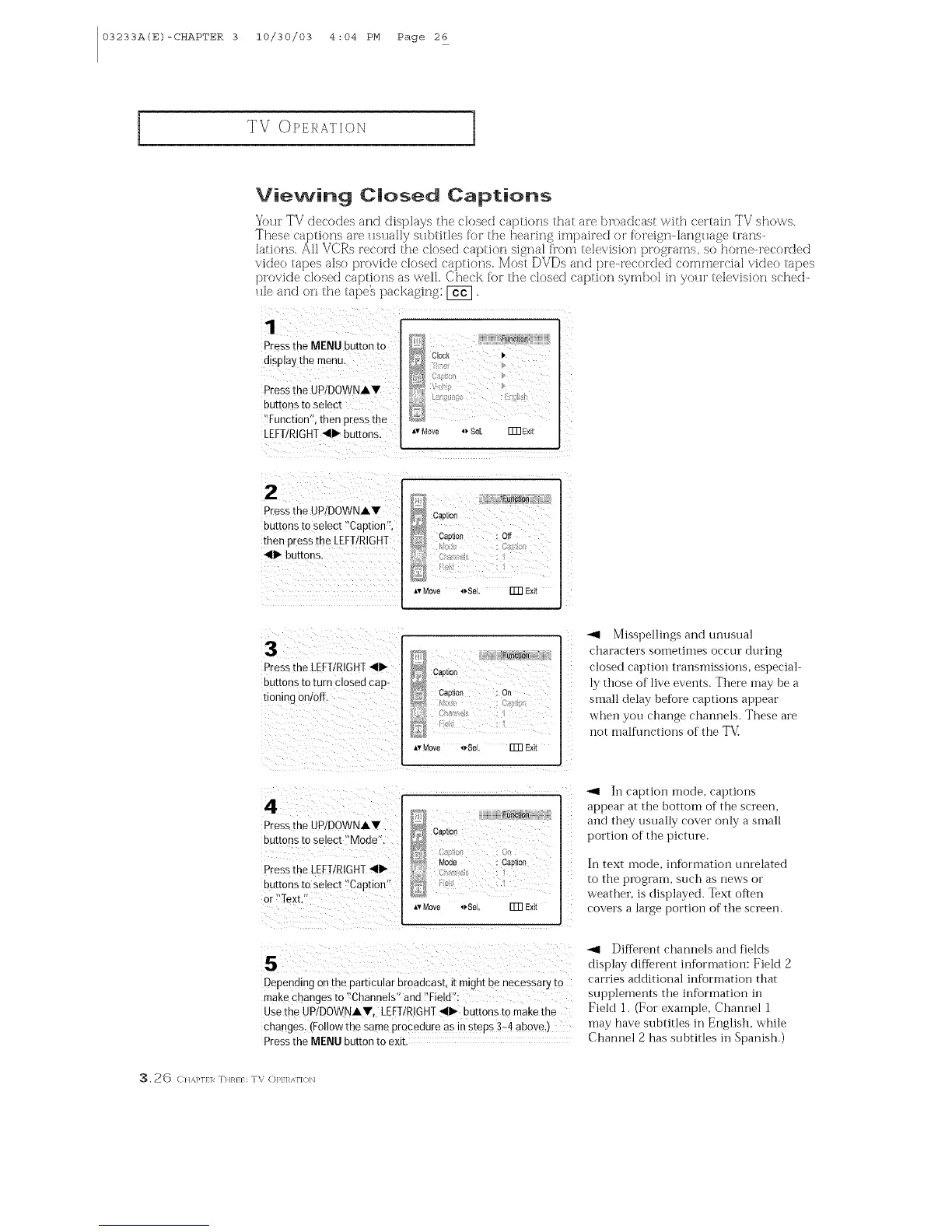
Pressthe MENU button to
disp!a themenu,
Dess the UPIDOWNAY
buttons to select
'Tunction':, then p[ess the
LEFT/RIGHI _111_buttons. *,Move ,_SeL ITnE×it
P[ess the UP!DOWNAV
_ Capti0_
butt°nst°select !'Capti0n'_' _ Cation Off
then Fess the LEFT!RIGHT _ ::c_
_111_buttons.
Av Move _Sel, ITR Exit
3
Pressthe LEFT!RIGHT_111_
ou[mns to turn closed cap-
nomng onloff
F_
Ca0tion
CaI)ti0n On
_,vMove o Se Fm Exi[
Misspellings and unusual
characters sometimes occur during
closed caption transmissions, especial-
ly those of live events. There nmy be a
small delay hefore captions appear
when you change chalmels. These are
not malflmctions of the T_d
4
Press[he UP/DOWNAY
outtonsto select Mode".
Pressme LEFT/RIGHT_111_
buttons to selec[ "Cap[ton
or "Texu
}_BRC_
Caotiol
Mode : CaDIJOi)
Av Move _Se Fm Exit
_1 In caption mode, captions
appear at the bottom of the screen,
and they usually cover only a snmll
portion of the picture.
In text inode, information unrelated
to the prograin, such as news or
weather, is displayed. Text often
covers a la<ge portion of the screen.
5
Depending on me parncmar oroadcast, it reign[ De necessary to
makecnanges [o "Channels" and "Fielo .
Usethe UPIDOW'/AV, LEFTIRIGHT_111_buttons to make the
changes. 1Followthe same orocedure as in steps 3-4 above,
Pressthe MENU button to exit
Different channels and fields
display different infbrmation: Field 2
carries additional information that
supl)lemei_ts the information in
FieM 1. (For example, Chalmel 1
may have subtitles in English, while
Channel 2 has suhtitles in Spanish.)
3.26 C}/,_.}'1}1_ THR}} : TV (])P} 1_,_\1"1(}1_



 To Next Page