03233A(E)-CHAPTER 3 10/30/03 4:04 PM Page 25
TV OPERATION
Setting the Sleep Timer
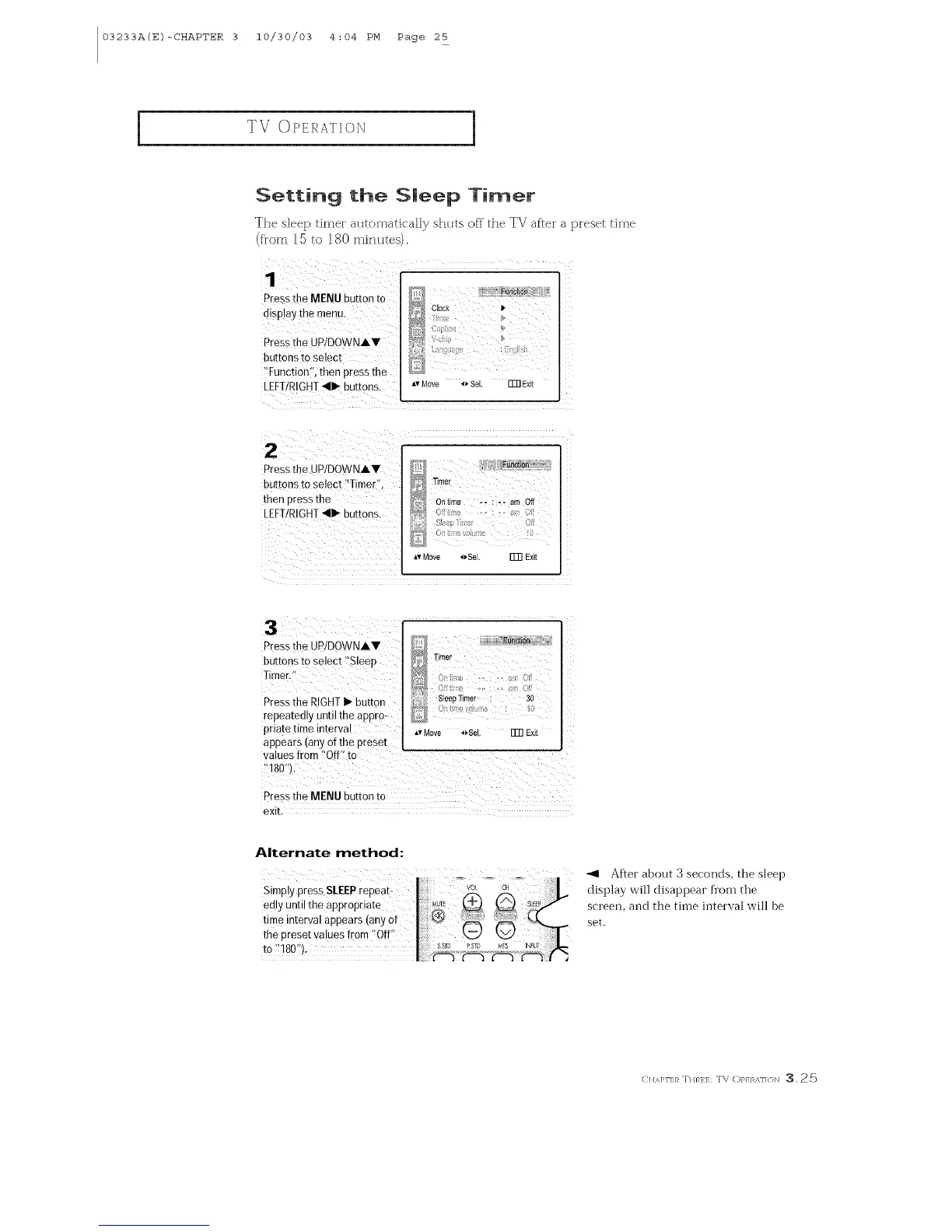
The sleep dmel atltomadca]]y shlttsof_"the TV af£ela piesettime
(fl'om 15 to 180 minutes).
Pressthe MENU button to
aBp ay the menu.
Pressthe JP/DOWNA.V
butrons [o select
Function men press the
LEFT/RIGHT_111_buttons.
Clock Ip
Av Move _" Sel. _ EXit
2
Pressthe UPIDOWNAV
buttons ro select "Timer"
then oress the
LEFT/RIGHT411_buttons.
"Nmer
Ontime -- : -- am Off
_v Move oSe FFn Exit
!3¸¸¸ ¸ /: /(
Press the UP/DOWNAY
buttons to select ::Sleep
Timer,'!
Pressthe RIGHTI_ button
repeatedly until the @pro:
priate time interval
appears (any of the preset
r r? : , ?
})': SleepTimer 30
AvMove 4_8el. FFn Exit
exit.
Alternate method:
After about 3 seconds, the sleep
display will disappear from the
screen, and the tiine interval will be
set.
< HA]q'I:}_ Trim:l:: T\ OP} R,_.]]ON :3. 25



 To Next Page