03233A(E)-CHAPTER 4 10/30/03 4:07 PM Page 4
DVD OPERAT]ON
Using the Display Function
When Playing a DVD
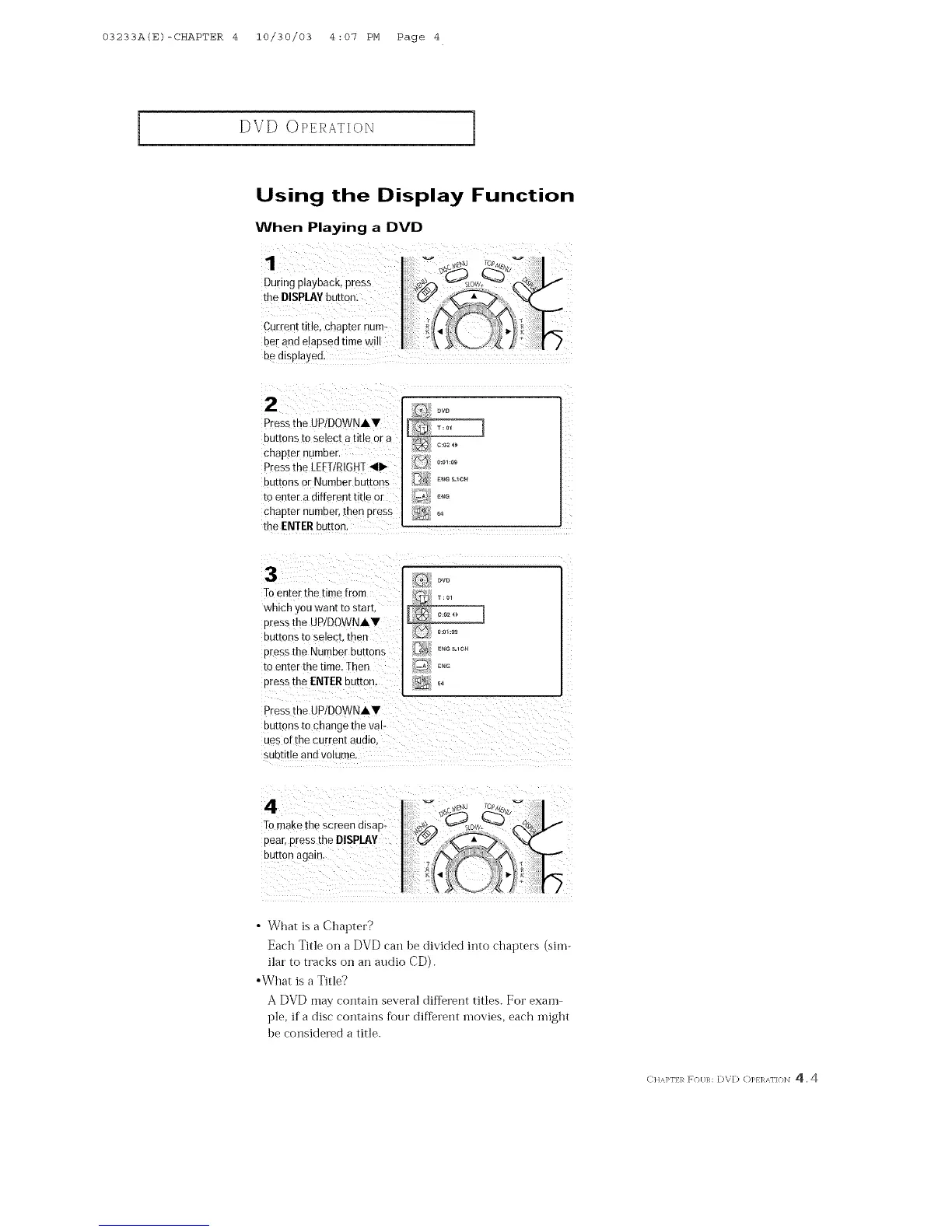
be displayed.
2
Press the UP/DOWNAV
Du[tons to select a title or a
chapter £umDer.
Press the LEFT/RIGHT 41_
DU[[ORSor Number buttons
[o en[er a different title or
chapter numDer, then Dress
the ENTER button
Q OVD
3
Toenter the time from
wnlcn you want ro start
Dressthe UPIDOWNAV
Du£tons to select, men
pressthe Number buttons
[o enter the time. Then
press the ENTERburton.
Press the UPIDOWNAV
DU[[OnSto change the val-
Jes of the current audio,
SUDeee ann VOlume.
_w
o:o1:o9
EN_S=lCH
4
To makethe screen disap-
pear,press the DISPLAY
DU£[On again
• What is a Chapter?
Each Title on a DVD carl he divided iflto chapters (sim-
ilar to tracks on an audio CD).
•What is a Title?
A DVD may contain several different titles. For exam
ple, if a disc contains fi)ur diflerent movies, each inight
be considered a title.
ClaAI>N R F(}[/R: DVD OREI%'\NON 4.4



 To Next Page