03233A(E)-CHAPTER 5 10/30/03 4:10 PM Page i0
VCR OPERATION
Recording at a Later lime
You can set the built-in timer for unattended recording of up to eight different TV
programs. The timer can turn on the TV at the time you select, record for a selected
length of time, and then turn off the TV - all without you being there.
You can also choose to record a program one time, daily (every day, Monday through
Friday), or weekly (the same day every week.)
-_t The clock must be set to the cor
rect time and date before you pro-
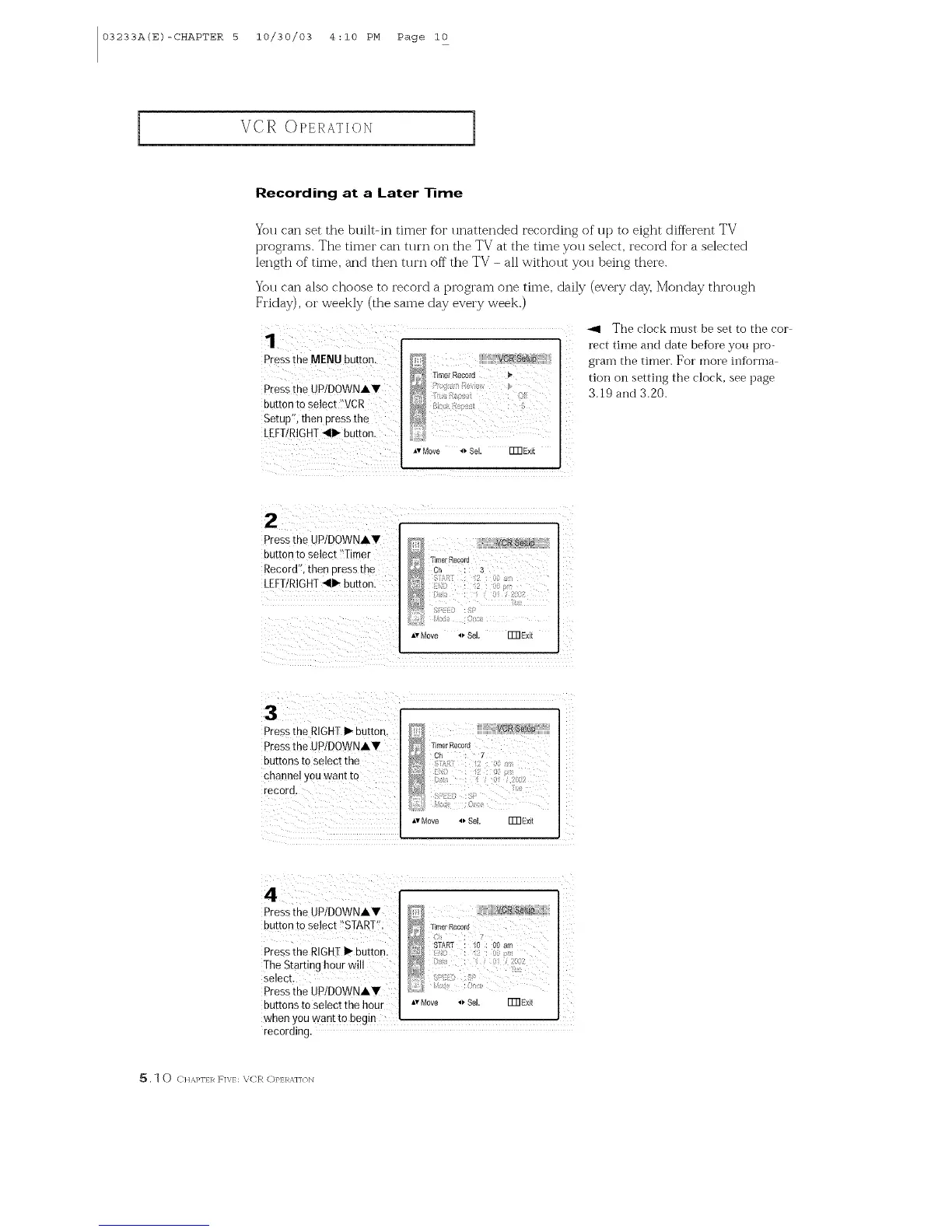
Press the MENUbutton,
Press the UP/DOWNAY
button to Select ?VCR
Setupe,then press the
LEFT/RIGHT_II1_button.
ivMove _ 8M. Fm Exit
grain the timer. For more infbrina
t_on on setting the clock, see page
3.19 and 3.20.
,*,',rMove '.' SeL FmExit
ilM
Pressthe UPIDOWNIY Jl lfi{JiVgR _!_ +diiif
buttonto Se!ect>tSTART% "_ Time,Record
PreSstheRIGH!I_button. _ _fART _0:O0_m
TheStartinghourwi!lselect. _ i::!,i_
Pressthe UPIDOWNAY
buttons to select the hour A,Move _ Sel. ITn_xft
when youwantto begin
recording.
_, ] 0 C It%PIq R F]V/: X;CR C)PERx,]];/IX]



 To Next Page