ŝ16Ş
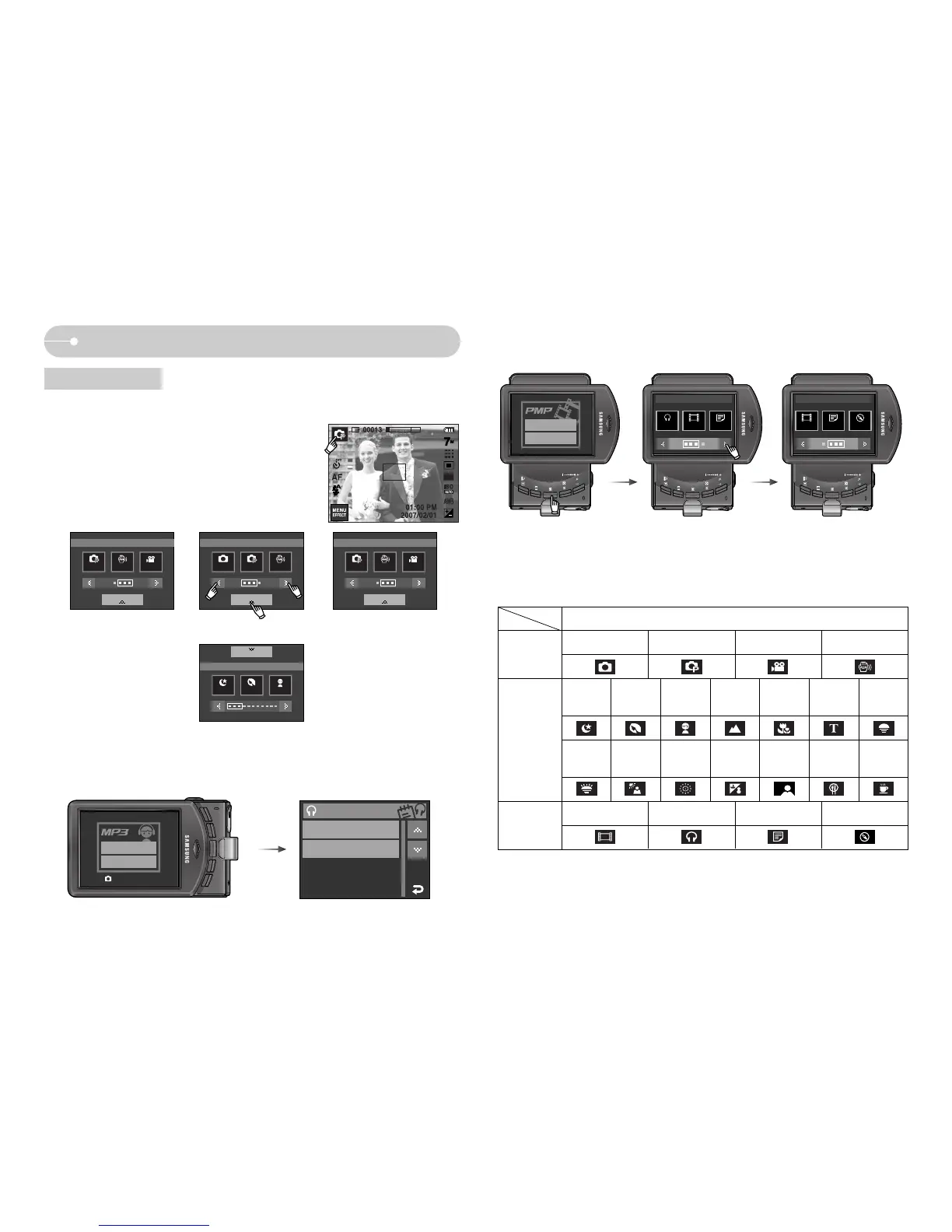
Starting the recording mode
ƃ Recording mode
Press the M (Mode) button or Press the
Recording mode icon and the menu will display
as shown.
ƈ Mode icons
M (Mode)
button
Selecting modes
ƈ MP3, PMP, Text Viewer, Tour Guide mode
Select a multi-media mode by rotating the LCD monitor. (p.91)
Resume
Open
AUTO : Shutter
Resume
Open
MP3 PMP
TextViewer
Multimedia
PMP
TextViewer
Travel Guide
Multimedia
Program ASR Movie Auto Program ASR
Nightscene
Portrait Children
Program ASR Movie
01-Audio Track 01.mp3
02-Audio Track 02.mp3
MUSIC LIST
SCENE
SHOOTING
SCENE SCENESCENE
SHOOTINGSHOOTINGSHOOTING
AUTO
PMP MP3 TEXT VIEWER
World Tour Guide
PROGRAM MOVIE ASR
NIGHT
PORTRAIT CHILDREN
LANDSCAPE
CLOSE-UP
TEXT
SUNSET
DAWN
BACK
LIGHT
FIRE
WORKS
BEACH
&SNOW
SELF
SHOT
FOOD CAFE
SHOOTING
MULTIMEDIA
SCENE
mode



 To Next Page