ŝ60Ş
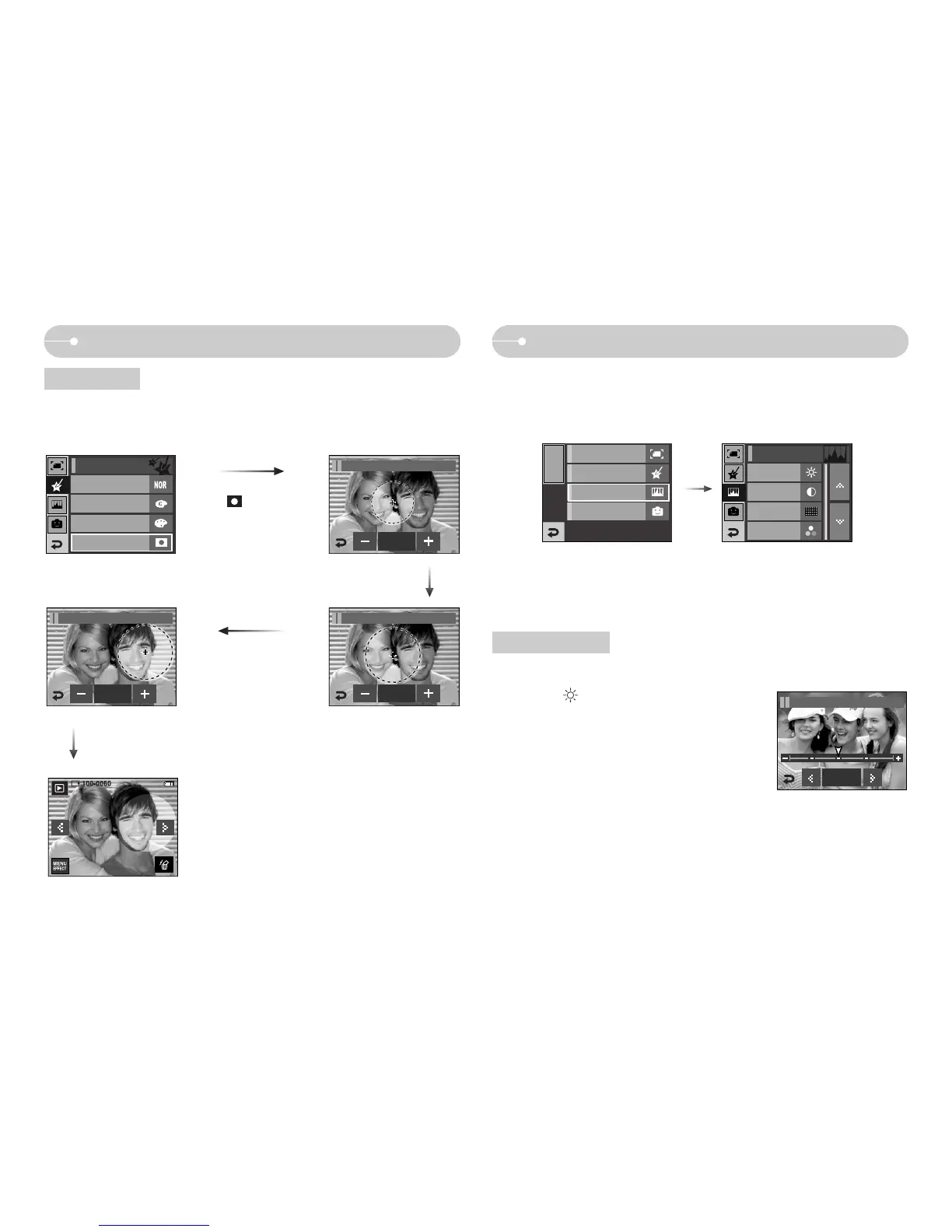
Effect: Image adjustment
ƈ You can change the brightness of image.
1. Select ( ) and a bar for selecting the
brightness will display.
2. Change the brightness by pressing the ȜȞ
icon.
3. Press the SAVE icon and the image will be
saved as a new file name.
Effect: Colour
ƃ With this menu, you can select a part you want to highlight. The rest of the image
will be black & white.
The brightness, contrast, noise effect, saturation and red eye removal functions are
available with this menu.
Select ( ) and a mark for
selecting part will display.
+, - icon : Changing the mask size
Pressing the + icon
: Moving the mask to the +
position
Colour mask
Brightness control
Save
Color Effect / Color Mask
Color Effect / Color Mask
Color Effect / Color Mask
Press the SAVE icon and the colour mask image will be
saved as a new file name.
EFFECT MENU
Image Edit
Color Effect
Fun
Brightness
Contrast
Add Noise
Saturation
Image Adjust
Save
Image Adjust / Brightness
Color
Custom Color
Color Filter
Color Effect
Image Adjust
[Final image]
Save
Save
Color Mask



 To Next Page