OfficeServ 7200-S INSTALLATION
TECHNICAL MANUAL PART 5 MAY 2010
5.12
CONNECTING POWER
Connecting an External Battery
A battery can be connected to the 7150 so in case of a power failure, the unit will continue
normal operation attaining power from the battery. Battery capacity should be DC48V, 45AH
or lower. Before connecting the battery to the 7150, turn OFF power to the system.
Observe the following safety requirements when connecting an external battery to the
system:
• Disconnect and turn off all power to the 7150 before connecting the battery.
• Disconnect any connections to an OfficeServ 7200-S system.
• Pay attention to polarity (+,-) orientation of the battery when connecting to the system.
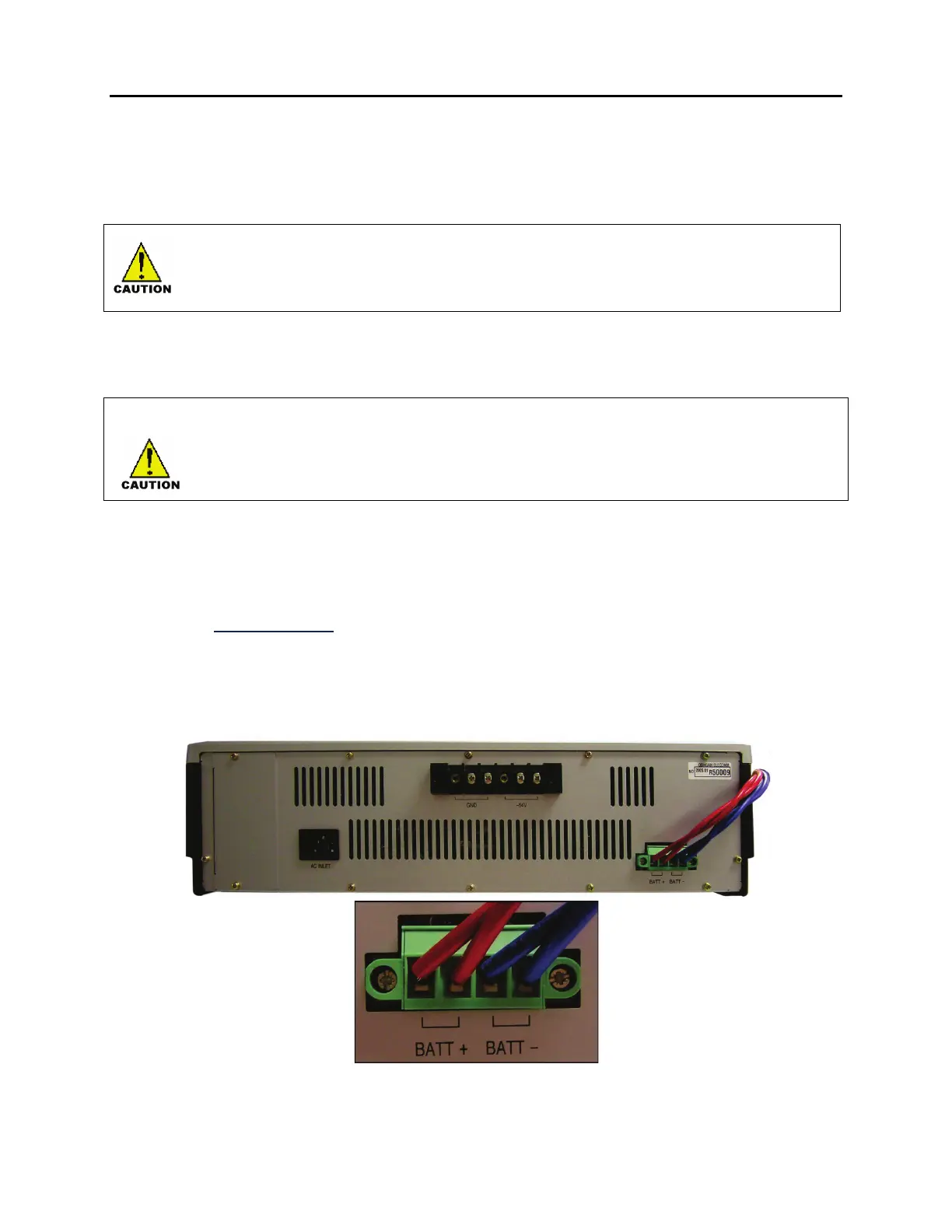
1) A battery cable comes with the OfficeServ 7150 cabinet. One end of the battery cable is a
green keyed plastic connector. The other end is made up of a red wire and a blue wire.
2) Connect the green connector into the battery connection port of the OfficeServ 7150. The
connector is keyed so you can only insert it in one way. Press it in until it is pushed in all
the way (see Figure 5.11
). At the other end of the battery cable, connect the red wire to
the (+) positive terminal lug of your battery, and connect the blue wire to the (-) negative
terminal lug of your battery.
Figure 5.11 Connecting an External Battery










 To Next Page