OfficeServ 7200-S INSTALLATION
TECHNICAL MANUAL PART 5 MAY 2010
5.14
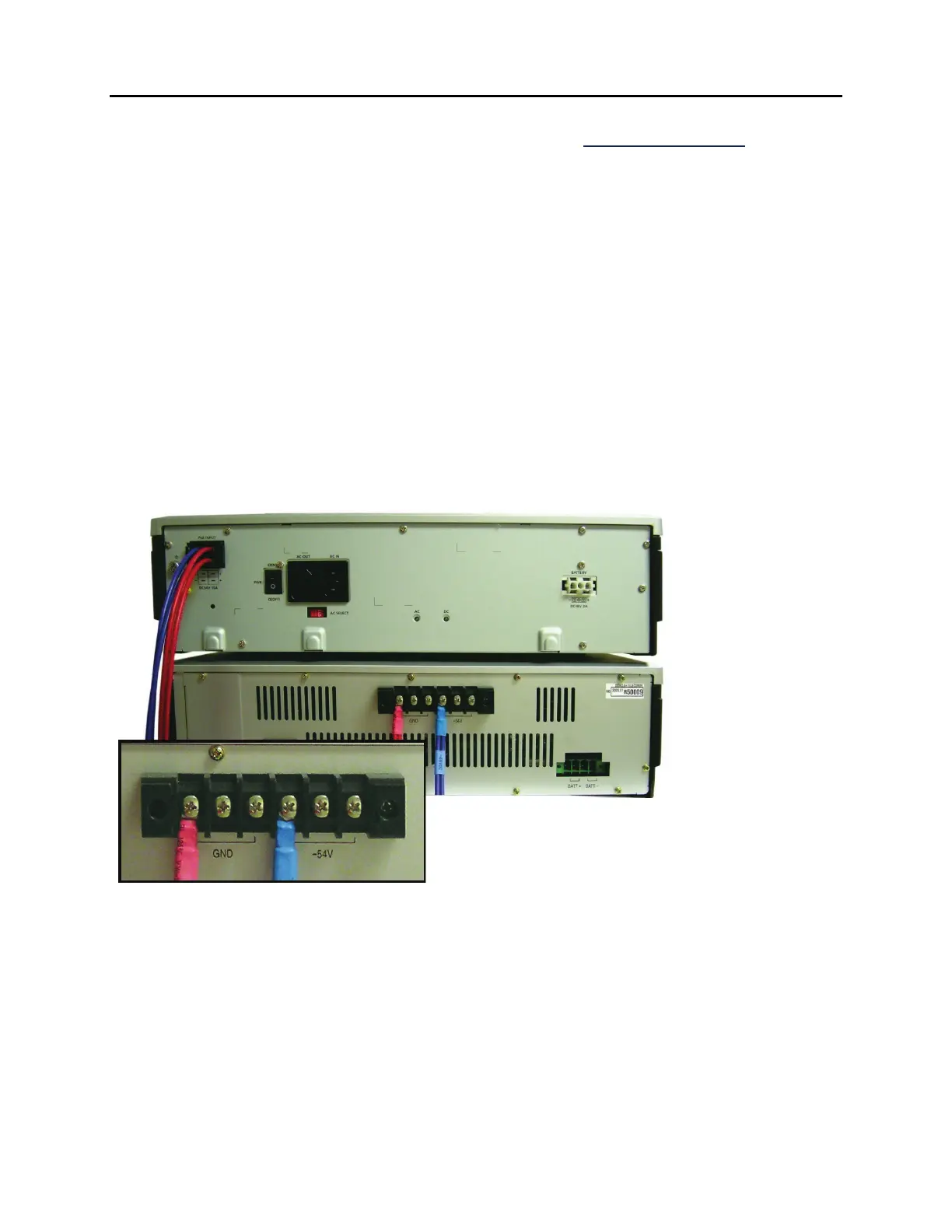
CONNECTING THE 7150 TO THE OFICESERV 7200 (See Figure 5.14)
1) Make sure All AC power and battery connections to the OfficeServ 7150 and OfficeServ
7200-S are disconnected before proceeding.
2) Connect the plastic connector end of the PoE cable into the back of the OfficeServ
7200-S connector labeled “PoE Input”.
3) The other ends of the PoE cable will have a Red wire and a Blue wire. Connect the Red
wire to the first GND lug from the left on the back of the 7150. Connect the Blue wire
to the first -54V lug from the left on the back of the 7150.
4) If connection to a second OfficeServ 7200-S cabinet is required, then repeat the steps
above and connect the red wire to the 2
nd
GND lug from the left and the blue wire to
the second +54V lug from the left.
5) Power on the 7200 cabinet.
6) Power the OS 7150 ON by turning on the power switches on each PoE-M PSU modules
and if a battery is connected, turn on the BATT switch to the ON position on the front
of the 7150.
Figure 5.13 Connecting OS 7150 to OS 7200-S










 To Next Page