OfficeServ 7200-S INSTALLATION
TECHNICAL MANUAL PART 6 MAY 2010
6.3
ORDERING A PRI
The following information may be useful when ordering PRI service from the telephone
company.
PARAMETERS supported on OfficeServ TEPRI cards used for PRI service only.
FRAMING PRI Circuit
Extended Super Frame (ESF 64K Frame) Yes
CODING PRI Circuit
B8ZS - ESF 64k Coding Yes
MMC 808 is not available since T1 mode is not supported on this product.
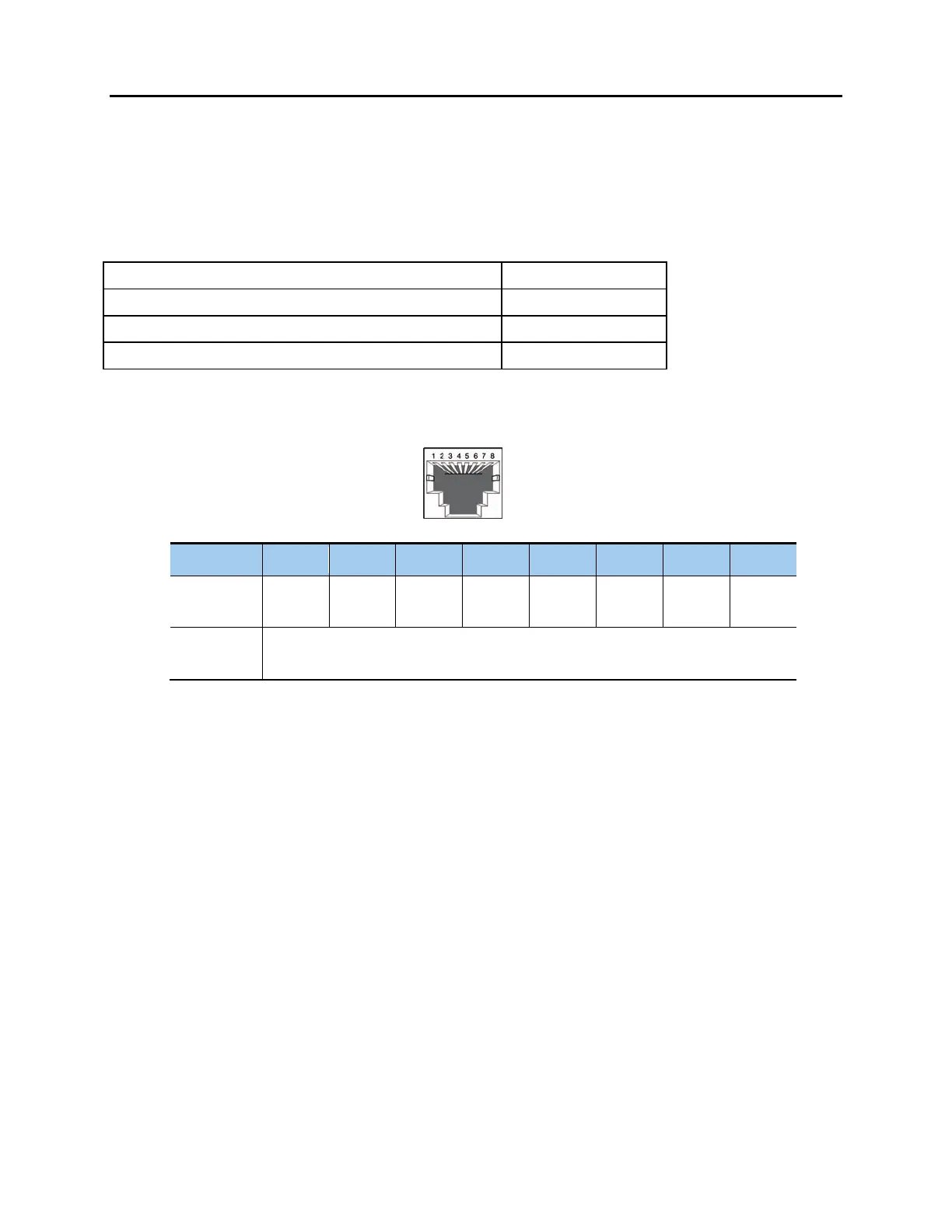
E1/PRI Port
Pin No. 1 2 3 4 5 6 7 8
PRI
Function
Rx+ Rx- - Tx+ Tx- - - -
E1
Function
NOT SUPPORTED IN USA
Figure 6.2 RJ-45 Port of TEPRI/TEPRIa Board
6.2.3 Connecting a SIP Trunk
There is no physical SIP trunk card required to use the SIP trunking service. However, in order
to use the SIP trunking service, the OfficeServ system must be IP-enabled. That means that
the OfficeServ system must have an MGI card with the latest MP20S software and have high
speed Internet connection.
Please refer to the “OfficeServ Series SIP Trunking Quick Reference Document” for
configuration.
(RJ-45)









 To Next Page