OfficeServ 7200-S INSTALLATION
TECHNICAL MANUAL PART 3 MAY 2010
3.15
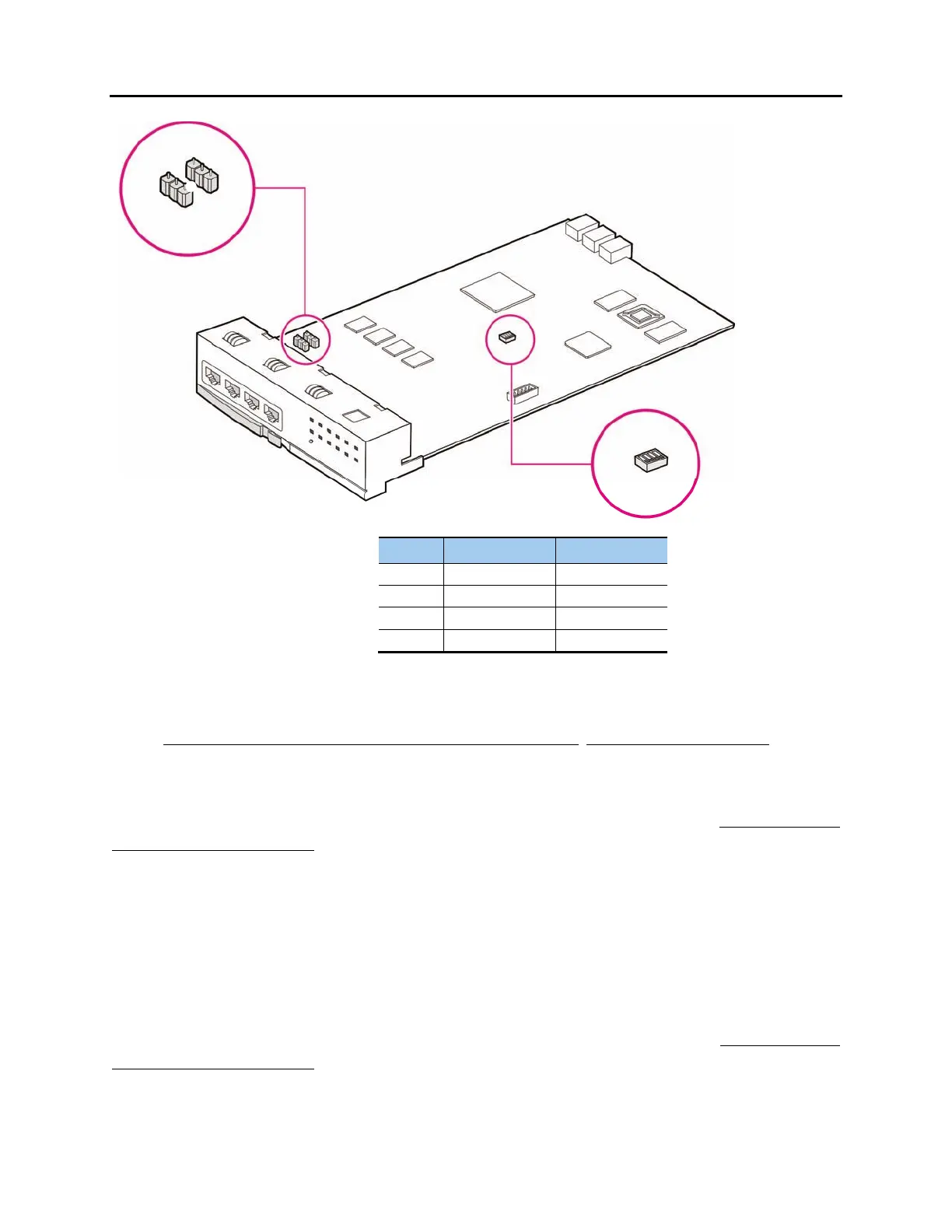
Figure 3.17 Setting Switches on the TEPRIa Board
NOTE: T1 and E1 are not supported on the OfficeServ 7200-S
. Only PRI is supported.
JUMPER SETTING FOR TEPRI
The TEPRI board comes from the factory with the following jumper settings. These settings
should NOT be changed.
• J1 & J2: Pins 2 & 3 connected
• J3: Pins 2 & 3 connected
• J4~J9: Pins 1 & 2 connected
• Pin 1 is labeled on the board for each jumper.
JUMPER SETTING FOR TEPRIa
The TEPRIa board comes from the factory with the following jumper settings. These settings
should NOT be changed.
• J1 and J2: Connect #1 and #2 for E1 cable #2 and #3 for T1 cable.
2 T1*/E1* PRI
3 24B + D 24B
S2
J1
J2
1
1
ON
1
4
OFF












 To Next Page