samsung media studio _ 39
TRANSFERRING FILES TO THE PLAYER WITH
SAMSUNG MEDIA STUDIO
<Media Studio> fi le transfer is the easiest way to get your fi les from your PC to
your MP3 player. <Media Studio> enables you to select and organize your fi les
and folders before transferring them to your player. This will make fi nding fi les
on your MP3 player easier and faster.
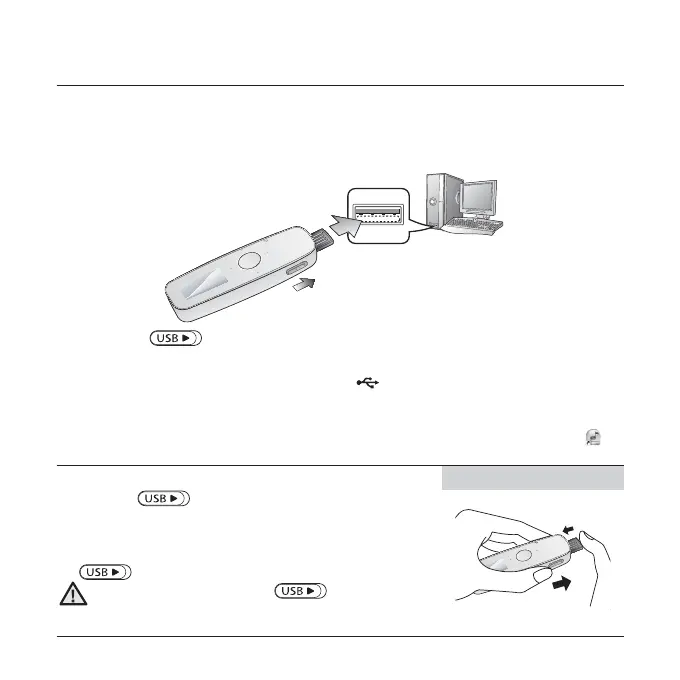
1. Slide the [ ] switch.
The USB plug is revealed.
2. Connect the USB plug to the USB port ( ) on your PC as in the fi gure.
<USB connected> appears on the screen display of the player.
<Media Studio> will automatically start when the player is connected to your PC.
If the program does not start automatically, double click the <Media Studio> icon
on
the desktop.
Ejecting the USB Plug
Slide the [ ] switch to eject the USB plug from the
player.
Inserting the USB Plug
Push the USB plug back into the player while sliding the
[ ] switch.
Be sure to slide and hold the
[ ]
switch when you
push the USB plug into the player. Otherwise, the player
may be damaged.
Inserting the USB Plug
1
2
The insertion direction of the USB port may differ,
depending on the PC. Check the direction of the player’s
USB plug before inserting.
2
1
CAUTION



 To Next Page