SAMWONTECH
4th Edition of TEMI880 IM : Jan. 29. 2007 Page 35 / 119
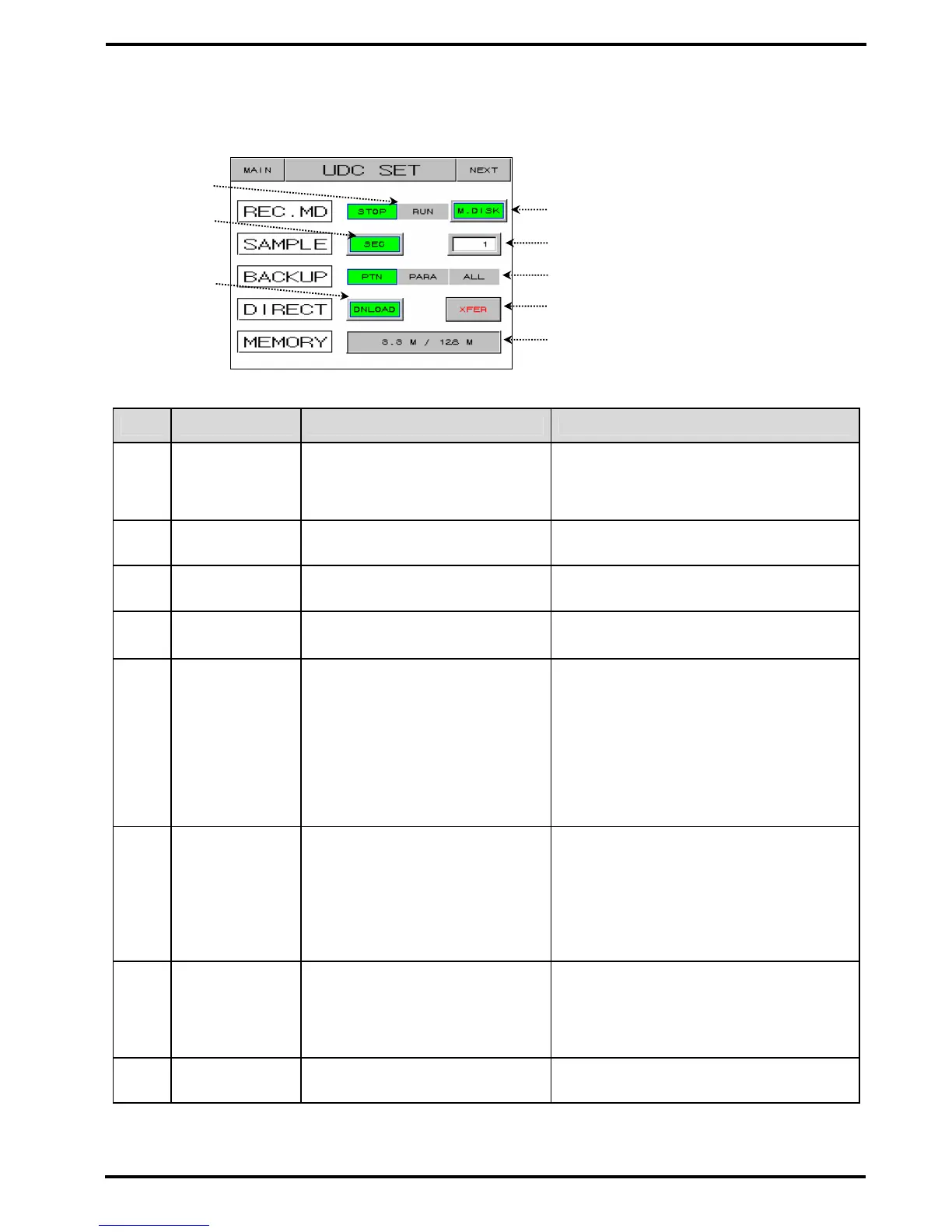
▶ Set graph storage(UDC100 : Data Storage Recorder).
☞ Graph storage function is possible that you purchase UDC100.
Figure 2-20. Graph Storage Setting Screen
No. Contents Description Additional Description
○
1
Operation Mode Data storage run or not.
▶ You can “RUN” operation when
▶ program or fix running.
▶ It is changed “STOP” when
▶ program or fix ending.
○
2
Save Location Select save location
▶ M.DISK : Save in UDC300
▶ U.DISK : Save in USB
○
3
Time Unit Select time unit.
○
4
Sampling Time Set sampling time.
○
5
BACKUP Select file.
▶ PTN : Select parameter about the
▶pattern setting, repeat setting and
▶ pattern name setting.
▶ PARA : Select all parameter except
▶ the selected parameter in the “PTN”
▶ and communication setting parameter.
▶ ALL : Select all parameter except the
▶ communication setting parameter.
○
6
Upload/Downlo
ad/MD.DMP/MD
.CLR
Select upload or download or
memory dump or memory clear.
▶ UPLOAD : Uploading selected file
▶ from USB connected at UDC300.
▶ DNLOAD : Downloading selected file
▶ to USB connected at UDC300.
▶ MR.DMP : Copy to USB data which
▶ saved at memory of UDC300.
▶ MR.CLR : Clear memory of UDC300.
○
7
XFER Execute button.
▶ You can’t move screen during upload
▶ or download.
▶ It is possible Upload/Download
▶ transmission only in PROG/FIX STOP
▶ state.
○
8
MEMORY Used memory / Total memory.
○
5
○
4
○
7
○
1
○
6
○
8
○
2
○
3


 To Next Page