4-2-1 Frequency
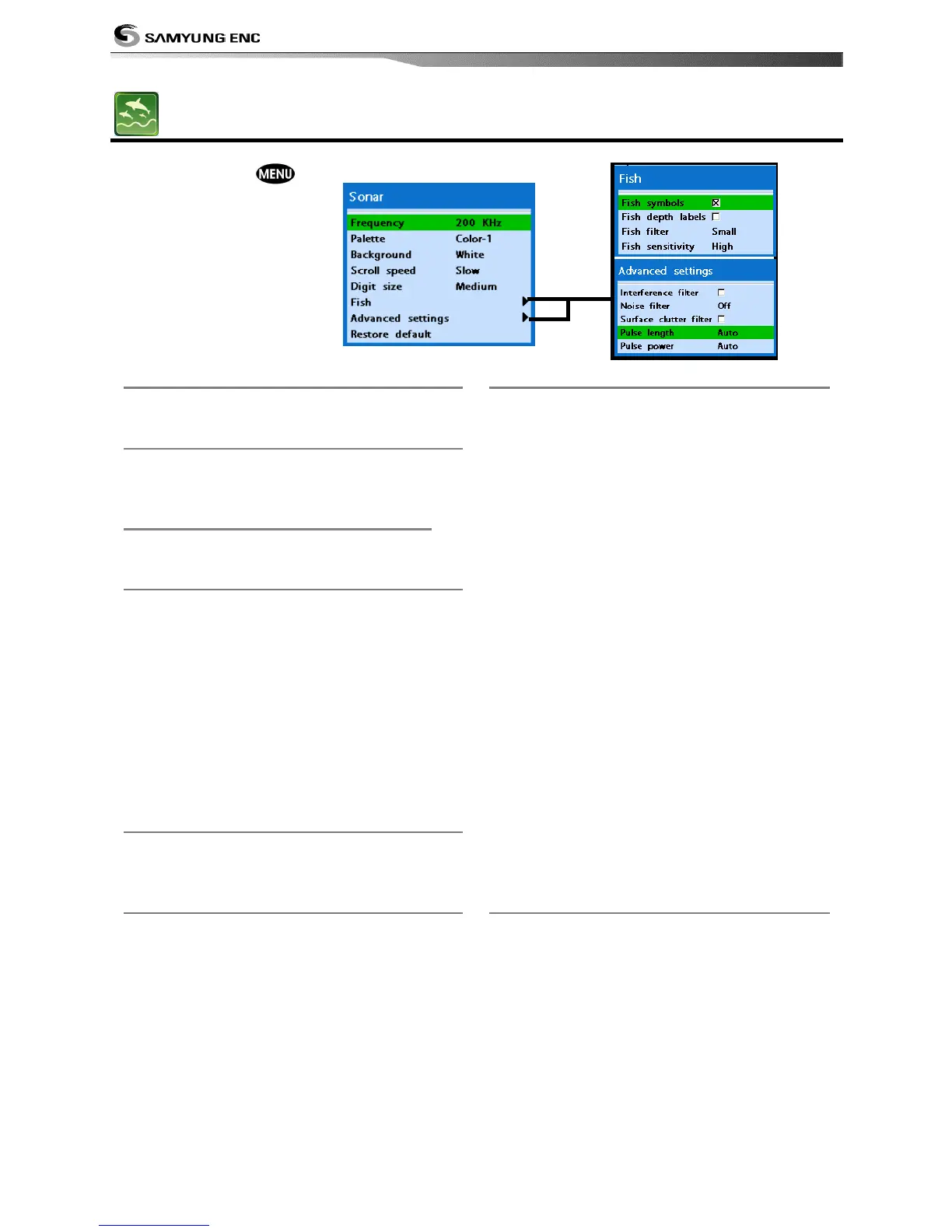
Sonar frequency is fixed at 200kHz frequency
of 200KHZ
4-2-2 Color display
You may choose from Color-1, Color-2, Color-
3, Color-4, Color-5, to change your color
display.
4-2-3 Palette
You may change the background color to
black, blue and white.
4-2-4 Scroll speed
You may set the scroll speed. It determines
how quickly the vertical scan lines run across
the screen.
The fastest speed may enlarge the size of the
fish on display, and slow speed shows the
opposite.
You may choose from Very fast, Fast,
Medium, Slow and Pause. Faster options are
recommended to see more details for slow
boats, and Slower options are recommended
for both slow and fast speed boats.
4-2-5 Digit size
You may change the digit size of the range.
Three options are available Small, Medium or
Large.
4-2-6 Fish
Fish symbols
You may turn the fish symbol on or off.
Fish depth labels
You may show the fish depth value or hide it.
Fish filter
Select the minimum fish size to be used as a
fish symbol
Fish sensitivity
You may select the minimum strength of fish
echo that will be displayed as a fish symbol.
4-2-7 Advance Settings
Interference filter
Interference from other equipment operating
nearby or on your boat may occur on the
display. Use this function to remove
interference.
Noise filter
The transducer signal may be unstable when
there is a noise. This function removes the
noise and averages the echo signal. However
this may remove the fish echoes.
Surface clutter filter.
This function removes the surface noise.
However this function does not remove the
fish echoes.
Pulse length.
User may select the specific pulse length of
transducer. A short pulse shows more
detailed information but can’t show deeply
into the water because of the less power. The
Auto setting therefore is recommended.
Pulse power
You may select the specific pulse power of
the transducer. Low power allows a clear
display but can’t show deeply into the water.
The Auto setting is therefore recommended.
4-2-8 Restore default.
This setting returns every sonar settings to
default.


 To Next Page