Installation and Operation Manual
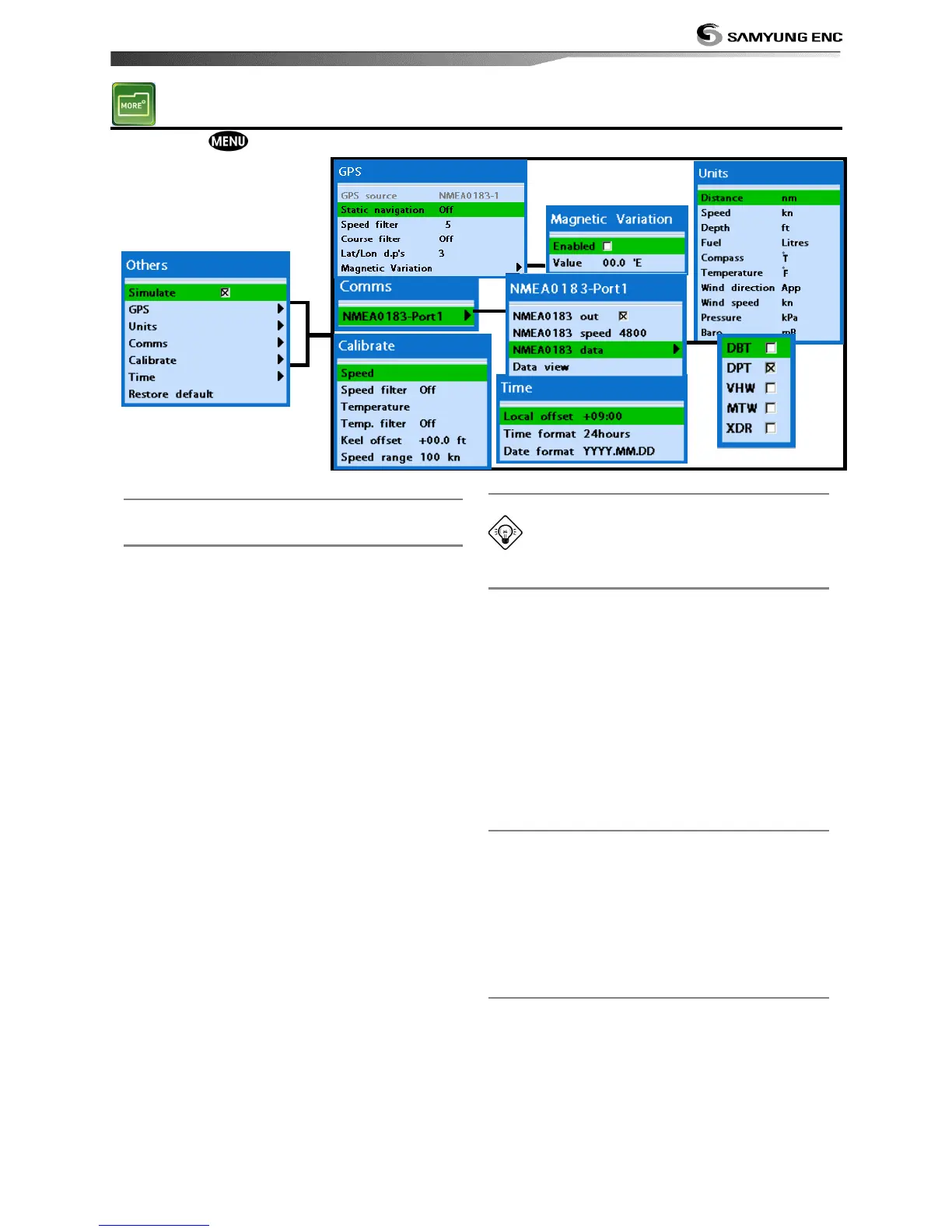
Press long then select Others:
4-6-1 Simulate
Turn the simulate mode on or off.
4-6-2 GPS
GPS source
Fixed as NMEA0183.
Static navigation
This option is useful when boat is stopped or
moves slowly. This option allows you to set a
minimum speed when movement is the
minimum. The speed range is from 0.00 to
9.99.
Speed filter
Occasional waves and wind at sea may affect
the boat speed. In order to have stable boat
speed, this unit calculates factors to give the
value of stable speed information.
Course filter
Occasional waves and wind at sea may affect
the boat course. In order to have stable boat
course, this unit calculates factors to give the
value of stable course information.
Lat/Lon d.p’s
You may select number of last digit of
Lat/Lon to be set when you are connecting to
the other marine electronics.
Magnetic Variation
This option compensates the difference
between true north and magnetic north.
It is recommended to leave this setting
untouched if you are not familiar with this
option.
4-6-3 Units
Select a unit of each measure.
Tip: Requires a optional VHF receiver
with barometer connected: InHg or mB.
4-6-4 Comms.
Use this feature when the unit is connected
to other marine electronics through any
compatible NMEA instrument.
NMEA0183/NMEA2000:This option to
transmit NMEA sentences to other marine
electronics. NMEA0183 and NMEA2000
interfaces are generally used with third party
marine electronics. Select a port (NMEA2000,
NMEA0183-Port 1 or NMEA0183-Port 2), a
communication speed and select a desired
output data.
4-6-5 Time
Local offset : The time information supplied
by the GPS satellites is in UTC (Universal
Time Coordinates). To read the correct time,
change the time of GPS chart plotter for
daylight saving time start and end.
Time format : Select the format of time.
Date format : Select the format of date.
4-6-6 Restore default
Returns every other setting to default.


 To Next Page