6.2 Maintenance Index Page
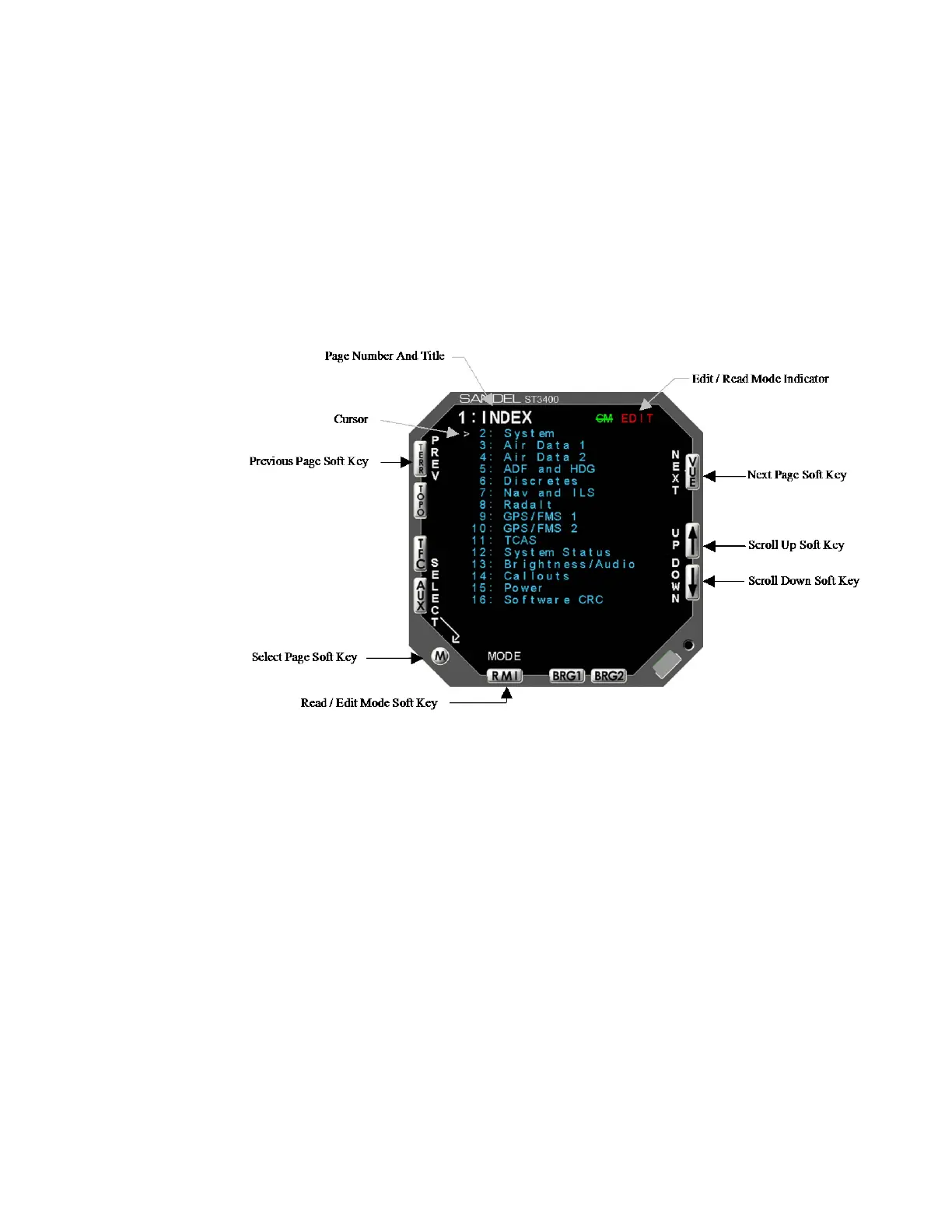
The Maintenance Index page (see Figure 6-1) is a multiple–choice list that
provides an index of all other maintenance pages and allows the operator to jump
to a particular page. First scroll the Cursor to point to the desired maintenance
page listing using the [Up] Soft key or [Down] Soft key. The [SELECT] Soft key
is then pressed to jump to this page. Once in the Maintenance pages, press the
[OPER] Soft key to return to the Maintenance Index page. The [PREV] or
[NEXT] Soft keys may also be used to reach a particular maintenance page
sequentially.
Figure 6-1: Maintenance Index Page Display
6.2.1 Maintenance Page Number/Title
The Maintenance Page Number/Title is displayed on every maintenance page
showing the maintenance page number and title.
6.2.2 Cursor
The Cursor points to the item, which may be modified or selected. If there are no
selectable items on the currently displayed maintenance page, the Current Line
Indicator is not displayed.
The [UP] Soft key and [DOWN] Soft key are used to move the Cursor up and
down through the list.
82002-IM-L ST3400 INSTALLATION MANUAL 6-3



 To Next Page