6.3.1.2 Editable Value
An Editable Value is an item whose value may be changed directly by the
operator when the maintenance pages are in the edit mode. They are shown in
RED. The Cursor points to the maintenance item to be modified. The [+]/[-] Soft
Keys are used to change the value or scroll through the possible choices.
When the maintenance pages are in the read mode the operator can see but cannot
change the items.
6.3.1.3 Internal Value
Internal Values are items shown for reference which cannot be edited. They are
shown in GRN or YEL.
6.3.2 Air Data Page
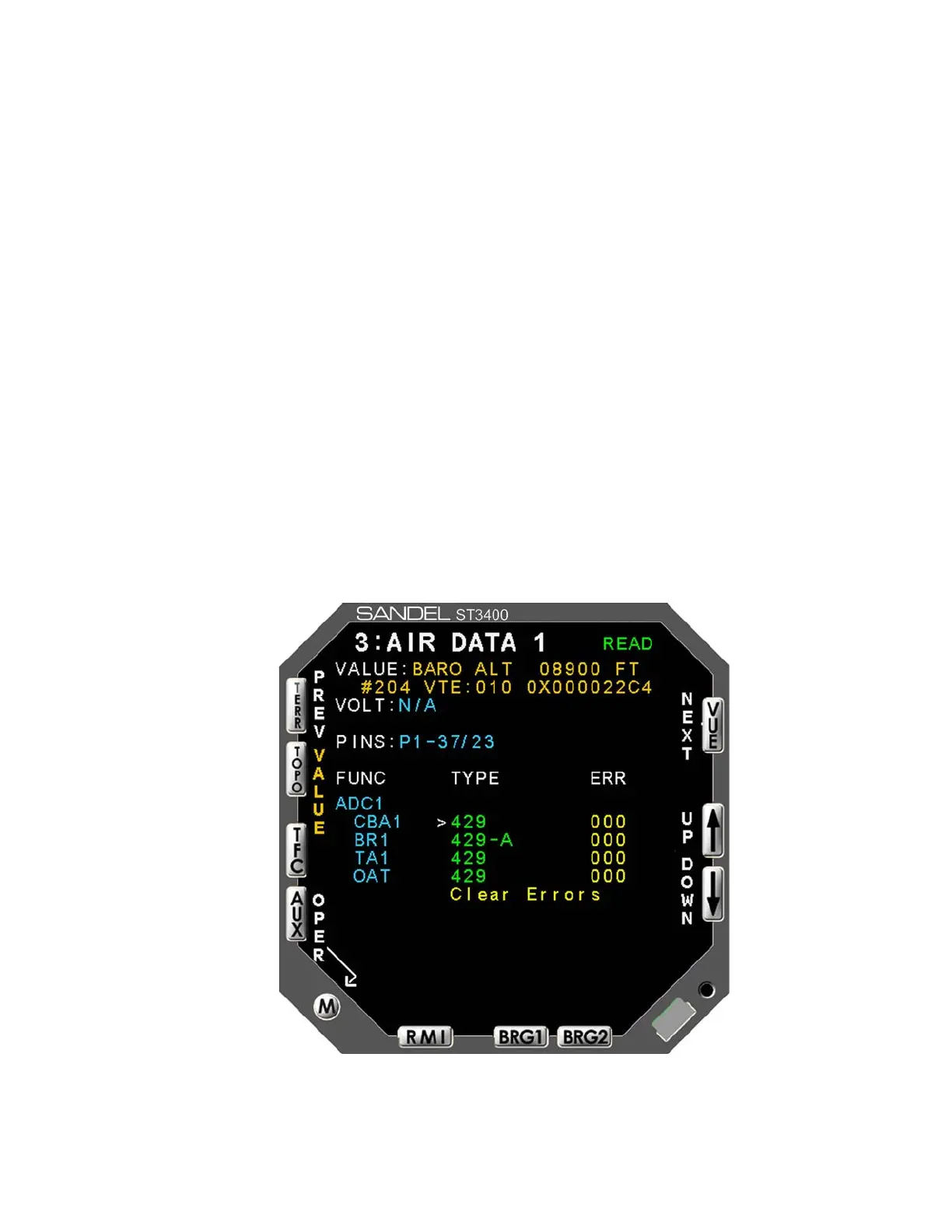
The Air Data page (see Figure 6-3) contains the setup information for the #1 and
#2 airdata systems. Use the [UP] or [DOWN] Softkeys to select a setup item.
This will move the Cursor to the appropriate line and display the current input
data value, input voltage (if applicable) and pin-pairs of the selected signal.
CBA: Corrected Baro Altitude Input
BR: Baro Rate input (Vertical Speed)
TA: True Airspeed
Figure 6-3: Air Data
82002-IM-L ST3400 INSTALLATION MANUAL 6-7



 To Next Page