-24-
Optical Adjustments
[Before Adjustment]
- Adjustment requires a 2.0mm hex wrench and a slot screwdriver.
- Remove cabinet cover following to step1 of “Mechanical Disassemblies”.
- Input a 100% of black raster signal.
[R/G/B-CONTRAST ADJUSTMENT]
1. Insert paper etc. in front of the LCD panels to block unnecessary
lights.
When adjusting the R-Contrast, project red light only.
When adjusting the G-Contrast, project green light only.
When adjusting the B-Contrast, project blue light only.
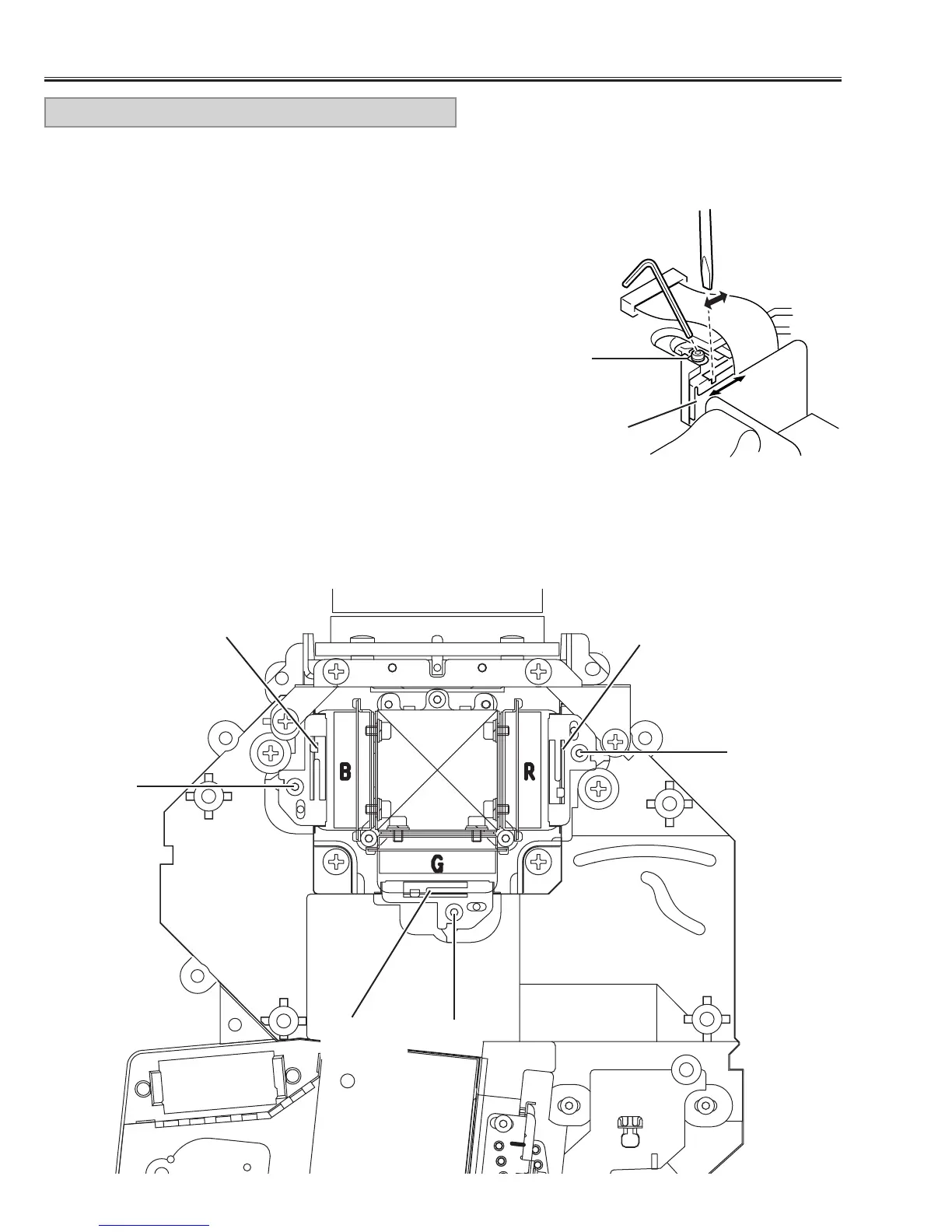
2. Loosen a screw “A” (Fig.3/4) on the polarized glass mounting base
which you intend to adjust.
3. Turn the polarized glass mounting base by using a slot driver as
shown in Fig.3 to obtain the darkest brightness on the screen.
4. Tighten the screw “A” to fix the polarized glass mounting base.
Repeat steps 1 to 4 for remaining polarized glasses.
B-Polarized
glass
R-Polarized
glass
G-Polarized
glass
A
A
A
A
Fig.4
Fig.3
Polarized
glass
CONTRAST ADJUSTMENT


 To Next Page