EasyManua.ls Logo

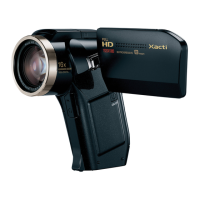
Sanyo Xacti VPC-HD1010GX - User Manual

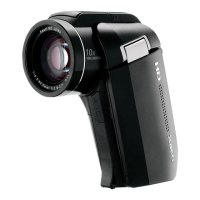
Sanyo Xacti VPC-HD1010GX
251 pages
Print Icon
To Next Page IconTo Next Page
Loading...
VPC-HD1010EX
VPC-HD1010
VPC-HD1010GX
INSTRUCTION MANUAL
Digital Movie Camera
Please read these instructions carefully before using the camera.
Make sure to read and understand the separate booklet “SAFETY MANUAL”.
Keep this manual in a safe place for later reference.
Important note
This manual explains how to safely operate the VPC-HD1010EX,
VPC-HD1010 and VPC-HD1010GX.
Any information regarding only one of these products will be labeled as such.

Table of Contents

Questions and Answers

  • D
    Dustin PearsonAug 20, 2025
    How to fix no power on my Sanyo Xacti VPC-HD1010GX?
    • D
      Dr. Michael DominguezAug 20, 2025
      If your Sanyo Camcorder isn't turning on, it could be due to a dead battery pack. Try recharging the battery or replacing it with a new one. Alternatively, connect the AC adapter.
  • R
    ryan02Aug 22, 2025
    Why doesn't the flash work on my Sanyo Xacti VPC-HD1010GX?
    • J
      John ArmstrongAug 22, 2025
      If the flash on your Sanyo Camcorder isn't working, there could be a few reasons. First, check if you've accidentally selected the flash off mode. If so, switch to automatic or forced flash mode. Another possibility is that the flash unit isn't open; press the m button to open it. Finally, ensure that the battery pack isn't dead. If it is, recharge or replace it, or connect the AC adapter.
  • H
    Heather MurilloAug 25, 2025
    What to do if Sanyo Xacti VPC-HD1010GX Camcorder doesn't capture image when pressing button?
    • S
      Sarah MartinAug 25, 2025
      If your Sanyo Camcorder isn't capturing images when you press the button, ensure the camera is turned on. If the power save function was activated, turn on the camera before shooting. If the camera was turned off, press the ON/ OFF button to turn it on. Also, check if you've reached the maximum number of images or video recording time. If so, install a new card or delete unnecessary images.
  • M
    Michael ChurchAug 26, 2025
    Why no playback image appears on Sanyo Xacti VPC-HD1010GX Camcorder?
    • M
      Madeline HessAug 26, 2025
      If you can't see any playback images on your Sanyo Camcorder, make sure the REC/PLAY switch is set to PLAY.
  • M
    Maria Larson MDAug 27, 2025
    How to fix 'No card' message on Sanyo Xacti VPC-HD1010GX Camcorder?
    • K
      Kimberly MezaAug 28, 2025
      If your Sanyo Camcorder displays a 'No card' message, it means that no card is currently inserted. Turn off the power and insert a card.
  • J
    Jennifer SalasAug 29, 2025
    Why are my Sanyo Xacti VPC-HD1010GX images too dark?
    • R
      robinsonkariAug 30, 2025
      If your Sanyo Camcorder images are too dark, ensure that your finger or another object isn't blocking the flash. Hold the camera correctly, and make sure the flash is not obstructed. Also, the subject might be too far away, so capture the image within the flash's operational range. If the subject is backlit, use the forced flash mode, the exposure compensation function, or the spot light-measuring mode. Finally, if there is not enough light, adjust the ISO sensitivity setting.
  • M
    Matthew JohnsonAug 31, 2025
    Why does my Sanyo Xacti VPC-HD1010GX turn off by itself?
    • W
      William WhiteAug 31, 2025
      If your Sanyo Camcorder turns off by itself, it's likely due to the power save function. Simply turn the camera on again.
  • M
    Mary SotoSep 2, 2025
    Why are my Sanyo Camcorder images too bright?
    • M
      mathewsjodySep 2, 2025
      If the images from your Sanyo Camcorder are too bright, it could be because the forced flash mode is selected. Try selecting a different flash mode. Also, if the subject was too bright, use the exposure compensation function.
  • K
    Kayla CopelandSep 4, 2025
    Why doesn't digital zoom work on my Sanyo Xacti VPC-HD1010GX Camcorder?
    • W
      William TateSep 4, 2025
      If the digital zoom isn't working on your Sanyo Camcorder, check that the still image is set to M or lower. Also, ensure that the digital zoom setting is set to “ON.”
  • D
    Dylan HoffmanSep 6, 2025
    Why is my Sanyo Camcorder image not in focus?
    • G
      ghallSep 6, 2025
      If your Sanyo Camcorder images are not in focus, it might be because the subject is too close to the camera. Capture the image with the subject within the photographable range and select the correct focus setting.

Summary

Checking Included Accessories

How to Use Accessories

Demonstrates attaching accessories like handstrap and lens cap.

Separately Sold Accessories

Lists optional accessories like HDMI cable, battery charger, etc.

Getting the Most Out of Your Camera

High-Quality Images with Full High Definition

Explains Full High Definition video recording capabilities.

SIMPLE Mode for Quick-and-Easy Operation

Details the two shooting/playback modes: SIMPLE and NORMAL.

Image Stabilizer for Sharp Pictures

Describes the camera's ability to compensate for shake.

Parts Names

Camera Components

Identifies front and rear components of the camera.

Docking Station

Details the front and rear parts of the docking station.

Remote Control Unit

Illustrates and labels the buttons on the remote control.

Installing the Card

Inserting the SD Memory Card

Step-by-step guide for inserting the memory card.

Removing the Card

Instructions on how to safely remove the memory card.

Preparing the Power

Charging the Battery Pack

Explains how to insert and charge the battery pack.

Using a Power Outlet

Details connecting the camera via AC adaptor.

Turning the Camera On and Off

Turning On the Camera

Steps to power on the camera using the monitor and switch.

Turning Off the Camera

Simple instruction to power off the camera.

Simple Mode and Normal Mode

About Simple and Normal Modes

Explains the differences and purposes of the two modes.

Switching Between Simple and Normal Modes

Instructions on using the SIMPLE/NORMAL switch.

Before Taking Pictures

For Best Results

Tips on holding the camera securely for stable shots.

Using the Autofocus

Explains autofocus function and conditions for incorrect focus.

Video Clip Recording

Starting and Ending Recording

How to begin and stop video clip recording.

Shooting Single Shots

Pressing the Capture Button

Guides on half-press for focus and full-press for capture.

Using the Flash

Explains flash modes and operation for still images.

Playing Back Video Clips and Still Images

Setting the Camera to Playback Mode

Steps to switch the camera to playback mode.

Navigating and Playing Back Media

How to select and play video clips or still images.

Editing Video Clips

Procedure to Cut (Extract) a Video Clip

Instructions on trimming unwanted parts of video clips.

Procedure to Join Video Clips

Guide to combining multiple video clips into one.

Connecting to a TV

Connecting to Standard Video Input

Details on connecting the camera to TV via various terminals.

Connecting to the HDMI Terminal

Guide to connecting via HDMI for high-quality output.

Playing Back on a TV

How to view recorded content on a television.

Troubleshooting

Camera Problems

Solutions for common camera operational issues.

Remote Control Unit Issues

Troubleshooting steps for the remote control unit.

Hints for Taking Pictures

Photographing a Moving Subject

Advice for capturing sharp images of moving subjects.

Night Photography

Tips for taking photos in low-light conditions.

Sanyo Xacti VPC-HD1010GX Specifications

General IconGeneral
Video Resolution1920 x 1080
Sensor TypeCMOS
Optical Sensor Size1/2.5 inch
Optical Zoom10x
Display TypeLCD
DisplayLCD
StorageSD Card
Image StabilizerYes
MicrophoneStereo
Connector TypeUSB
Battery TypeLithium ion
Image SensorCMOS
Focal Length6.3 mm - 63 mm
Video Recording FormatAVC, H.264
Frame Rate30 fps
FocusAutomatic, Manual
Exposure ControlAutomatic, Manual
White BalanceAuto
SpeakerYes

Related product manuals