Configuration
Purpose
You can configure the scale terminal
to meet individual requirements
by entering user data and setting
parameters in the Setup program.
The Setup menu contains the
following submenus:
– Balance/scale functions
– Device parameters
– Application parameters
– Printout
– Device information
– Language
– Factory settings
Setting the Language
You can choose from 5 languages for
the information display:
– German
– English (factory setting)
– English with U.S. date/time format
– French
– Italian
– Spanish
Configuring the Scale for Use
in Legal Metrology
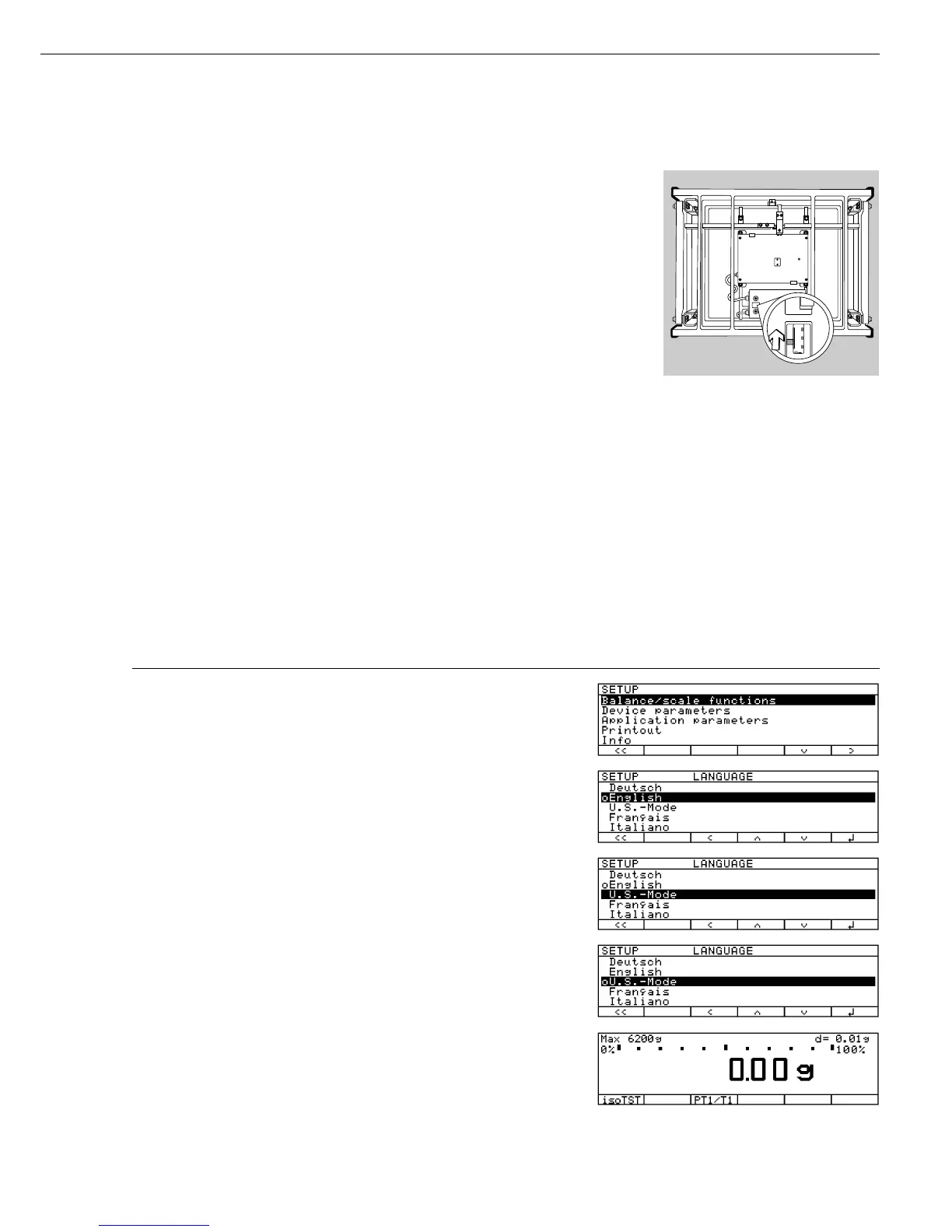
Set the menu access switch as described
below to configure the following
functions for use of the scale in legal
metrology:
– Display: Verification scale interval
e;
lower limit of the weighing capacity
Min
– External calibration blocked
Preparation FCA...IGG:
§ Remove the load plate from the
weighing platform
§ Remove the cap from the back of
the scale housing
§ Move the switch upwards
> When the switch is in the upper posi-
tion, the Setup menu is locked and the
scale can be used in legal metrology
> When the switch is in the lower
position, the menu is accessible
Preparation FC…, FCA...EDE:
– Switch located see sections entitled
“Overview” and “Plates and Markings”
7
Example:
Settting the Language to “U.S. Mode”
Step Press key Display/Output
(or follow instructions)
1. Select “Setup” menu H
2. Select “Language” repeatedly press
q soft key,
and confirm then
O soft key
3. Select “U.S. mode”
Q soft key
4. Save language
l soft key
5. Exit the Setup menu
oo soft key



 To Next Page