nova250 Touch Panel
Standard application
20 7001064003 T1 Sauter Systems
allows you to delete the existing
time program entry.
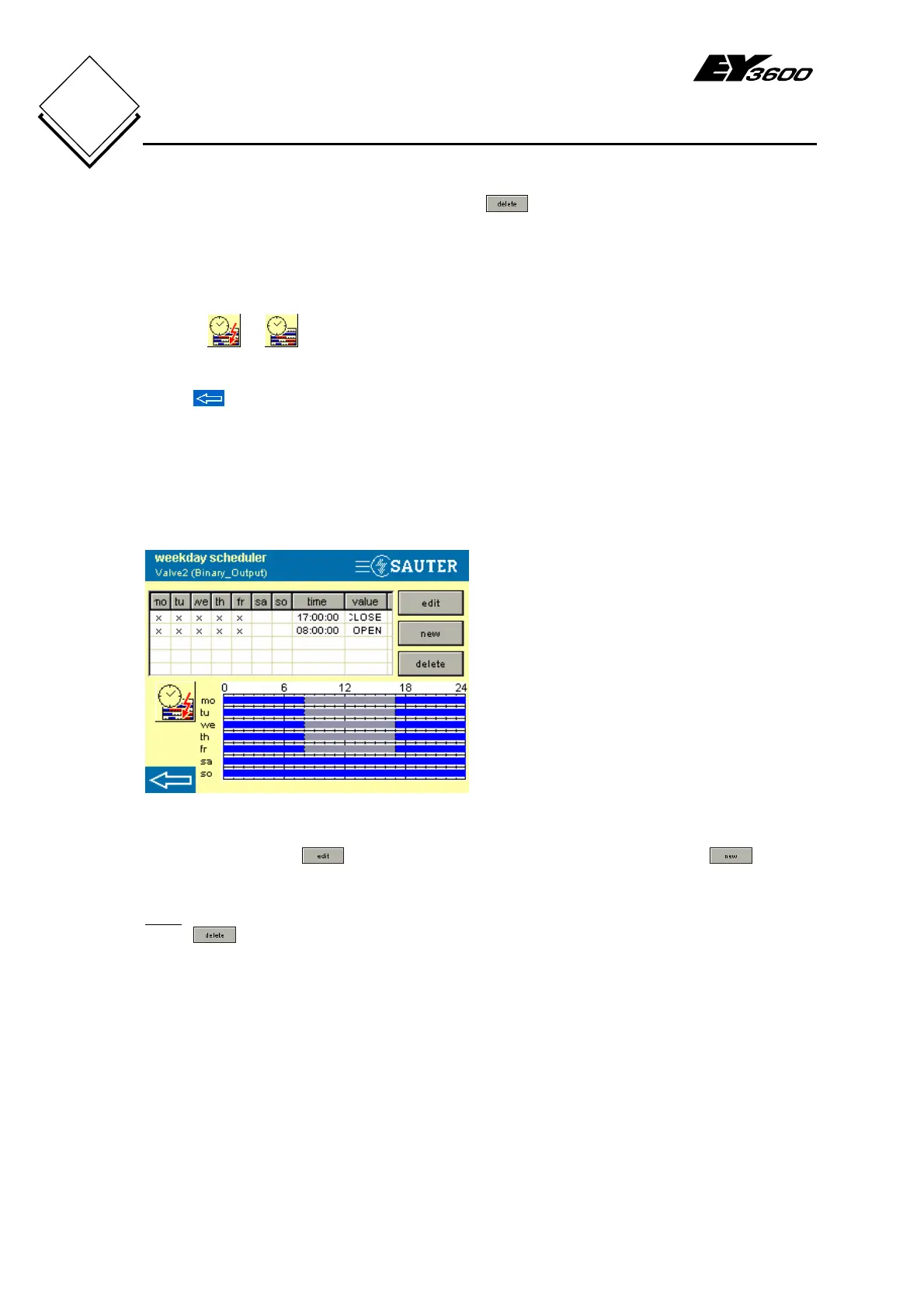
The list view of the weekday time program is in the upper section of the window and the
graphic view is in the lower section.
Buttons
or switch over between the weekday time program and the special
day time program for the relevant data point (see also section 4.3.4).
Press
to exit the time programs and the configuration will be sent to the AS (see
section 4.3.5).
The time program sets or changes the data point to the time on the activated weekday
and the activated special day with the analogue value or switching command value.
An example:-
Fig. 4-11: Example of Time Program
If the selected data point has a time
program, the time program is shown
graphically (in different colours) and in list
form (Fig. 4-11).
In the example, the valve ('Valve2') is
opened at 8 o'clock on Monday to Friday
(OPEN) and is closed again at 5 o'clock
(1700 hours) (CLOSE).
When you press the
button (after selecting a line from the list) or the button,
you see the window for making entries in the time program (Fig. 4-12).
Note
Press to delete the selected entry without further enquiries, except when the time
program entry is parameterised for both a weekday and a special day.


 To Next Page