nova250 Touch Panel
Settings
32 7001064003 T1 Sauter Systems
Notes
Hardware versions:
4.1-1
Colour…
4.1-2
Monochrome…
…with HDB and with functionality for a
hardware reset
3.1.1 Colour with HDB
3.1.2 Monochrome with HDB
XX.X.1 Colour without HDB
XX.X.2 Monochrome without HDB
Software versions:-
Up to 1.2.x Applications without HDB
From 1.3.x Applications with HDB
5.4 Other settings
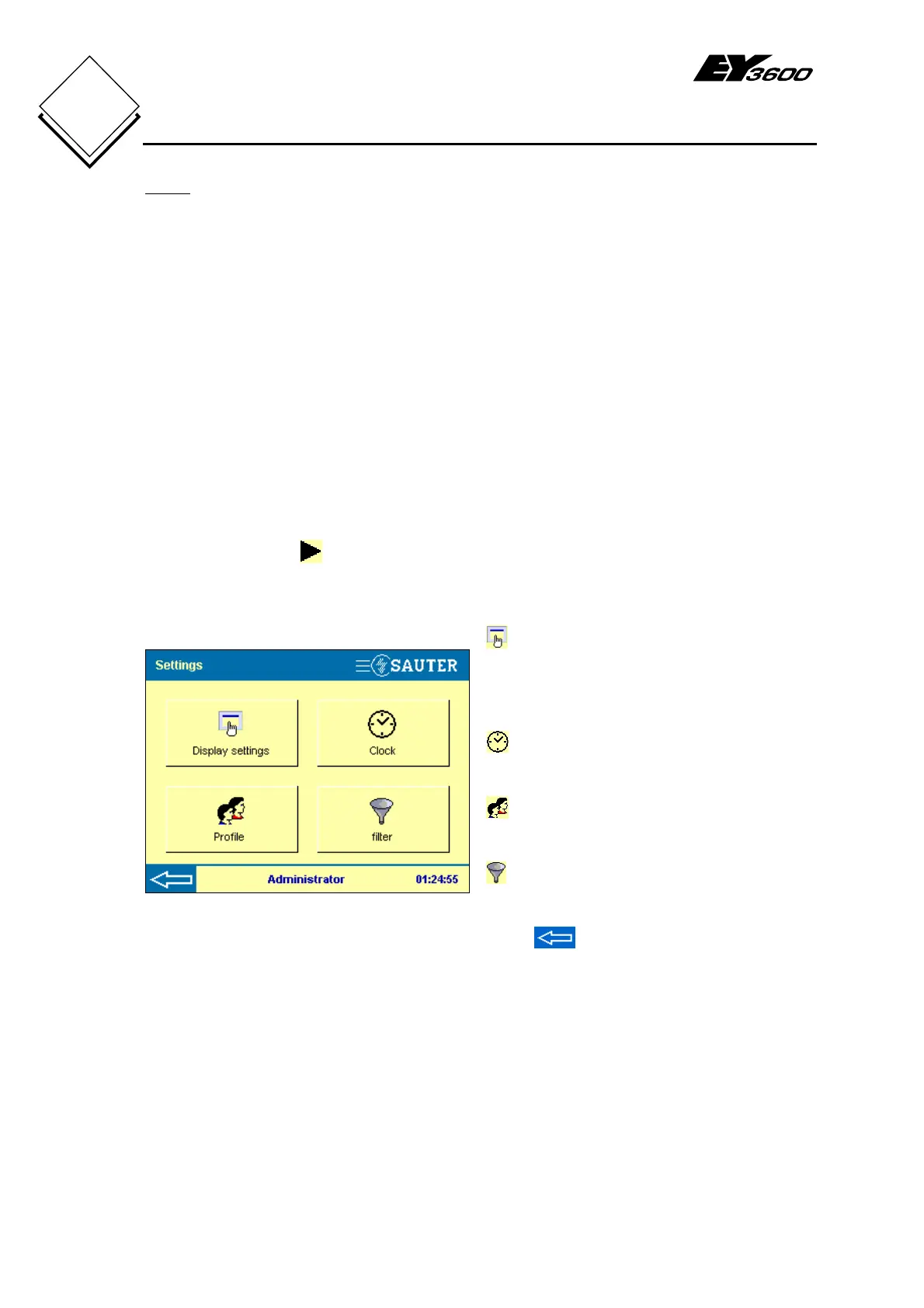
The Other settings button takes you to Fig. 5-8 and – for a user from the
administrator or user group – shows further setting options for the touch-panel.
These other settings are briefly described in the following sections.
Fig. 5-8: Other Settings
Display settings (parameters). Use
this button to adjust the contrast setting for
the background illumination. (administrator
and user)
Clock: sets time and date
(administrator only)
Profile: user definition (administrator
only)
Filter: to disable/enable any filters that
are present (administrator only)
Press to return to Fig. 5-1.


 To Next Page