nova250 Touch Panel
Overview
7001064003 T1 Sauter Systems 5
1 Overview
1.1 Introduction
The nova250 Touch Panel for the Sauter EY3600 system comprises local operation of
the automation stations with the possibility of bus-wide access to the EY3600 system.
The two variants of the touch-panel – monochrome or colour – provide a convenient
graphic presentation with operation from plant lists or graphics, time programs and
historical data by touching the surface of the panel. Operational security can be
implemented by assigning passwords and user rights for different users. The touch-
panel can be fitted into a motor control centre or onto a top-hat rail.
These Operating Instructions aim to explain the basic functions of the touch-panel and
to aid operation of the automatically created application.
In the rest of this section, you will find information on installing the touch-panel. If the
device is already installed and capable of functioning, please refer to sections 2 to 4 for
the main instructions on correct operation of the touch-panel.
1.2 Installation
The Fitting Instructions (MV 505814) enclosed with the product contain information on
how to install the device correctly.
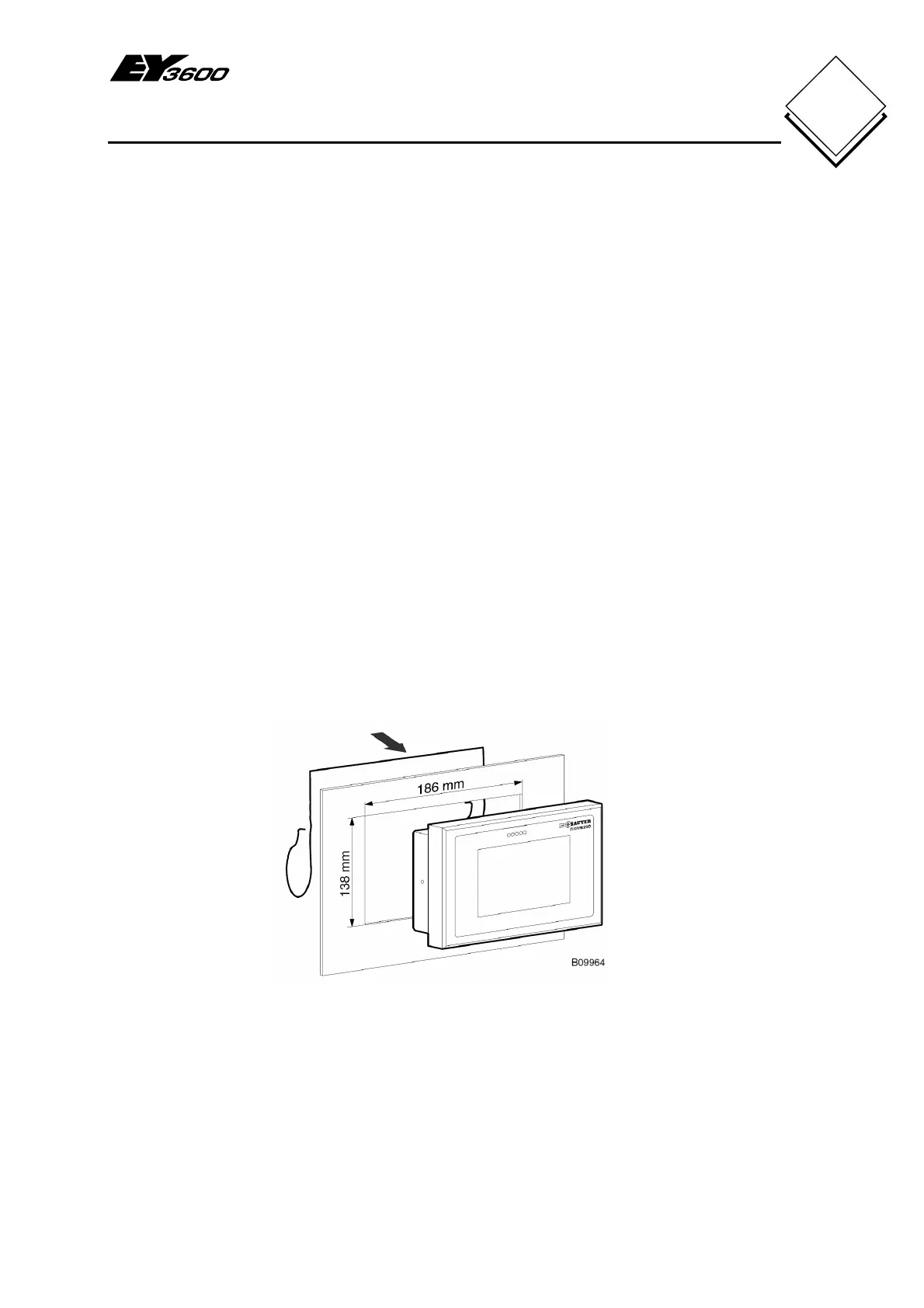
Fig. 1-1 shows how the device is installed in a switch cabinet.
Fig. 1-1: Installation in a switch cabinet
The touch-panel may also be fixed onto a top-hat rail. Accessory 0374515 is available
for a water- and dust-proof IP65 installation.


 To Next Page