nova250 Touch Panel
Settings
30 7001064003 T1 Sauter Systems
5.1 Calibration
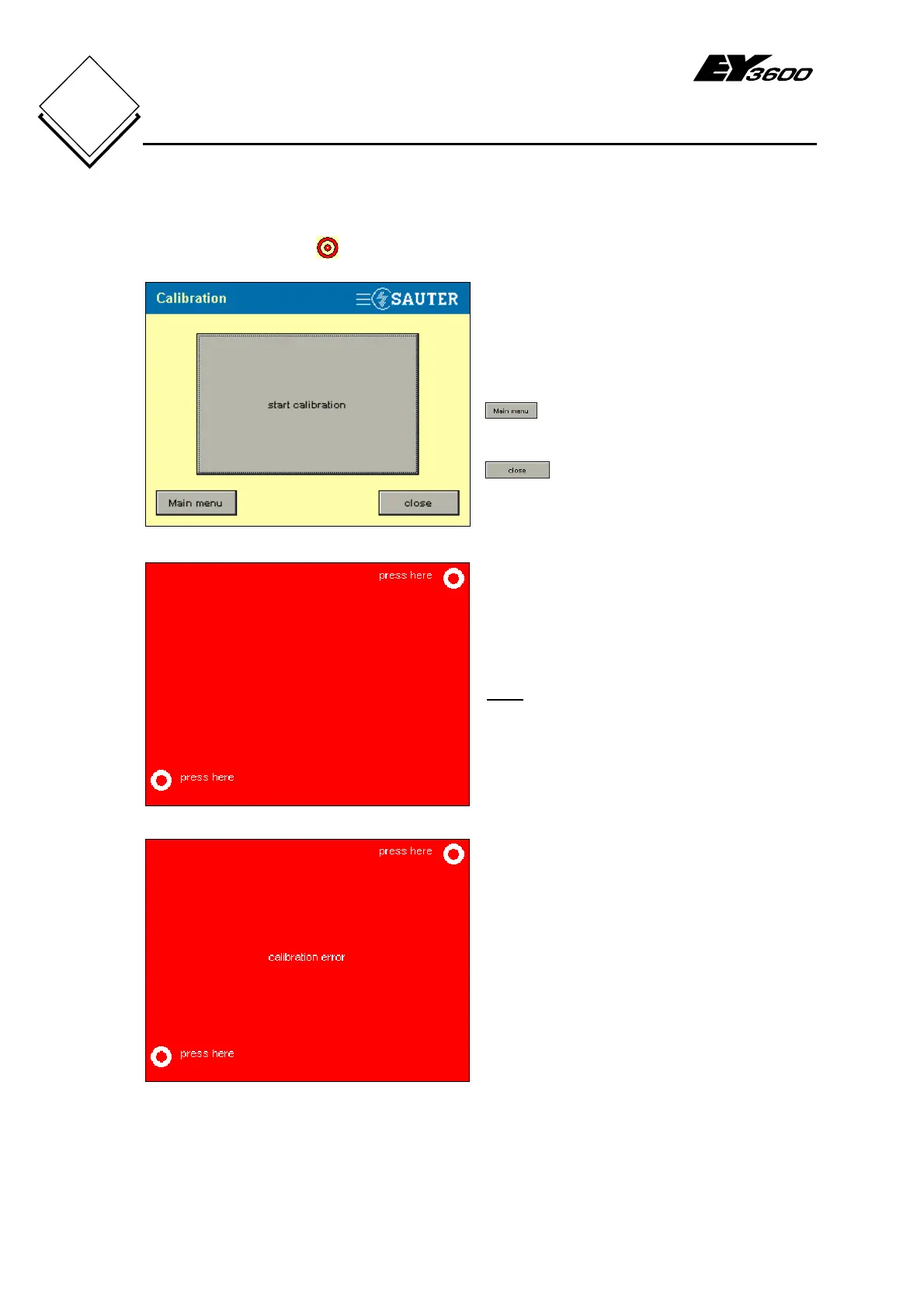
Press the Calibration button to start the calibration.
Fig. 5-2: Calibration
Large Start calibration button: this button
allows you to change the existing
calibration. After you press the button, the
calibration starts and Fig. 5-3 appears.
: this button lets you return to the
main menu.
: this button lets you close the
window being displayed.
Fig. 5-3: Calibration Points
For a new calibration, you must press
briefly in the centre of the circle at the top
right and then in the circle at the bottom
left.
Note
You are recommended to use a pen or
pencil for this setting.
If this operation has been performed
correctly, you are taken back to Fig. 5-2.
Fig. 5-4: Calibration Error
If the calibration has not been successful,
you see the Calibration error message
as in Fig. 5-4.
You must perform the calibration again.
After completing the calibration, it is important to check it. You can proceed as follows:-


 To Next Page