nova250 Touch Panel
Standard application
18 7001064003 T1 Sauter Systems
4.2 Alarms
If an alarm status is active in the selected application, the top left red light-emitting diode
(LED) will flash.
Note:
The light-emitting diode is lit only when the application is activated.
4.2.1 Visualise alarm list
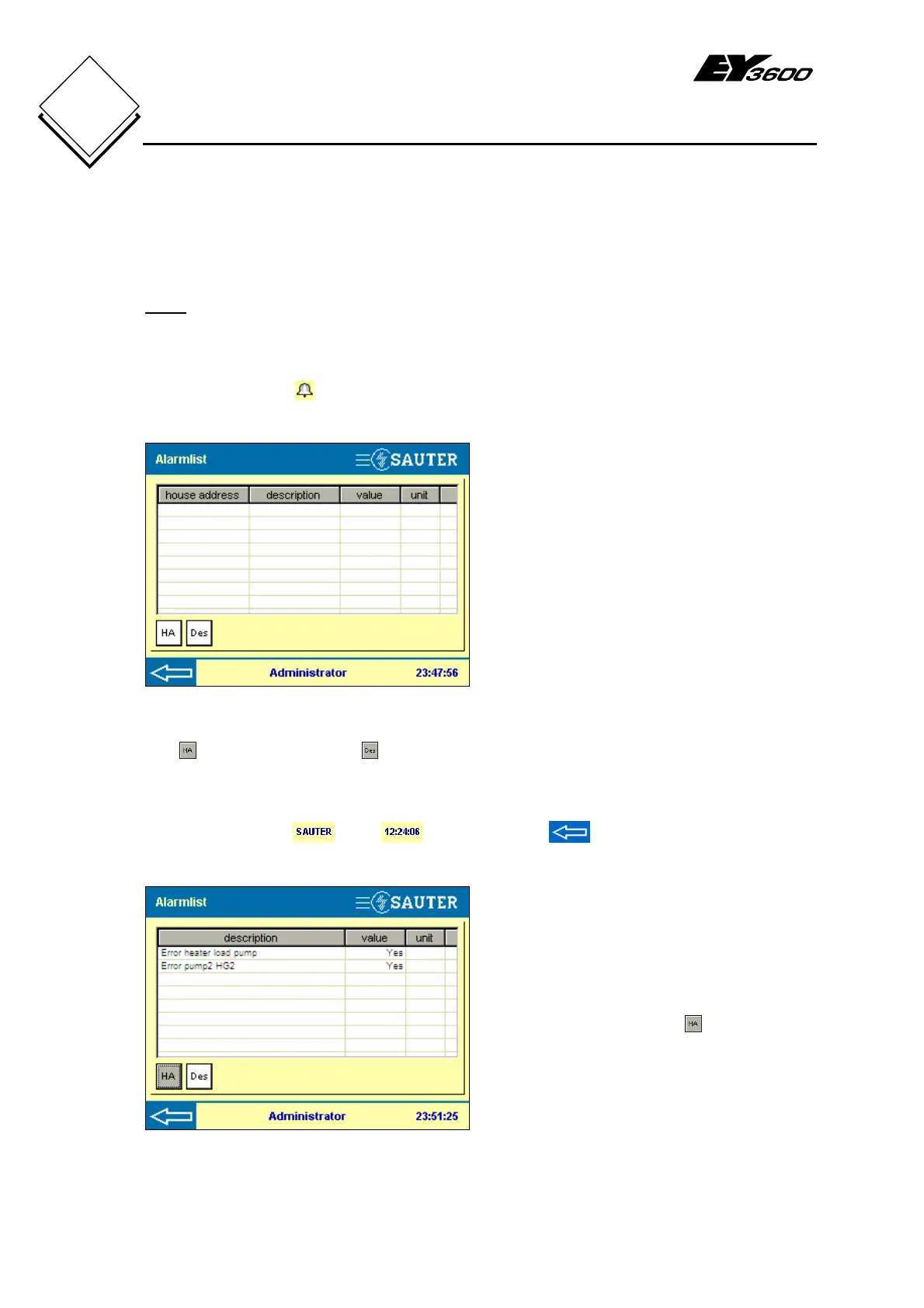
Press the alarm list button in the data-point list to open a window with a list of all
active alarm data points.
Fig. 4-7: Alarm List
House address column: address of the
data point
Description column: data point
description (address text)
Value column: current value
Unit column: shows the physical variable
Press the column header house –
address, description, value or unit – to sort
the lines in ascending or descending
alphanumeric order.
The
(house address) and (description) buttons allow you to show or hide the house
address and address text columns, only the house address, only the address text or
only the value and physical variable.
The logged-in user
, time and back arrow to go to the data-point list
are also visualised in the status bar.
Fig. 4-8: Active Alarms
Fig. 4-8 shows an example of an alarm list
with active alarms. Button
was pressed
to hide the house address column.


 To Next Page