nova250 Touch Panel
Settings
7001064003 T1 Sauter Systems 31
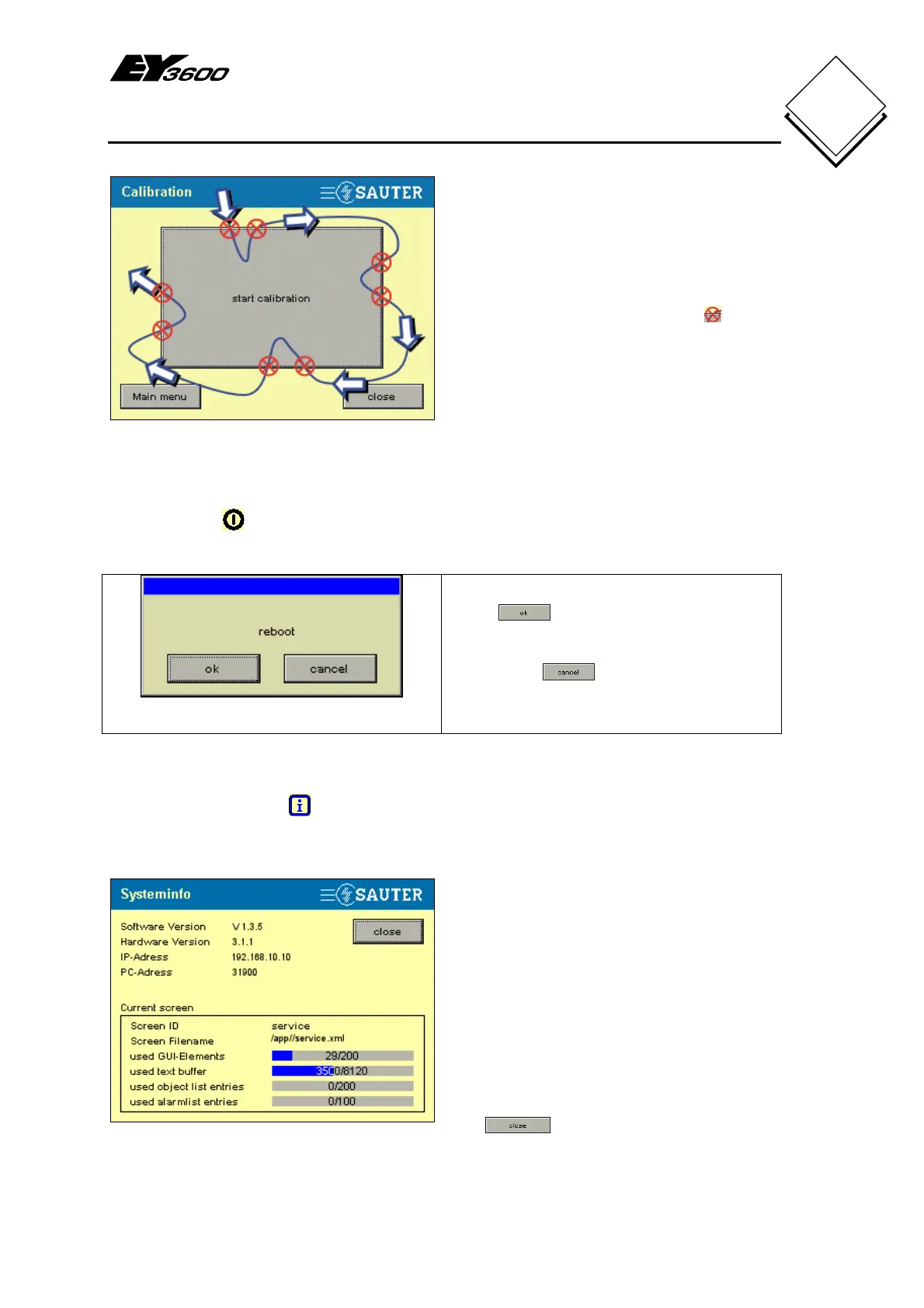
Fig. 5-5: Calibration Test
Press on the area with your finger or a
pen/pencil, and without interrupting the
pressure, check the active zone of the
'Start calibration' button (follow the
arrow). If the zone becomes active (white)
exactly on the edge of the button
, the
device is correctly calibrated; otherwise,
the calibration must be repeated until
precision is attained.
5.2 Reboot
Press Reboot to restart the touch-panel. This may be useful in certain cases; after
you press the button, you see a confirmation window as shown in Fig. 5-6.
Fig. 5-6: Reboot
Press to trigger the reboot of the
touch-panel.
If you press
, the reboot action is
not performed and the window closes.
5.3 System information
Press the System info button to display the most important system information.
Fig. 5-7: System Info
The upper section contains the information
about the installed versions and active
configurations, such as the PC address
(for novaNet) and the IP address (for
application download).
For access to the EY3600 novaNet, it is
important that the PC address has a
unique number that is not yet present in
the network.
In the Current screen area, you see the
information about available memory and
objects in the last picture that was opened.
The button takes you back to the
settings (Fig. 5-1).


 To Next Page