nova250 Touch Panel
Standard application
16 7001064003 T1 Sauter Systems
Time program button : this button allows you to read weekly time programs or specify
new ones (see section 4.3).
Alarm button
: this button enables you to visualise all data points that are defined as
alarms and are currently active (see section 4.2).
The logged-in user , time and back arrow to go to the application list
are also visualised in the status bar.
4.1.2 Change command or value from data-point list
The data-point list allows manual setting or changing of all data points that accept
remote commands or value changes.
Select the relevant line with the data point; you must press the
button in order to
make the entry.
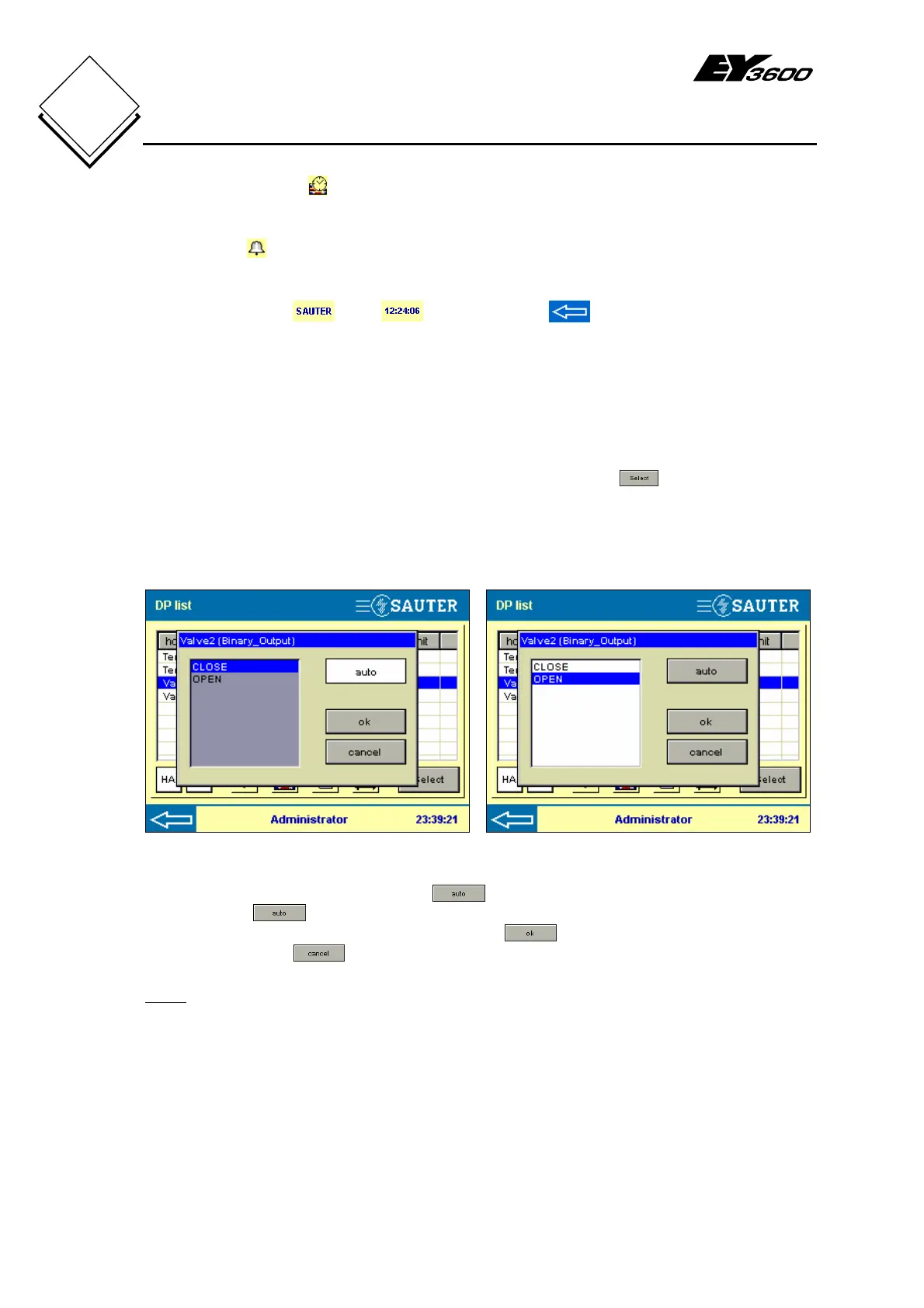
These windows are shown for binary values.
Automatic mode Manual mode
Fig. 4-2: Binary Output, Automatic Fig. 4-3: Binary Output, Switching Command
Automatic mode can be selected with . To select a manual status for the
command the
button has to be deselected and the command as OPEN or
CLOSE, for example, can be choosen. Use the
button to close the switching
command. Use the
button to return to the previous screen (Fig. 4-1).
Note:
Statuses OPEN and CLOSE are specified command texts in the project
engineering (CASE FBD) and they may have different names for the application.


 To Next Page