nova250 Touch Panel
Settings
38 7001064003 T1 Sauter Systems
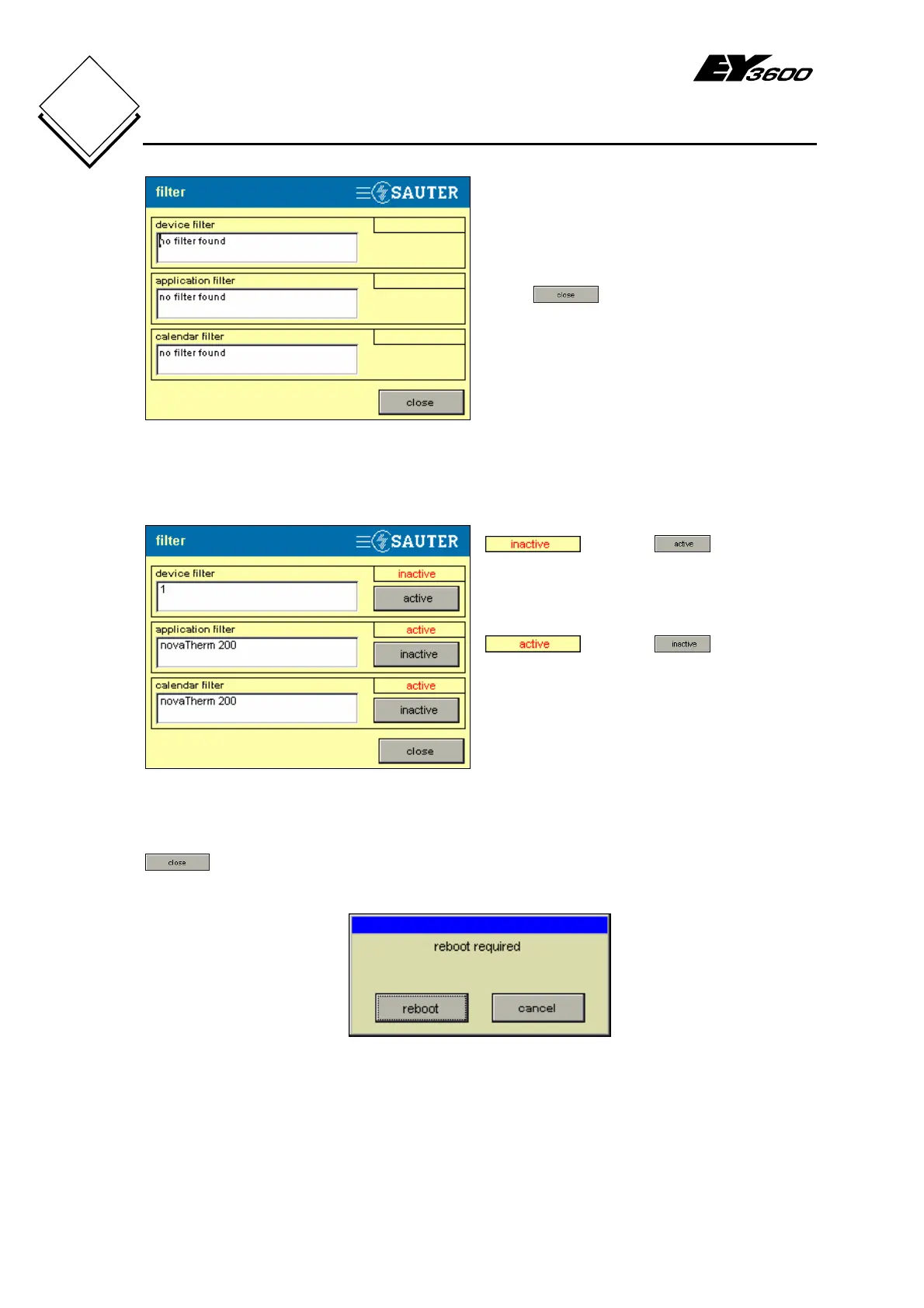
Fig. 5-19: Filter
Press to close the window and
return to the other settings (Fig. 5-8).
An example of a filter definition is shown in Fig. 5-20.
Fig. 5-20: Filter Definition - Example
AS (automation station): an AS filter is
defined but not enabled (activated)
. Click on to activate
the filter.
Application: an application filter named
'novaTherm 200' is defined and activated
. Click on to disable
the filter.
Calendar: a calendar filter with the
application name is also defined and
activated. Any calendar that is sent (see
section 4.3.6) will go only to this
application.
If a filter is activated or deactivated and if the Filter window is closed by pressing
, a dialogue box (Fig. 5-21) will appear asking you to reboot the touch-panel.
This is necessary so that the new filter definitions can be activated.
Fig. 5-21: Reboot to Activate Filters


 To Next Page