PAGE 17
© 2022. All rights reserved. Used under license by Schlüter-Systems KG.
Boost mode is accessible from the “Other” menu.
In Boost mode, the underfloor heating is constantly activated for one hour. After one
hour, the thermostat returns to Scheduled Operation.
1. From the Scheduled Operation home screen, tap the “Other” button to access
the alternative operating modes.
2. Choose “Boost”.
3. Confirm that you wish the thermostat to activate Boost mode by tapping ”√”.
The thermostat automatically enters the Boost home screen.
While in Boost mode, an “X” button is shown on the home screen. Press this button
to return the thermostat to Scheduled Operation.
The function of the buttons and symbols shown on the home screen varies
according to the chosen operating mode.
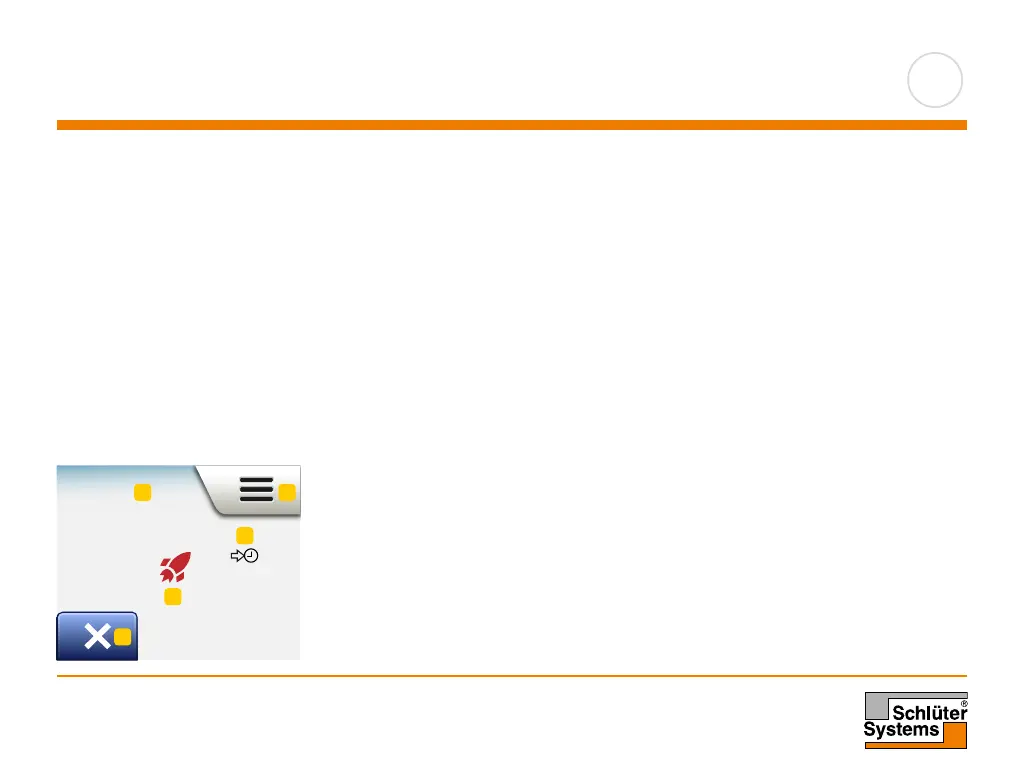
Boost home screen:
1. Indication of Boost mode.
2. Tap here to access the menus.
3. Icon indicating the current operating mode (red rocket = Boost).
4. The time at which the thermostat will return to Scheduled Operation.
5. Tap here to quit Boost mode and return to Scheduled Operation.
Boost
Boost
11:00
1 2
3
4
5
Mon 11:15
17:00
23.5
°
Manual Other...
1
Mon 11:15
17:00
23.5
°
Manual Other...
1
The thermostats boost
mode will now be
activated for 1 hour
3
Comfort
Boost
Frost Protect
Holiday
Comfort
Boost
Frost Protect
Holiday



 To Next Page