PAGE 8
© 2022. All rights reserved. Used under license by Schlüter-Systems KG.
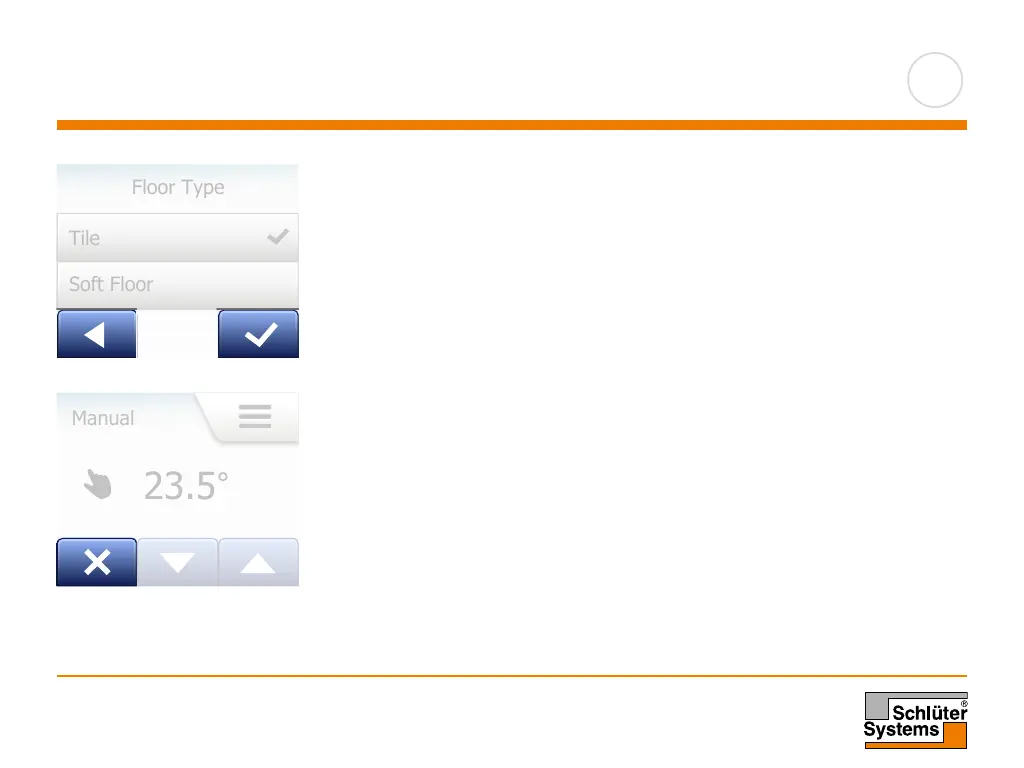
Whenever you change a parameter setting, you must tap the “Accept” button for
the thermostat to acknowledge the change.
“Accept” is shown on the screen as “√”.
“Back” is shown on the screen as a button marked with an arrow pointing to the
left. In this manual, it is also referred to as the “Left Arrow“ button.
In the various menus and submenus, you will find the “Back” button in the lower left
corner of the touchscreen.
Tap the “Left Arrow” button to return to the previous menu.
“Cancel” is shown on the screen as a button marked “X”.
Although “Cancel” has the same eect as “Back”, it also results in all unsaved
settings being discarded.
As soon as you leave a home screen and enter one of the menus, either a “Back”
button or a “Cancel” button will be shown.
To return to the home screen, tap Back/Cancel once or multiple times depending
on where you are in the menu structure.
Accept/Back/Cancel
Floor Type
0201 2014
Tile
Soft Floor
Floor Type
0201 2014
Tile
Soft Floor
Floor Type
0201 2014
Tile
Soft Floor



 To Next Page